




Are you using WooCommerce to run your online store? Did you know that WooCommerce recently came up with a new update that improves site speed?
Being a business owner, you already understand the importance of efficient order management.
Time is of the essence when it comes to processing and fulfilling orders, and any delays or inefficiencies can significantly impact your business’s success.
That’s why WooCommerce came up with a High-Performance Order Storage (HPOS) update.
Formerly known as “Custom Order Tables,” HPOS is a powerful update designed to streamline the order management process within WooCommerce. It aims to make your order handling faster, smoother, and more efficient than ever before.
In this blog post, we’ll explore the features and benefits of the new High-Performance Order Storage WooCommerce update, shedding light on how it can revolutionize your order management process.
Get ready to meet your speed needs and take your e-commerce business to new heights with HPOS.
What is WooCommerce HPOS Update?
As defined by WooCommerce, High-Performance Order Storage (HPOS) also previously known as “Custom Order Tables” is a solution that provides an easy-to-understand and solid database structure – specifically designed for eCommerce needs. It uses the WooCommerce CRUD design to store order data in custom tables – optimized for WooCommerce queries with minimal impact on the store’s performance.
In simple terms, High-performance order storage is a performance improvement feature being built into the WooCommerce core.
Read More: The Plan for the WooCommerce Custom Order Table
The benefit of WooCommerce HPOS Update
Managing a growing number of orders can become overwhelming, especially when dealing with complex data structures. HPOS addresses these challenges by providing a robust and optimized database structure.
This update enhances the overall performance of your WooCommerce store. It ensures that your order management system can handle increasing order volumes without compromising speed or efficiency.
In a nutshell, WooCommerce HPOS
- Causes a huge performance improvement which will make the checkout faster i.e improves CRO
- Removes bulky data stored in posts and post meta tables which will improve overall site performance at the general WordPress level.
- Standardizes the data storage practices for Woo Extension plugin authors
Read More: Performance Benchmarking for WooCommerce HPOS
Why is WooCommerce HPOS Update important?
As per WooCommerce, by bringing custom order tables to WooCommerce Core, they want to improve 3 properties.
Scalability – The goal is to facilitate the scalability of shops of any size without the requirement for expert intervention, achieved through the implementation of dedicated tables (along with dedicated indexes, reduced table congestion, decreased read/write operations, etc)
Simplicity – The lack of dependency on WP posts should help in locating where underlying data lives, enabling developers to make more precise modifications to WooCommerce with greater finesse.
Reliability – Restoring targeted backups, implementing read/write locks, and preventing race conditions will become easier.
How to enable HPOS in WooCommerce?
WooCommerce version 7.1 onwards, users can opt-in to enable HPOS. However, the HPOS update will be released in the core plugin
To enable HPOS in WooCommerce, go to WooCommerce > Settings > Advanced > Features
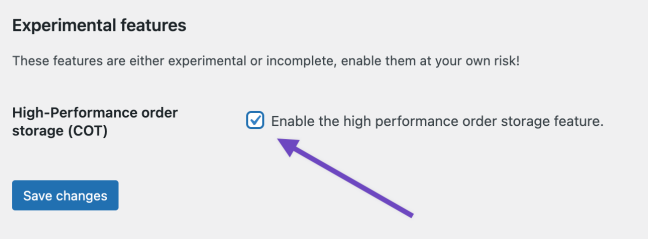
Upon enabling, a new setting section will appear called “Custom Data Stores” under WooCommerce > Settings > Advanced
The first time, it will prompt you to create the custom tables by going to WooCommerce > Status > Tools and running Create the custom orders tables.

Once the tables are ready, you can configure the usage of the HPOS tables.
Also Read: Check out this documentation to learn more on High-Performance Order Storage Update in WooCommerce
The Impact of WooCommerce HPOS Update
Although the WooCommerce HPOS update will have an impact on all Woo users, here are some examples to help you understand better:-
Note: The HPOS Update will be included in WooCommerce 8.0 which is scheduled to be released in August.
Wrapping Up…
The implementation of High-Performance Order Storage in WooCommerce will introduce fresh opportunities for users who prioritize performance and speed.
The team at WisdmLabs has been working hard under the hood to make our WooCommerce products HPOS compatible so that you can enjoy all the benefits that come with this update.
We’ve already started with Customer Specific Pricing for WooCommerce and Custom Product Bundles for WooCommerce
So stay tuned for more HPOS-related updates and information on our blog. You can also subscribe to our Newsletter for the same.
If you have any more questions, feel free to comment below or reach out to us here.


