The education sector is in a phase of rapid evolution and the reason is artificial intelligence, which is growing and growing fast.
This surge in AI application has brought about a whole new dimension to education, spawning an ecosystem of AI-powered tools and technologies, creative educators, researchers, and influencers. ChatGPT and tireless teachers are both integral members of this ever-expanding family.
Now, imagine harnessing this power to draft a course syllabus in just 15 minutes.
How, you ask? Whether you’re an underpaid teacher juggling multiple roles, a newcomer to AI technology, or an old-timer in academia, how can you utilize this transformative tool to streamline your course planning? In this expert guide, I will explain the process of creating a comprehensive, detailed, and well-structured course syllabus using ChatGPT and humanized by AI Detector Pro.
I am about to let you in on this AI-powered secret!
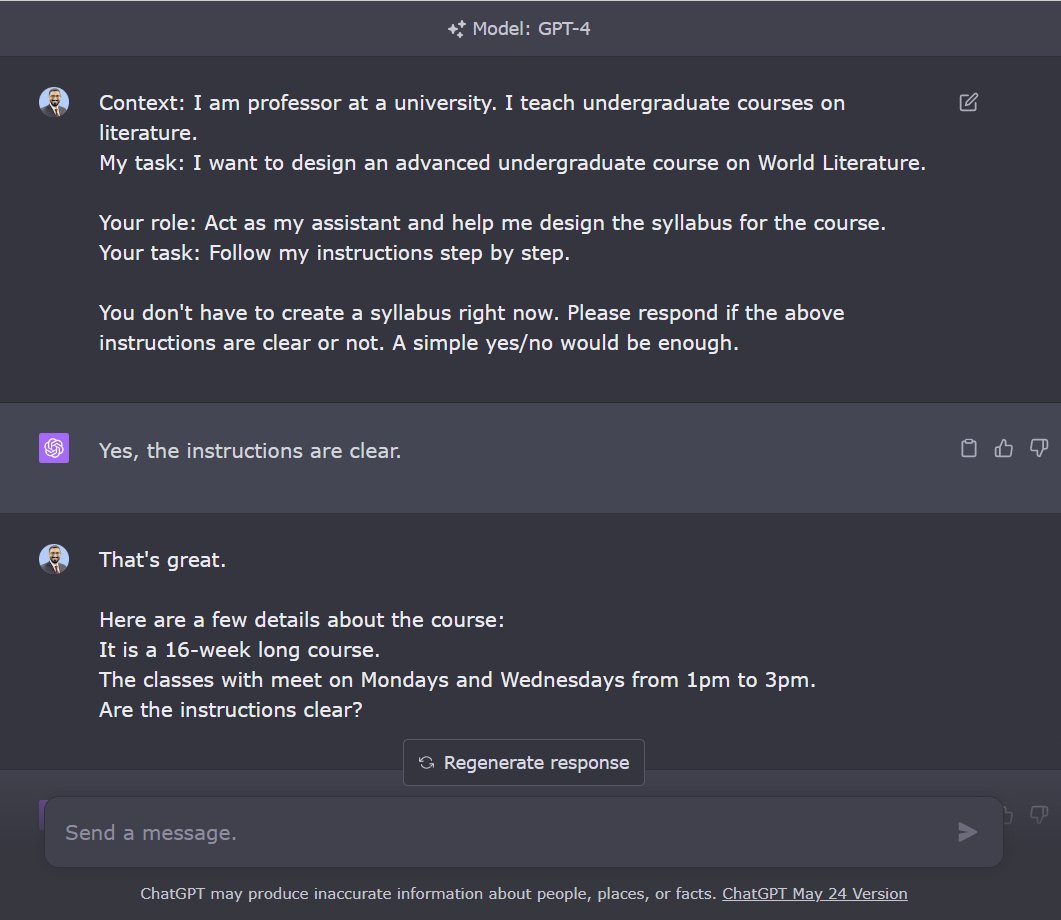
1. Start by establishing context (prompt in ALT).
Your role: a professor
Your task: design a syllabus for [course title]
ChatGPT’s role: Act as your assistant
ChatGPT’s task: Follow your step-by-step instructions
Ask ChatGPT a yes/no question if the instructions are clear.
2. Give ChatGPT specific details about:
- How long the course is
- How often your classes will meet

3. Tell ChatGPT your preferences
Example: My course on World Literature should cover literature from various parts of the world and time periods.
Preference should be given to non-European literature.

4. Ask ChatGPT to give you a week-by-week reading plan.
This is a great first draft of the syllabus with an impressive collection of primary texts.
5. Ask ChatGPT to give you secondary/supplementary sources.
To ensure ChatGPT doesn’t give you fake references, enable a plugin called ScholarAI.
ChatGPT has given me secondary sources for every primary text with clickable links.
6. Tell ChatGPT if you want to conduct any workshops for your students.
I usually run two workshops for students to help them with their essays.
Then ask ChatGPT to give you a revised outline with the schedule for the workshops incorporated.
7. Tell ChatGPT about the schedule of assignments.
I usually divide the essay writing process into five steps.
I spread these steps over the course of the semester to make the writing process manageable.
Ask ChatGPT to incorporate the assignment schedule in the course outline.
8. Ask ChatGPT to give you discussion questions for every primary text in the syllabus.
Not all questions would be useful, but they will give you a great starting point.
9. Now ask ChatGPT to consolidate all the above details in the form of a table.
The table should have columns for:
Week; Primary Reading; Supplementary Reading; Essay Steps; Discussion Questions
Want to learn more about how to supercharge your academic writing with AI-powered apps?
I have a complete tutorial (250+ slides) for you.
It’s being used by 1900 academics including those at Harvard, Princeton, Yale, and Stanford.
You can get it here: https://efficientacademicwriter.carrd.co
10. Copy the table into an MS Word file.
Please note it won’t look like a table in Word.
11. Start editing and organizing.
Below is a sample syllabus for Weeks 1-2 with primary and supplementary readings and discussion questions.
This would’ve taken me at least a couple of hours. Now I can spend that time reading these texts.
Conclusion
Hopefully, this guide has shown you how you can avoid the common problem of spending too much time on course planning and how to deal with it.
This is your chance to use AI, save time, and give more attention to the actual teaching.
Good luck with your new teaching tool!