Restrict Content Pro is now Kadence Memberships.
MemberDash got folded into LearnDash. Your existing licenses still work, but the add-on layer on your $1M+ LearnDash site now sits in three structurally different risk categories.
And each one needs a different verification step this week.
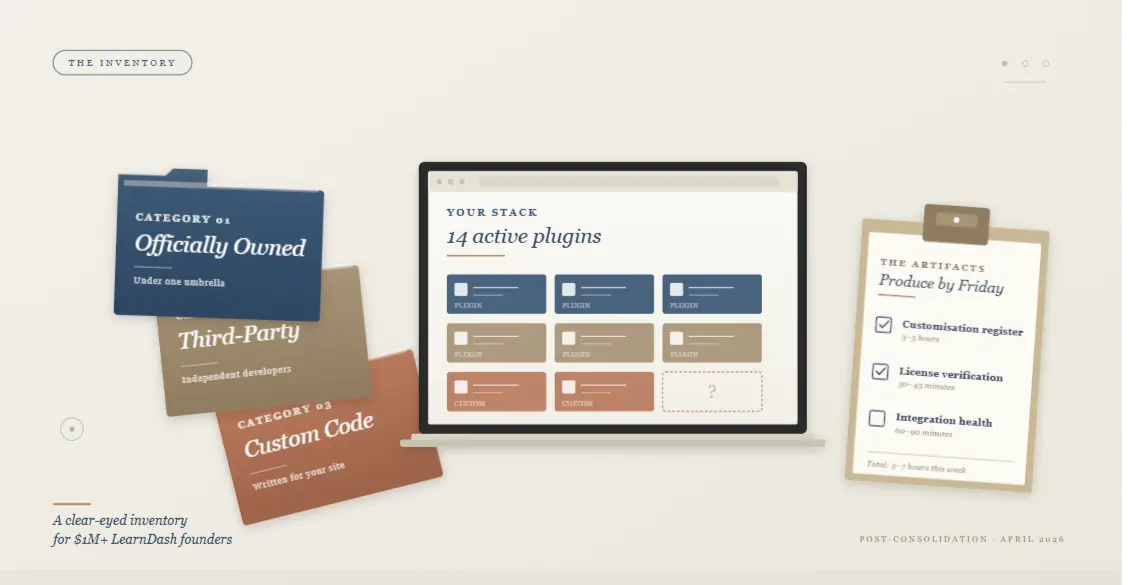
A founder we work with at WisdmLabs opened her LearnDash admin two weeks ago and counted 14 active plugins supporting her $3M/year certification business.
Restrict Content Pro, MemberDash & ProPanel. Six WisdmLabs-built add-ons that joined LearnDash in 2024. Three third-party integrations. Two custom plugins that her old developer wrote in 2022.
“I have no idea what just changed for any of these,” she said. “I don’t know which ones I should be worried about.”
If you have a similar concern, read on…
The question our foundational article didn’t fully answer
Our foundation piece on the StellarWP wind-down answered the high-level question every LearnDash user had two weeks ago. Nothing breaks today. Your subscription continues. Your licenses still work. The plugin still updates.
That covered the calm of it. What it didn’t go deep on is the question every honest founder runs into the moment they open their admin: but what about MY specific stack?
Most $1M+ LearnDash sites are running 6–14 add-ons. Liquid Web officially owns some. Some are third-party. Some are custom code that your developer wrote three years ago.
The April 2026 consolidation hit each category differently, and the generic “your add-ons are fine” coverage everywhere right now doesn’t distinguish between them.
A quick disclosure before we go further.
We at WisdmLabs built the LearnDash add-ons that joined the LearnDash portfolio in 2024: Instructor Role, Group Registration, Reports for LearnDash, Content Cloner, Ratings & Reviews.
That gives us a closer view of how this consolidation affects the add-on layer than most publishers can offer, and no commercial reason to push you toward any specific decision.
This article is the inventory framework. Not a migration recommendation. Not a platform pitch. A clear-eyed walk-through of what’s actually in your stack and what changed for each piece.

The three categories of LearnDash add-ons (and why each behaves differently)
The single most useful reframe is treating your add-on stack as three structurally different categories, not one.
Each has a different owner, a different fate under the consolidation, and a different verification step you should take this week.
Here’s the taxonomy at a glance:
| Category | Examples | What changed in April 2026 | Risk profile | Verification step this week |
| 1. Officially-owned add-ons | Restrict Content Pro (now Kadence Memberships), MemberDash (folded into LearnDash), ProPanel, Instructor Role, Group Registration, Reports for LearnDash, Content Cloner, Ratings & Reviews | Brand and ownership consolidated under Liquid Web; some products renamed or absorbed into other products; portal moved to software.liquidweb.com | Bespoke modifications, custom plugins, theme customisations, integration, glue your developer wrote for your site specifically | Verify each license in the new portal; screenshot what you see |
| 2. Third-party add-ons | BuddyBoss, WP Fusion, Uncanny Toolkit for LearnDash, GamiPress, others | No direct change — these developers operate independently | Indirect — each developer’s incentive to keep building for LearnDash depends on the platform’s continued health | Check each developer’s changelog cadence over the next 90 days |
| 3. Custom code | Bespoke modifications, custom plugins, theme customisations, integration glue your developer wrote for your site specifically | Nothing changed — this is your code | Highest concentration of business-critical logic; usually undocumented | Produce a written register of every customisation and where it lives |
The rest of this piece walks through each category in depth: named products, current confirmed status, the open questions still being clarified, and the specific verification step for each.
Category 1: Officially-owned add-ons under Liquid Web
This is the category where the consolidation actually changed things. Five products to walk through.

Restrict Content Pro is now Kadence Memberships (here’s what that means)
Restrict Content Pro is the most-searched of the consolidated products, and also the most renamed.
SolidWP’s security tools now live inside “Kadence Security,” IconicWP’s WooCommerce tools are now “Kadence Shop Kit,” Restrict Content Pro has become “Kadence Memberships,” and MemberDash has been folded into LearnDash.
What this means for an existing RCP customer:
- Your installed plugin still works. Your license is still valid. Your subscription continues on its current terms until renewal.
- The brand identity is gone. restrictcontentpro.com redirects. Future installations and feature development happen inside the Kadence Memberships product, not the standalone RCP brand.
- A handful of older RCP-specific tools will receive critical security patches only — a handful of older tools and themes will receive critical security patches through April 2027, then nothing.
If a meaningful slice of your revenue runs through RCP-powered memberships, this is the product where the verification step matters most.
The Reddit thread “Is Restrict Content Pro dead?” was the sixth-ranked result when we checked the SERP this week. People are asking. The answer is: not dead, but no longer sold as a separate product.
| Verification step: Log in to software.liquidweb.com. Confirm your RCP license is visible and active. Screenshot it. Note the renewal date. |
MemberDash absorbed into LearnDash
MemberDash had a shorter lifespan than RCP.
It launched relatively recently and was StellarWP’s attempt to compete head-on with MemberPress and Paid Memberships Pro inside the LearnDash ecosystem.
MemberDash, a full membership and subscription plugin, has been merged into LearnDash.
Restrict Content Pro, one of the older and more established names in the WordPress membership space, has also been absorbed into Kadence.
This means MemberDash users now access membership functionality bundled into LearnDash itself.
There’s an honest awkwardness in this consolidation worth naming. MemberDash Users are now paying for an LMS plugin to get membership features.
If you bought MemberDash for membership management and weren’t running courses, the bundled-into-LearnDash framing changes the value equation on your next renewal.
| Verification step: If you own MemberDash, check the new portal for your access. Verify the LearnDash bundle reflects the membership features you actually use. Note any feature gaps. |
ProPanel and the LearnDash-native add-ons
ProPanel and the long-running LearnDash-native add-ons are the easiest part of this story. They’re still LearnDash. Still maintained. Still receiving updates.
The recent updates include a modern two-column course page and enhanced reporting via ProPanel 3.0, which Liquid Web has continued to ship since the consolidation. The product team’s structure has changed, but the ProPanel roadmap appears to be intact.
| Verification step: Check your ProPanel version. If you’re on 3.0 or later, you’re current. If you’re behind, the update is worth doing this month. |
The WisdmLabs-built add-ons that joined LearnDash in 2024
Five WisdmLabs-built add-ons joined the LearnDash portfolio in 2024: Instructor Role, Group Registration, Reports for LearnDash, Content Cloner, and Ratings & Reviews. These are now officially owned by Liquid Web under the LearnDash umbrella.
We at WisdmLabs were involved with these add-ons before they joined the LearnDash portfolio in 2024. So, we have some familiarity with how they were integrated, and we’ll flag where things are genuinely uncertain.
The continuity of these products depends on Liquid Web’s continued investment in the LearnDash add-on layer, specifically, which is one of the open questions across the consolidation.
What’s confirmed: existing licenses work. The plugins still update. Support transitioned to the LearnDash help desk as the portal migration was completed.
What’s still being clarified: the long-term roadmap for each individual add-on. Some may be folded directly into LearnDash core over time. Some may receive maintenance releases only. Liquid Web hasn’t published that detail per add-on yet.
| Verification step: Confirm each WisdmLabs-built add-on you own shows up correctly in the new portal. Note their current version numbers. Watch their changelogs over the next two release cycles. |

Category 2: Third-party add-ons (and the indirect risk most coverage misses)
This is the category most other coverage gets wrong. The standard line is: “third-party add-ons aren’t affected by the consolidation because they’re not part of it.” Technically correct. Operationally incomplete.
Why third-party add-ons aren’t directly affected
BuddyBoss, WP Fusion, Uncanny Toolkit for LearnDash, GamiPress, the Tin Canny SCORM tools, and many others, all these are built by independent developers outside the Liquid Web orbit. The April 2026 consolidation doesn’t touch their code, their roadmaps, or their renewal economics directly.
If you own a BuddyBoss license, it works exactly as it did before. If your business runs on WP Fusion, nothing has changed in your configuration. That’s the direct picture, and it’s accurate.
The indirect risk — and the signals worth watching
The indirect risk is more interesting.
Third-party LearnDash developers are not on Liquid Web’s payroll, but their businesses depend on LearnDash being a healthy platform.
If LearnDash’s user base shrinks because of confidence loss post-consolidation, third-party developers see fewer renewals.
Fewer renewals mean less budget for the developer to keep building. Less building means a slower roadmap.
This is the chain most coverage skips. Liquid Web was founded in 1997 in Lansing, Michigan, and gradually expanded through acquisitions. The consolidation pattern affects ecosystem participants downstream of the platform, even when their products aren’t directly involved.
LearnDash itself is still big. According to Sell Courses Online study analyzing 240,000+ WordPress LMS websites, LearnDash is the most popular WordPress LMS plugin with over 34% market share, followed by LearnPress (31%) and Tutor LMS (19%).
That scale gives third-party developers a reason to keep building for the platform. But “still big” and “growing” are different things, and the latter is now a question.
| If you’re already considering whether to stay or migrate, our 5-factor decision framework piece walks through how to think about it. For most readers of this piece, that’s not the right conversation yet, the inventory comes first. |
Named developers and what to track
Four third-party developers most likely to be in a $1M+ LearnDash stack, and what to watch for each:
- BuddyBoss: Community and membership platform tightly integrated with LearnDash. Watch their changelog cadence and public messaging on LearnDash compatibility.
- WP Fusion: CRM integration backbone for most $1M+ LearnDash businesses. Watch their LearnDash-specific updates and integration documentation for freshness.
- Uncanny Toolkit / Uncanny Automator: The most-installed third-party LearnDash extension. Watch for any reduction in the LearnDash-specific feature shipping rate.
- GamiPress: A gamification layer used by many course businesses. Watch for ongoing LearnDash trigger development.
| Verification step: Set a calendar reminder for 90 days from now. Check each developer’s changelog. Compare release cadence over those 90 days to the prior 90 days. A meaningful slowdown is a signal worth noting, not panicking about. |
Category 3: Your custom code (the most overlooked category)
This is the category where the highest-leverage work happens, and the one almost no $1M+ founder has documented properly.
What “custom code” actually includes:
Custom code on a LearnDash site usually includes:
- Custom plugins your developer wrote specifically for your site
- Theme customisations layered on top of a parent theme
- Code snippets in functions.php or a site-specific snippets plugin
- Integration glue between LearnDash and external systems (your CRM, your accounting system, your fulfillment platform)
- Custom CSS that controls course-page or quiz-page styling
- Custom hooks and filters that change how LearnDash behaves under specific conditions
Most $1M+ sites have at least four of those. Many have all six.
The combined business logic in your custom code is usually more business-critical than the off-the-shelf add-ons sitting next to it, because the custom code is what makes your site yours.
Why most founders can’t list theirs from memory
Custom code accumulates gradually. A small fix here, an integration there, a one-line snippet your last developer added to solve a specific bug.
Over three to five years, this turns into an undocumented layer that nobody on your team, including you, fully understands.
This isn’t a failure of your team. It’s how every $1M+ WordPress site looks unless someone deliberately documented as they went. The 9 LearnDash customization examples we’ve published from real high-completion course businesses all came from sites where the custom code was substantial enough to be worth case-studying.
The April 2026 consolidation doesn’t change any of this code. It does, however, make this the right moment to finally write it down.
If LearnDash’s roadmap eventually requires you to evaluate alternatives, a documented custom-code layer is the difference between a 90-day migration and a 9-month one.
The audit method (and what the artifact looks like)
The audit method we use at WisdmLabs on engagements like this is straightforward.
Walk the site systematically: plugins folder, theme folder, snippets, mu-plugins, custom database tables, and produce a single document with five columns per item: what it does, where it lives, who wrote it, when, and what would break if it disappeared.
The plugin and theme cleanup methodology we’ve published applies here directly. The output is a customisation register — usually 1 to 3 pages, that becomes the operational foundation for every future decision.
This is also the work that produced the results in our Fire Safety Training Platform case study, where mapping the custom layer first made the reporting and user-management improvements possible without breaking existing functionality.
If your custom-code stack is complex enough that documenting it feels overwhelming ,a second pair of eyes from someone who knows the LearnDash + custom-code intersection is often what unblocks it.
That’s a one-call conversation, not a sales process. The work that follows is either yours to do internally or ours to help with, depending on what the audit surfaces.

Critical integrations — what to verify for each
The integration layer is where most $1M+ LearnDash businesses concentrate their operational complexity. Six integrations worth a specific look:

WooCommerce: The dominant payment and product layer paired with LearnDash. Used by over 65% of WordPress LMS websites.
Nothing changed in the consolidation here: WooCommerce is independent of Liquid Web.
Verify: your WooCommerce-LearnDash bridge is functioning normally and your last 30 days of enrollments are completed without orphan records.
Stripe: The dominant payment processor for $1M+ course businesses. Connected to LearnDash either directly or through WooCommerce. Nothing changed in the consolidation.
Verify: your Stripe-LearnDash webhook is firing on every enrollment.
BuddyBoss: Discussed in Category 2 above. If you run BuddyBoss as your community layer,
Verify: the LearnDash compatibility is current.
ActiveCampaign or your CRM: Usually connected through WP Fusion or a custom integration.
Verify: your last 30 days of leads and enrollments synced to the CRM without gaps.
Zapier: Used as the connective tissue for ad-hoc workflows.
Verify: the LearnDash-triggered zaps you depend on are still firing. Reauthorize any that aren’t.
Your email platform (MailChimp, ConvertKit, Drip): Usually integrated through WP Fusion, native LearnDash integration, or custom code.
Verify: enrollment-triggered email sequences are firing on the correct trigger.
For a deeper walk through the full LearnDash integration landscape, our ultimate guide to LearnDash integrations is the companion reference; this section is the verification snapshot.
License and portal verification — what to check this week
The unified customer portal is now at software.liquidweb.com. Old portal links from learndash.com and the various StellarWP brand sites redirect automatically.
This is the practical heart of the verification work.
A few realities worth knowing before you log in:
A WordPress plugin migration and rebrand triggered a backlash after users reported missing pages, login issues, and license confusion. The migration period was rough for some customers, particularly lifetime license holders.
If you see any of the following, you’re not alone, and they’re addressable:
- Missing license keys in the portal
- Invoices that don’t appear in your billing history
- Login issues with credentials you know are correct
- Products you own that aren’t showing up under your account
The fix path is the same for each: contact Liquid Web support through the new portal with your account email, license key, and original purchase date. Most issues resolve within a few business days.
What to verify and document this week:
- Log in to software.liquidweb.com using your existing LearnDash credentials.
- Confirm every product you own appears under your account — LearnDash, RCP (now Kadence Memberships), MemberDash, if you own it, ProPanel, and any WisdmLabs-built add-ons.
- Note the license type for each: subscription, lifetime, or grandfathered.
- Screenshot the account page. Save the screenshots somewhere you’ll find them in 6 months.
- Check renewal dates for any subscription products.
That’s it. Forty-five minutes of work that gives you a recoverable snapshot you can come back to if anything goes wrong later.
The three artifacts every $1M+ LearnDash founder should produce this week
Pulling the inventory work into three concrete deliverables. None of these are aspirational — they’re real documents that take a defined amount of time to produce.

Artifact 1 — Your customisation register
A single document listing every add-on, third-party plugin, and custom-code modification on your site. Five columns per row: name, category (1, 2, or 3), what it does, where it lives, current status (confirmed / open question/needs verification).
Time to produce: 3–5 hours for the first pass.
Owned by: you. Vendor-agnostic. Useful regardless of what platform decisions you make later.
Artifact 2 — Your license verification log
Screenshots of your license status in software.liquidweb.com for every officially-owned product you hold. Stored somewhere, you’ll find them in 6 months. Note the renewal date for each subscription.
Time to produce: 30–45 minutes.
Owned by: you. Recoverable evidence in case anything goes wrong with the portal data later.
Artifact 3 — Your integration health summary
For each of the 5–8 most critical integrations on your site (WooCommerce, Stripe, your CRM, Zapier, your email platform, etc.), a one-line current-status note plus a watch signal, “expected to remain stable” or “watching changelog cadence,” or “verify after next LearnDash update.“
Time to produce: 60–90 minutes.
Owned by: you. The baseline you compare against in 90 days.
Total time investment to produce all three: 5–7 hours. The single most valuable Q3 2026 operational hygiene investment for any $1M+ LearnDash founder.
What this clarity gives you
The reader who has produced these three artifacts is not in a worse position than yesterday. The platform didn’t change.
The risk profile didn’t change. What changed is that you can now see your stack clearly, and that visibility is the foundation for every future decision.
Most $1M+ founders we work with at WisdmLabs find that Category 3 (custom code) is where their biggest visibility gap lives.
That’s also the gap that compounds, every additional year of accumulated custom code without a register makes it harder to evaluate any platform decision, not just this one.
If your inventory work surfaces real questions: products whose status isn’t clear, custom code that nobody on your team understands anymore, integrations that may or may not survive the next renewal cycle.
That’s exactly what the work is for. You now have specific questions to investigate, instead of vague background worry.
| Watch this space for new articles coming soon:
For founders who finish the inventory and find themselves in Watch state on a meaningful slice of their stack, the Exit-Ready 90-Day Project is the natural next step. This will help translate inventory clarity into operational preparedness. For founders who finish the inventory and realise the picture is mostly fine, the right move is the easiest one: archive the three artifacts, set a 90-day calendar reminder to re-verify, and get back to running your business. |
If you want a second pair of eyes on what you’ve inventoried, particularly on Category 3 custom code, which is where most of our LearnDash work has lived, we at WisdmLabs are happy to take a look.
We confirm what’s solid, flag what isn’t, and you take it from there.
Frequently asked questions
Is Restrict Content Pro dead?
No. Restrict Content Pro has been rebranded; it’s now Kadence Memberships. Your existing RCP installation still works. Your license is still valid. What’s gone is the standalone brand and the restrictcontentpro.com website. Future feature development happens inside Kadence Memberships. If you saw the Reddit thread “Is Restrict Content Pro dead?” — the answer is “rebranded, not dead.”
What happened to MemberDash?
MemberDash has been folded into LearnDash. It’s no longer sold as a standalone product. If you own an existing MemberDash subscription, it continues on its current terms until renewal. At renewal, the equivalent membership functionality lives inside LearnDash itself. Meaning: you’ll be paying for LearnDash to get the features you previously bought separately.
Will my LearnDash add-ons still work after the StellarWP consolidation?
Yes. The April 2026 consolidation was a brand and ownership change, not a functional change. Every officially-owned add-on still works, still receives updates, and continues to be supported. Liquid Web has committed to critical security patches for retiring features through April 2027, with continued feature development for the four core products.
Do I lose my Restrict Content Pro license under the new structure?
No. Existing RCP licenses remain valid. You haven’t lost anything. What changed is the brand the license sits under. You now access it through the unified portal at software.liquidweb.com rather than the old RCP brand site. Lifetime customers in particular have been grandfathered, though the rollout period saw some reported login and invoice issues that are worth verifying.
Are the WisdmLabs-built LearnDash add-ons still being supported?
Yes. The five WisdmLabs-built add-ons that joined the LearnDash portfolio in 2024: Instructor Role, Group Registration, Reports for LearnDash, Content Cloner, and Ratings & Reviews. They are now owned by Liquid Web and supported through the LearnDash help desk.
Existing licenses remain valid. The longer-term roadmap for each add-on hasn’t been published in detail yet. That’s the open question worth watching over the next two release cycles.
Are third-party LearnDash add-ons (BuddyBoss, WP Fusion, etc.) affected by the consolidation?
Not directly. Third-party developers like BuddyBoss, WP Fusion, Uncanny Owl, and GamiPress operate independently of Liquid Web. Their products, roadmaps, and license terms didn’t change. The indirect signal worth watching is each developer’s changelog cadence over the next 90 days: a meaningful slowdown in LearnDash-specific updates is data, not panic.
What happens to my LearnDash lifetime license?
Lifetime customers are grandfathered. Your lifetime access continues as purchased. The rollout was rough for some lifetime holders. For example, login issues and missing invoices were reported during the portal migration period.
If you bought a lifetime deal, especially for the consolidated products (MemberDash, RCP, the WisdmLabs add-ons), the right move is to log in to software.liquidweb.com this week and verify your access shows up correctly. Screenshot what you see.
If this piece helped, the next step depends on which of the three artifacts felt hardest to produce. Most $1M+ founders find Category 3 (custom code) is where the gaps live.
That’s also the easiest gap to close. It’s usually a single conversation with someone who knows the LearnDash + custom-code intersection well enough to walk through your specific site.