
| If you’re a LearnDash user or Founder of an elearning business on the platform, wondering what to do after the latest news, the short version is this: your existing licence still works, your students are unaffected, and your site is doing what it did yesterday. You don’t need to react this week. What you do need is a clear way to decide whether your specific situation calls for staying put, monitoring, or actively planning a move. This guide walks you through that decision: a five-factor framework, an honest look at the credible LearnDash alternatives, and a short list of things worth doing this month regardless of which direction you’re leaning. |
Quick context for anyone who missed the news!
StellarWP, the brand LearnDash that sat under since 2021, has been dissolved.
LearnDash is now one of four core products under “Liquid Web by Nexcess.” That’s the trigger for this guide. The rest of the article is about you, not the news.
Who’s who (so the names don’t trip you up)
A handful of brand names show up in this article. Here’s the quick map:
- LearnDash: the WordPress LMS plugin you (probably) run. Still being shipped and supported.
- StellarWP: the umbrella brand that owned LearnDash from 2021 until it was wound down in 2026. No longer in use.
- Liquid Web: the parent company that owned StellarWP. Now sells LearnDash directly.
- Nexcess: Liquid Web’s managed hosting brand. The portfolio now goes by “Liquid Web by Nexcess.”
- Kadence, Give, The Events Calendar: the other three products are kept under Liquid Web by Nexcess. Not LMS tools.
- MemberDash, SolidWP, IconicWP, Restrict Content Pro (RCP): former StellarWP products that were folded into LearnDash or Kadence rather than kept as standalone brands.
A client of ours, who runs a continuing-education business serving 3,400 active students in a regulated certification space, pinged us last week. Her renewal is coming up in six weeks.
Her question wasn’t “should I be concerned?”
It was sharper than that: “If I auto-renew, am I locking myself into a product that won’t get any meaningful development in the next two years? And if I don’t, what does that mean for the certification workflow you built me?“
That’s the kind of question a lot of LearnDash users are turning over in private right now, in different versions. The pricing renewal is just the trigger. The real worry sits underneath: is the platform I built my business on still the right place to keep building?
We at WisdmLabs have spent 12+ years building on LearnDash, and in 2024, we sold our own LearnDash add-ons to StellarWP. So we have an unusual vantage point on what’s happening: close enough to know the product and the team, independent enough to give you a straight answer.
Here’s the framework we walked her through.
What the latest LearnDash update news actually changed (the 60-second version)
On April 22, 2026, Liquid Web consolidated its WordPress software into four core products: Kadence, LearnDash, The Events Calendar, and Give.
The StellarWP brand was retired. LearnDash.com now redirects to LiquidWeb.com. MemberDash got folded into LearnDash, while SolidWP, IconicWP, and Restrict Content Pro moved under Kadence.
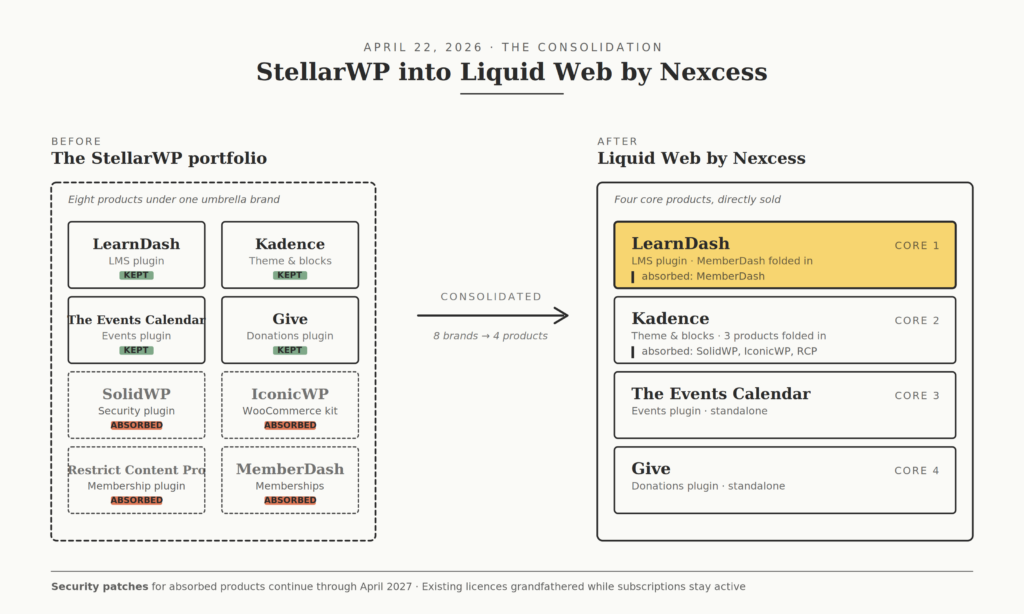
For you as a LearnDash user, four things are still true: your plugin works, your data is intact, your licence is grandfathered, and security patches run through April 2027. The brand identity is gone, the team has been restructured, and the customer portal has been moved to software.liquidweb.com.
If you need the full timeline and the technical details of what changed, our calm, fact-first briefing on the StellarWP wind-down covers it. From here on, this guide assumes you have the news. The rest is about what to do with it.
Why “should I switch?” is the wrong first question
Most coverage of the LearnDash update news leads with “here’s where to migrate.” That’s a fair starting point if migration is what you came looking for. But it skips a question worth asking first: Does your situation actually call for a move?
For roughly half the LearnDash users we talk to, the honest answer is no. Their site works, their renewal is set, their students are happy, and nothing about a corporate reorganisation in Michigan changes their day-to-day. For the other half, there are real reasons to look harder. But those reasons are specific to their setup, not to the news.
The framework below helps you tell which group you’re in.
The five-factor framework for deciding what to do next
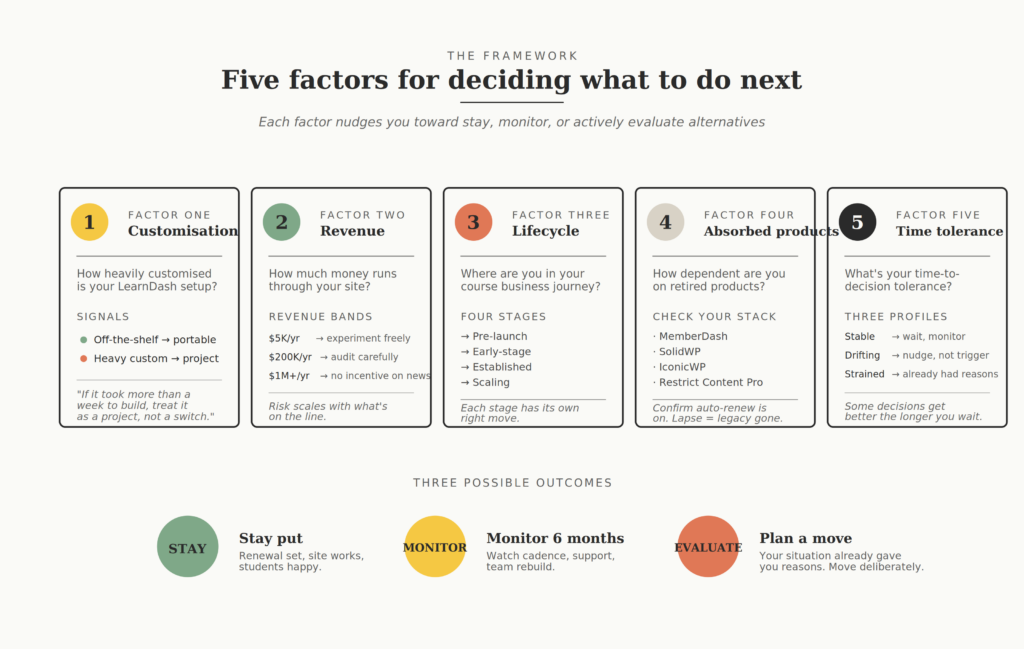
Run your situation through these five factors honestly. Each one nudges you toward “stay,” “monitor,” or “actively evaluate alternatives.” Read them in order, because they build on each other.
Factor 1: How customised is your LearnDash setup?
This is the single biggest variable. A standard LearnDash install with a few official add-ons is portable: migration tools handle courses, lessons, quizzes, and student progress reasonably well. A heavily customised LearnDash setup is a different story altogether.
Examples of “standard” setups that move fairly cleanly: a coaching business with 5 to 15 courses, drip content, basic quizzes, certificates, and Stripe checkout. A solo creator with a few cohort courses and an email automation tied to course completion. These are well-served by the features that ship with LearnDash out of the box, and most migration tools handle them well.
Examples of customised setups that don’t move easily: a continuing-education provider with state-specific compliance reporting baked into the certification workflow. A multi-instructor academy where each instructor has front-end course-editing permissions tied to a custom user role. A LearnDash site that’s deeply integrated with a CRM, with student records syncing in real time.
We built one of these for INMED, a non-profit medicine institute, where LearnDash had to sync with Neon CRM without compromising speed. That kind of build doesn’t transfer via a one-click migrator.
Worth knowing: Several LearnDash add-ons people rely on today (Instructor Role, Reports Pro, Group Registration, Ratings and Reviews, Content Cloner) were originally built by us at WisdmLabs and sold to StellarWP in May 2024. They’re now part of the LearnDash bundle. If your customisations lean on these add-ons, you have more LearnDash in your stack than you might realise.
The rule of thumb: if your LearnDash setup took more than a week to build, treat migration as a project, not a switch.
Factor 2: How much revenue runs through it?
The math on staying vs. moving shifts with revenue. The question isn’t whether you can afford to migrate. It’s how much risk a transition carries relative to the upside.
A course business doing $5,000 a year on LearnDash can experiment freely. The downside of a botched migration is small, the upside of a cleaner platform might be meaningful, and the disruption affects a small enough audience that you can absorb it.
A course business doing $200,000 a year is in a different bracket. Even a two-day outage during migration could cost you several thousand dollars in support tickets, refunds, and lost trust. The right move at that revenue level is rarely “switch quickly.” It’s almost always “audit carefully and decide deliberately.”
A course business doing $1M+ has effectively no incentive to move on the news alone. The platform survives, the licence is grandfathered, and the migration cost (including the inevitable post-launch issues) is real money. You’d want a much sharper trigger than corporate reorganisation to consider it.
Factor 3: Where are you in your course business lifecycle?
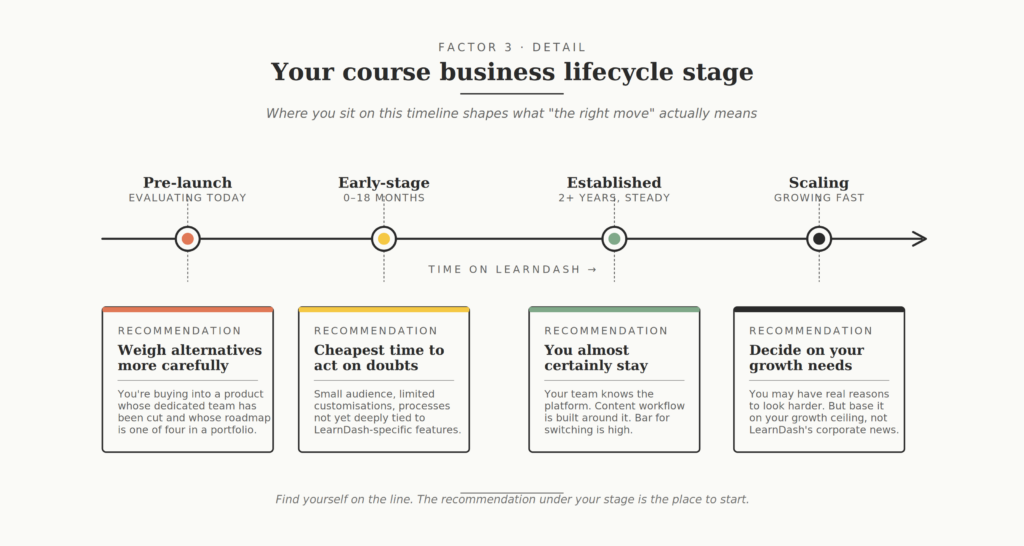
Different stages call for different responses.
Pre-launch and evaluating LearnDash today: the news has changed your decision. You’re now buying into a product whose dedicated team has been cut and whose roadmap is one of four in a portfolio.
That doesn’t make LearnDash a bad choice, but it does mean you should weigh alternatives with more rigour than you would have a year ago. Read our breakdown of the actual pros and cons of LearnDash before committing.
Early-stage (first 0 to 18 months on LearnDash): You have flexibility that most people don’t. Your audience is small, your customisations are limited, and your processes aren’t deeply tied to LearnDash-specific features yet. If you have nagging doubts, this is the cheapest moment to act on them.
Established (running 2+ years, steady revenue): you almost certainly stay. Your team knows the platform, your content workflow is built around it, and your students know how to use it. The bar for switching is high, and the news doesn’t clear it on its own.
Scaling (growing fast, hitting current limits): this is the trickiest position. You might have legitimate reasons to evaluate alternatives, but those reasons should be about your growth needs, not about LearnDash’s corporate situation.
As one widely shared comment from Rodolfo Melogli of Checkout Summit put it on the consolidation, moving toward a single ecosystem can actually be a strong long-term move when you’re optimising for platform competition rather than standalone product visibility. That’s not a guarantee, but it’s a credible counterpoint to the doom narrative.
Factor 4: How dependent are you on absorbed products?
This factor applies if you were using MemberDash, SolidWP, Restrict Content Pro, or IconicWP alongside LearnDash. If you weren’t, skip to Factor 5.
MemberDash has been folded into LearnDash itself, so if you used it for memberships layered over courses, you’ll see less disruption: the features come inside LearnDash now. SolidWP and Restrict Content Pro are now inside Kadence. IconicWP is now “Kadence Shop Kit.”
Critical security patches continue through April 2027 for all of these as standalone products, but feature development on the legacy versions has effectively stopped.
The grandfathering caveat is where founders are getting burned in real time. Liquid Web has been clear: your existing pricing and features persist as long as your subscription stays active. As their official portfolio announcement spells out, “If your subscription lapses, you’ll need to purchase one of the new software plans to reinstate access.”
A recurring concern in WPBeginner’s coverage and reader emails is that this caveat is easy to miss. If you let a renewal lapse for any reason (expired card, missed email, billing change), you can’t reactivate at the old price.
The action here is small but urgent: check that auto-renew is on for every active subscription you have in the Liquid Web by Nexcess portfolio. If you’ve built compliance, security, or membership functionality on any of these, put April 2027 on your calendar too. You don’t need to panic about it. You do need to have a longer-term plan in place before security patches stop coming.
Factor 5: What’s your time-to-decision tolerance?
Some decisions get better the longer you wait. Others get worse. Which kind is this?
If you’re stable on LearnDash, customised, and earning well, waiting is the right move. The next 6 to 12 months will tell you more about the new LearnDash than any analysis you can do today.
Three places worth watching. The release cadence on the LearnDash release notes hub and the official changelog. What customers are saying on r/WordPress and the various LearnDash user Facebook groups. And whether the team rebuilds, with LinkedIn job postings under “Liquid Web by Nexcess” being the most reliable signal there.
If you’ve been thinking about migrating for unrelated reasons (you outgrew LearnDash, you want a different feature set, you’d rather not run WordPress at all), the news doesn’t change much. It might bring the decision forward by a few months. But you should still make it on the merits of where you want to be, not on where LearnDash currently is.
If you’re hitting active problems today (pricing pressure, support gaps, technical limits), the news matters less than you think. You had reasons to consider alternatives before this, and you still do. Don’t let the headlines convince you the answer is more urgent than it is.
How exposed is your LearnDash setup? A quick self-assessment
Before reading about alternatives, score your own situation. Answer yes or no to each:
- Is your LearnDash setup mostly off-the-shelf, with fewer than five custom plugins or workflows? (Y/N)
- Is your course business under 2 years old, or doing under $50,000 a year in revenue? (Y/N)
- Were you already considering a platform switch before this news? (Y/N)
- Do you have absorbed products (MemberDash, SolidWP, RCP, IconicWP) in your stack? (Y/N)
- Is your auto-renewal confirmed and on for all your StellarWP-era subscriptions? (Y/N)
Score 4 to 5 yes: you’re well-positioned. Your situation is either portable enough or low-stakes enough that you have real flexibility. Take your time.
Score 2 to 3, yes: you’re in the murky middle. You’re not stuck, but you’re not casually mobile either. This is where most established course businesses sit, and where a careful audit pays off.
Score 0 to 1 yes: your setup is complex enough that any move is a project. Don’t react to the news. Plan a calendar. Read the next section for context, not as a shopping list.
LearnDash alternatives worth knowing (with honest pros and cons)
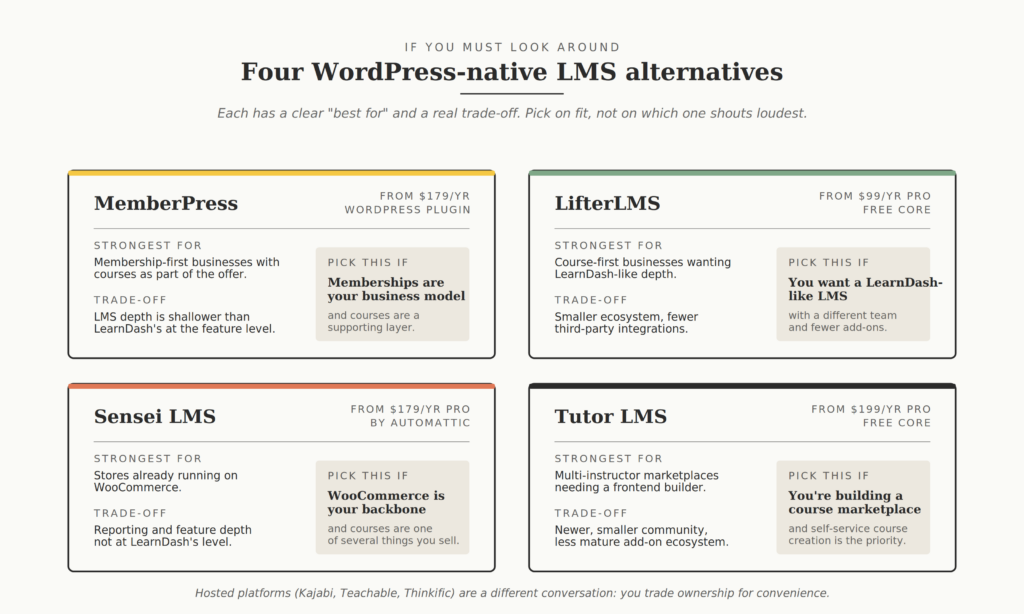
If you’ve worked through the framework and want to know what else is out there, here are the four serious LearnDash alternatives in the WordPress ecosystem.
We’re keeping this WordPress-only because the move from LearnDash to a hosted platform like Kajabi, Teachable, or Thinkific is a different kind of decision: you’re trading platform ownership for convenience. If that’s where your head is, our framework on when to outgrow Teachable, Thinkific, or Kajabi is the better read.
| Alternative | Architecture | Pricing (starting) | Strongest for | Main trade-off |
| MemberPress | WordPress plugin | $179/year | Membership-first businesses with courses as part of the offer | LMS depth is shallower than LearnDash’s at the feature level |
| LifterLMS | WordPress plugin | $99/year (Pro), free core | Course-first businesses wanting LearnDash-like depth | Smaller ecosystem and fewer third-party integrations |
| Sensei LMS | WordPress plugin | $179/year (Pro), free core | Stores already running on WooCommerce | Reporting and feature depth not at LearnDash’s level |
| Tutor LMS | WordPress plugin | $199/year (Pro), free core | Multi-instructor marketplaces | Newer, smaller community, less mature add-on ecosystem |
MemberPress
MemberPress is the most aggressive voice in the current news cycle, and for understandable reasons: their MemberDash competitor just got folded into LearnDash. They’ve built a native LearnDash migrator, and as their own coverage points out, thousands of course creators have already moved from LearnDash to MemberPress.
Where it fits: memberships are the centre of your business, and courses are part of how you deliver value. If you primarily sell access to a body of content where courses are one of several pillars, MemberPress is a strong fit.
The trade-off: MemberPress’s courses functionality is solid, but doesn’t match LearnDash’s depth on assessments, advanced quiz types, or reporting. A pure course business may find it lighter than what they’re used to.
Pick this if: memberships are your business model and courses are a supporting layer, not the main product.
LifterLMS
LifterLMS is the closest like-for-like alternative to LearnDash in the self-hosted WordPress space. The course-building experience, lesson structure, and quiz capabilities are comparable. Pricing is on the gentler end.
Where it fits: you want a WordPress LMS that feels familiar after LearnDash, you don’t want to give up depth, and you’re comfortable with a smaller third-party ecosystem.
The trade-off: the add-on universe around LifterLMS is noticeably smaller. If your LearnDash site relies on niche extensions, you may not find direct equivalents.
Pick this if: you want a LearnDash-like LMS, just with a different team behind it and fewer add-ons to chase.
Sensei LMS
Sensei is built by Automattic, the company behind WordPress.com and WooCommerce. Its WooCommerce integration is native rather than bolted on, which matters if you’re selling courses alongside other products.
Where it fits: your store already runs on WooCommerce, you want LMS functionality that plays cleanly with the rest of your commerce setup, and you don’t need the deepest possible LMS feature set.
The trade-off: Sensei is the lightest of these four on LMS-specific functionality. Reporting, advanced quizzing, and instructor management aren’t at LearnDash’s level. For Automattic’s own scale of LMS use, it’s enough. For complex training operations, it’s often not.
Pick this if: WooCommerce is already your commerce backbone, and courses are one of several things you sell.
Tutor LMS
Tutor LMS has been gaining ground in multi-instructor and marketplace contexts. Its frontend course builder is well-regarded, and pricing on the Pro tier is competitive.
Where it fits: You’re running or building a course marketplace where multiple instructors need self-service course creation. The frontend builder is the standout feature.
The trade-off: Tutor is newer than the others, with a smaller community and a less mature third-party ecosystem. For mature, well-documented support, the others are ahead.
Pick this if: you’re building a multi-instructor marketplace and a frontend course builder is your top priority.
What should founders actually do this month?
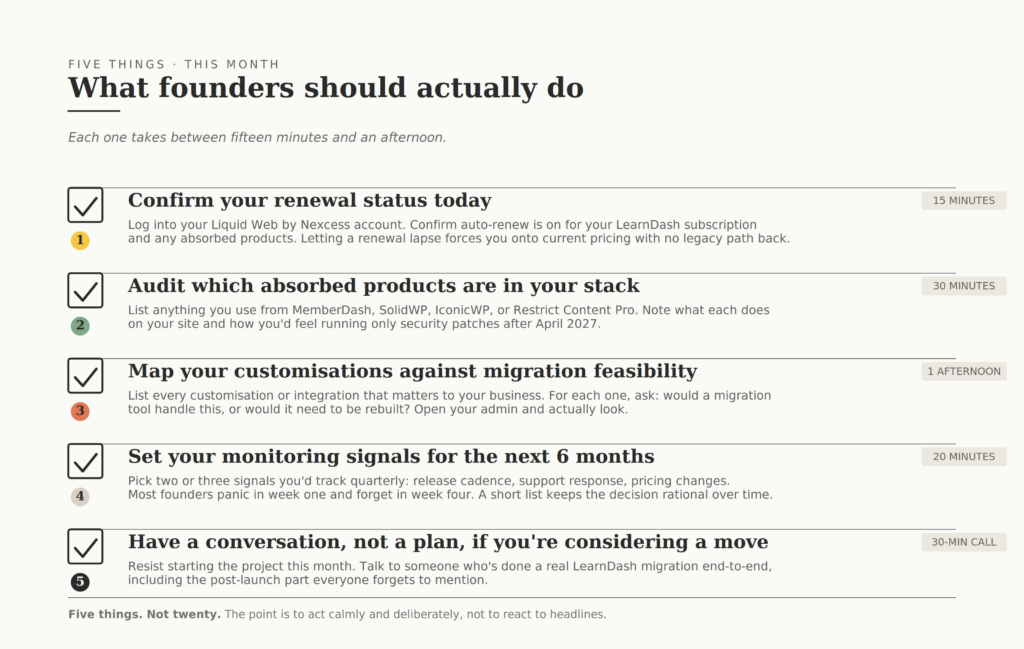
Five things. Not twenty. Each takes between fifteen minutes and an afternoon.
1. Confirm your renewal status today. Log in to your Liquid Web by Nexcess account. Confirm auto-renew is on for your LearnDash subscription and for any absorbed products you own. This is the single highest-leverage action you can take today: letting a renewal lapse forces you onto current pricing with no path back to your legacy plan.
2. Audit which absorbed products are in your stack. Make a one-line list: do you use MemberDash, SolidWP, IconicWP, or Restrict Content Pro? For each, note what it does on your site, when its renewal is due, and whether you’d be okay being on the legacy version with only security patches after April 2027.
If anything is critical and you don’t love the answer, that gets escalated to the planning category. While you’re auditing your stack, our free WordPress Vulnerability Scanner can give you a quick read on exposure across all your installed plugins.
3. Map your customisations against migration feasibility. List every customisation or integration on your LearnDash site that matters to your business. For each one, ask: would a migration tool handle this, or would it need to be rebuilt? Don’t guess. Open your admin and actually look.
This single exercise often resolves the “should I move?” question on its own. Our list of the most-used LearnDash add-ons is a useful starting point for what counts as a “customisation” worth listing.
4. Set your monitoring signals for the next 6 months. Decide upfront what would change your assessment. A delayed feature release? Slower support response times? A pricing change? Pick two or three things you’d track, and check in on them quarterly. Most founders panic in week one and forget in week four. A short monitoring list is what keeps the decision rational over time.
5. Have a conversation, not a plan, if you’re considering a move. If you’ve worked through the framework and your gut says, “I’m probably moving,” resist the urge to start the project this month. Talk to someone who’s done a real LearnDash migration end-to-end, including the post-launch part everyone forgets to mention.
We’re happy to be in that conversation: you can talk it through with our LearnDash transition team before you commit to anything. A 30-minute call costs nothing. Starting the wrong migration can cost you months.
Frequently asked questions about the LearnDash update news
Is LearnDash going to be shut down?
No. LearnDash is one of the four products Liquid Web kept as core offerings: the survivor list, not the absorbed list. The brand identity is gone, and the team has been restructured, but the product itself continues with active development. LearnDash 5.0 shipped recently with REST API improvements and MemberDash functionality bundled in.
Will my existing LearnDash licence still work?
Yes. Liquid Web has been explicit that current plans, pricing, and tools continue unchanged as long as your subscription stays active. “Your current plan, pricing, and tools remain the same unless you choose to upgrade. This is a new option for customers who want more, not a forced migration.” The site keeps running, the licence keeps validating, the updates keep coming.
What happens if my LearnDash subscription lapses?
Your legacy pricing is gone. This is the catch that the official announcement is least loud about: a lapsed subscription forces you onto a new Liquid Web Software plan at current pricing, with no path back to your old plan. Check auto-renew today.
Should I migrate off LearnDash now?
Probably not, unless your situation already gave you reasons before this news. The framework above is the honest way to decide. For most established course businesses, the right move is to monitor for the next 6 to 12 months, not to react this week.
What about the WisdmLabs add-ons I bought before StellarWP acquired them?
If you bought our LearnDash add-ons before May 2024, they’re now part of the LearnDash bundle under Liquid Web. We’ve documented the migration history and licence implications in our service pages, and we continue to support clients running LearnDash setups built on those add-ons. If you have a specific question about a setup we built for you, reach out. We still know that code well.
If you’ve worked through this guide and you’re still not sure whether staying or moving is the right call for your specific setup, that’s a conversation worth having before deciding anything. Here’s how we work at WisdmLabs when course business owners come to us with this exact question.
1. A short call (30 minutes). We look at your actual setup, not a hypothetical one. What you’re running, what your students need, what your renewal situation looks like, and where your customisations sit. No sales deck.
2. An honest read. We tell you what we’d do if it were our course business, including the answer “stay where you are” if that’s what your situation calls for. We’ve talked plenty of people out of migrations they didn’t need.
3. If a move makes sense, a clear scope. What the work involves, how long it takes, what it costs, and what your students will and won’t notice. In plain language, before anything starts.
4. If you stay, a stability plan. Even if migration isn’t right, there are usually things worth doing: confirming renewals, auditing dependencies, hardening security, documenting customisations. We’ll tell you what’s worth your time and what isn’t.
5. You decide, on your timeline. No pressure to start this week, this month, or this quarter. The whole point of this framework is to make a decision you don’t regret in a year.