


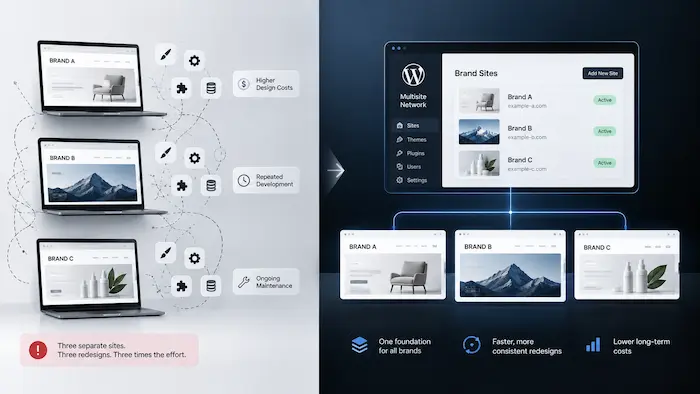
| Quick Answer
Multisite WordPress can make a multi-brand redesign more efficient when the sites share similar structures, templates, user journeys, and integrations. It lets teams build a shared foundation while keeping each brand’s design, content, and customer experience distinct. If the brands have significantly different security, compliance, ownership, or business requirements, separate sites or a hybrid approach may be better. |
The real cost of running separate brand sites isn’t the extra hosting bill. It’s that your team ends up solving the same structural problems several times over, once per site, on the same redesign timeline.
Four separate websites means four separate navigation systems, four sets of page templates, four content structures, and four sets of integrations, even when the underlying business logic behind them is nearly identical.
When it’s time to redesign, the team isn’t redesigning one website with four coats of paint. They’re rebuilding four foundations that happen to look similar, on a budget and timeline that was scoped for one.
The result is straightforward: the same redesign decisions get paid for again on every site.
Running Separate Sites Means Duplicating More Than Hosting

Every separate site duplicates work across at least eight layers, and most of them never show up on a hosting invoice.
● Navigation and information architecture. Each site’s menu, category structure, and page hierarchy gets designed and tested from scratch, even when the underlying customer paths are nearly identical.
● Page templates and components. Product pages, course pages, landing pages, and forms get rebuilt per site instead of reused.
● Content structures. Custom fields, taxonomies, and content models for products, courses, or case studies get redefined on every install.
● Design systems. Colors, typography, spacing, and component styling get re-decided per site, with no shared source of truth.
● Integrations and forms. Payment gateways, CRM connections, and lead forms get configured separately, with separate points of failure.
● Analytics and reporting. Each site tracks its own events differently, making it harder to compare performance across brands.
● Content governance. Who can publish what, and under which brand guidelines, gets figured out independently for each property.
● Future redesign work. Every subsequent redesign repeats all seven items above, on its own schedule.
| EXAMPLE · WooCommerce and LearnDash example: the same catalog structure, rebuilt twice
A WooCommerce brand’s variable-product and subscription catalog runs on custom fields, checkout logic, and pricing rules refined over two or three years of iteration. A second, smaller brand joins the portfolio and needs a storefront of its own, so a different team starts that catalog and checkout build from a blank install. The new team has no visibility into the first site’s custom fields or checkout logic, so they re-decide product structure, variant handling, and subscription rules from scratch, landing on something close but never quite identical. Business consequence: A LearnDash-based training arm under the same parent company goes through the same cycle for its course catalog and enrollment journey, on its own timeline, with its own team, until the parent company is maintaining two or three separate versions of decisions it already made once. TRY THIS BEFORE YOU REBUILD THE SECOND SITE: Document the first site’s product fields, variant rules, subscription logic, and checkout steps before the second team starts. If the second catalog follows the same structure, make those rules part of the shared foundation instead of recreating them. |
At WisdmLabs, we built our website redesign process specifically to catch that duplication before it repeats a third or fourth time.
Also Read: Premium Website Design: 7 Decisions That Set Brands Apart
| ✓ MAP THE REPEATED DECISIONS BEFORE YOU REDESIGN
Pull one representative customer journey from each brand and mark every step as shared, modified, or unique. If the core steps, fields, and integrations repeat, standardize them before design starts. If payment, compliance, or approval steps diverge, keep those parts separate. That gives the redesign team a concrete boundary: share what is genuinely repeated, and avoid forcing a brand into infrastructure that creates exceptions later. |
When WordPress Multisite Makes Sense for a Multi-Brand Redesign
WordPress Multisite makes sense when your brand sites are structurally similar enough that redesigning them separately would mean solving the same problems more than once.
The signals worth checking for before your team scopes a redesign around Multisite:
● For WooCommerce brands: your stores use similar product structures, such as variable products, subscriptions, shared checkout logic, or similar account areas, even though the catalogs and brand identities differ.
● For LearnDash brands: your sites follow a similar learning journey, such as enrollment, course access, progress tracking, completion, and certificate delivery, even though the courses and learners differ.
● Your team wants common templates or components across sites, not a fresh design language for each one.
● Content or functionality follows similar patterns across the brands, even if the products or courses themselves differ.
● The parent company wants centralized governance: one place to manage users, plugins, and updates across every site.
● New brands, regions, or product lines are likely to be added, and you’d rather not build another foundation from zero.
● Each site still needs its own identity, but on top of a common technical and structural base.
A simple way to test the fit: three WooCommerce stores might have different catalogs but use the same variable-product and subscription logic. Two or more LearnDash sites might teach completely different subjects but follow the same enrollment-to-completion-to-certificate flow. Those are the kinds of repeated structures that can justify designing a shared foundation.
| EXAMPLE · WooCommerce and LearnDash example: when the fit is strong
A company runs three WooCommerce brand stores, each selling a different product line, but the product pages, checkout, and account areas all follow essentially the same structure. A redesign gets scoped brand by brand, with each site treated as its own project, its own templates, and its own component decisions. The team ends up rebuilding the same product page layout, the same cart and checkout flow, and the same account dashboard three times, then maintaining three separate versions of what should have been one shared foundation. Business consequence: The same pattern shows up with a parent company running two or three LearnDash-based certification brands. The certifications themselves have nothing in common, but the enrollment flow, completion tracking, and certificate delivery are close enough that building all three separately wastes a redesign budget on decisions that only needed to be made once. TRY THIS BEFORE YOU SCOPE THREE SEPARATE BUILDS: Pick one product page, one checkout flow, and one account area from each brand. Compare them side by side. If the underlying structure is repeated, define those pieces once and let each brand customize only the parts that genuinely differ. |
If that’s closer to your situation, our piece on simplifying multi-brand and multi-location site management with Multisite customization covers the operational side once the architecture decision is made.
Planning a Multi-Brand Redesign?
Map what your sites should share before rebuilding each one separately.

A Shared Foundation Doesn’t Mean Identical Websites
A shared WordPress Multisite foundation is not the same thing as identical websites, and treating them as the same idea is where most Multisite conversations go wrong.
A company can share a foundation across brands, meaning:
● Core components: buttons, forms, cards, and layout building blocks.
● Page templates: the underlying structure for product pages, course pages, or landing pages.
● Content structures: the fields and taxonomies behind products, courses, or case studies.
● Governance: who can publish, and under what brand rules.
● Certain integrations: payment processing, CRM connections, analytics tracking.
While each brand still keeps its own:
● Visual identity: color, type, imagery, and tone.
● Messaging and positioning.
● UX patterns: how search, filtering, checkout, or enrollment behave.
● Navigation variations suited to its own catalog or course library.
● Product or course structure specific to what it sells or teaches.
● Its own customer journey, where that journey is genuinely different.
| EXAMPLE · WooCommerce and LearnDash example: shared logic, distinct storefronts
A parent company standardizes checkout component logic across its WooCommerce brand stores, and enrollment-flow scaffolding across its LearnDash-based training sites, as part of a shared design system. One team owns and maintains that underlying logic, the cart behavior, the checkout steps, the enrollment and progress-tracking mechanics, across every brand it applies to. Each brand still needs its storefront or course catalog to look and feel like its own, not like a reskinned copy of another brand’s site, or customers and learners start noticing the sites feel interchangeable. Business consequence: Because the shared layer covers only checkout and enrollment logic, each brand keeps its own merchandising style, its own course-discovery layout, and its own visual identity on top of it, so the redesign moves faster without the finished sites looking identical. TRY THIS BEFORE YOU SCOPE THE REDESIGN: Put the checkout flow for each WooCommerce brand, or the enrollment flow for each LearnDash site, side by side. If more than 70% of the steps are functionally identical — same field types, logic, and integrations, with branding as the main difference — that is a strong shared-foundation signal. If they diverge on payment methods, compliance steps, or approval flows, that brand may need to stay on its own build. |
That said, Multisite doesn’t hand you this kind of shared foundation automatically. On a real WordPress.org support thread, a store owner planning several brand subdomains on one network was told plainly that data isn’t shared between sites out of the box without custom development.
Multisite gives you shared infrastructure. The shared design system on top of it is still something your team has to build deliberately.
That’s the execution-level work our piece on building a brand design system for multi-brand ecommerce teams covers in more depth, if you want to see what standardizing that layer looks like.
| ✓ THE RISK RUNS BOTH WAYS
Overbuild the shared infrastructure and one brand’s plugin conflict or traffic spike can affect every site on the network. Underbuild it and you’re paying full redesign price, per brand, for decisions your team already made once. . |
What Changes When You Redesign Several Sites as One System

Redesigning several brand sites as one system means deciding the shared architecture first, then building brand-specific experiences on top of it, instead of redesigning each site in isolation.
The old sequence looks like: Site A redesign, then Site B redesign, then Site C redesign, each one starting from a blank page and re-deciding things the last redesign already settled.
The better sequence looks like: shared architecture, then a shared design system, then brand-specific experiences layered on top of both. Each brand still gets its own redesign decisions about identity and journey. Nobody re-litigates the navigation pattern or the checkout component from zero, three times in a row.
Forma is a useful example of the brand-specific layer you build on top of a strong system. The site was created from scratch for a senior finance audience, with an editorial visual direction rather than generic SaaS patterns.
The design system established consistent spacing, typographic hierarchy, and a unified component language across pages, while the brand kept its own imagery, founder-led positioning, and editorial layouts. The lesson for a multi-brand redesign is the same: standardize the underlying rules, but let each brand’s identity and content determine how those rules are expressed. You can see how that redesign came together in the full case study.
Before your team commits to that sequence, it helps to see exactly what’s currently duplicated across your existing sites.
Our Design & UI Bot is a useful starting point for a quick audit of where your current templates and components already overlap.
Even with a shared architecture decided on, Multisite still isn’t automatically the right delivery mechanism for every situation that fits the pattern above.
The Real Redesign Question Isn’t Whether Multisite Can Run These Sites. It’s Whether They Should Still Be Separate.
WordPress Multisite can technically run almost any combination of brand, regional, or product sites. Whether it should is a completely different question, and it’s the one most Multisite content skips.
Most articles on WordPress Multisite answer a narrower question: can this platform host multiple related sites without falling over. The honest answer is usually yes, with the right hosting and setup.
That’s not the decision a founder facing a multi-brand redesign needs to make. The real question is whether four separately-designed, separately-maintained sites should keep being designed and maintained as four completely independent systems, or whether some of that structure should be shared.
Also Read: WordPress Multisite: Simplify Managing Multiple Sites, if you want the operational and technical side of that question.
Answering it well starts with knowing when a shared foundation earns its keep.
| Is Your Multi-Brand Redesign Ready for a Shared Foundation? A Quick Check
Answer yes or no to each question. Signals toward a shared foundation: 1. Do three or more of your brand or business-unit sites serve a similar customer journey, browsing, learning, buying, or enrolling in roughly the same way? (Y/N) 2. Will more than one of these sites need a full template and component rebuild in this redesign? (Y/N) 3. Does one team currently own design and content decisions across all the sites involved? (Y/N) 4. Are you likely to add another brand, region, or product site in the next one to two years? (Y/N) Signals toward staying separate: 5. Do any of these sites need meaningfully different security, compliance, or infrastructure requirements? (Y/N) 6. Could any of these brands realistically be sold, spun off, or run by a fully independent team within a few years? (Y/N) SHARED FOUNDATION Mostly yes on the first four, no on the last two. A shared foundation, whether that’s Multisite or at minimum a shared design system, is worth designing for now. Skipping this and redesigning separately typically means paying for the same navigation, template, and checkout decisions two or three times over, on a budget that was scoped for one. HYBRID APPROACH Mostly yes on the first four, but one of the last two is also yes. A hybrid is worth scoping, a shared design system with separate installs where the exception sits. A hybrid keeps the exception isolated, but it means you need to plan two delivery models: shared where repetition is real, separate where it is not. That can add coordination time, but it avoids forcing one brand’s requirements into every site. KEEP SEPARATE A strong yes on either of the last two, regardless of the first four. Keep that site technically separate, and standardize only at the design-system level. Plan your website design with WisdmLabs → Sharing infrastructure here doesn’t save the redesign budget. It can add migration cost later if that brand gets sold or spun off, on top of whatever you saved |
Turn Your Redesign into a Shared Foundation
If multiple sites are repeating the same templates, components, and customer journeys, WisdmLabs can help you decide what to standardize, what to keep brand-specific, and whether Multisite is the right foundation.
Conclusion
A multi-brand redesign is a chance to decide what should be shared before you decide what should be redesigned.
That decision gets harder to make well the more brands, regions, or business units get added, because each one arrives with its own assumptions about how the site should work.
Look back at the check above. Which of your sites share a similar journey? Which ones are about to need a full template rebuild anyway? Which ones carry different security or ownership requirements that don’t belong on shared infrastructure?
If most of your sites share structure and are due for a redesign together, a shared Multisite WordPress foundation is worth the upfront planning. If the fit is mixed, a shared design system across separate installs may get most of the benefit without the shared-infrastructure risk.
If a brand’s journey, team, or compliance needs are genuinely different, keep it on its own site.
The right answer isn’t Multisite or separate sites as a rule. It’s whichever one matches how your brands operate today and how you expect them to grow.
Start by mapping what’s duplicated across your sites right now, before your team scopes the next redesign around templates and components you may not need to rebuild from scratch.
If that mapping is the part you don’t have time for, plan your website design with WisdmLabs →
FAQ
What is WordPress Multisite, in plain terms?
WordPress Multisite is a single WordPress installation that runs multiple related websites from one shared codebase, database, and admin network. Each site can have its own domain or subdomain, its own content, and its own look, while sharing the same underlying WordPress core and, if configured to, the same plugins and themes.
Can each site in a WordPress Multisite network look completely different?
Yes. Multisite controls shared infrastructure, not visual design. Each site can run its own theme customization and content, though teams typically standardize some templates and components across sites deliberately, rather than leaving every site to diverge on its own.
Does WordPress Multisite actually save money on redesign and maintenance?
It can, when the sites involved are structurally similar enough to share templates, components, and governance. The savings come from not rebuilding the same navigation, page templates, and content structures separately for each brand, not from Multisite itself being cheaper to host.
What’s the risk of putting several brands on one WordPress Multisite network?
The main risk is shared infrastructure means shared risk. A plugin update, a security issue, or a performance problem on one site can affect every site on the network at once. That’s a real trade-off against the convenience of centralized management, not a minor technical footnote.
Can a single site be pulled back out of a Multisite network later, if that brand is sold or spun off?
It’s possible, but it takes real migration work, since the site’s content and configuration live inside a shared database and codebase. If a spin-off or sale is a realistic near-term scenario for any brand, that’s a strong argument for keeping it on a separate installation from the start.


