| One founder we worked with had spent 18 months paying for a WordPress maintenance plan. Updates were running. Backups were live. No red flags on the dashboard.
Then her checkout integration broke on a Thursday afternoon. She spent her evening chasing a developer who wasn’t in scope, and by Friday morning had paid an emergency rate to someone she’d never worked with before. By the time she reached us, the immediate issue was fixed but the bigger problem had become obvious: she had paid for maintenance, assuming it covered management. We hear this story more often. The founder, paying for professional site maintenance, discovers at the worst possible moment that website maintenance and website management are not the same category of service. This piece makes that distinction concrete and operational. Not semantic. Not “maintenance is reactive, management is proactive.” While true, it often doesn’t give teams enough clarity to make decisions |
What “Monthly Website Maintenance” Actually Covers
Maintenance plans are not a bad product. They’re the right product for a specific stage. The problem is that most founders are still on a maintenance plan three or four years after they needed to upgrade.
The three things a maintenance plan does well
A well-run maintenance plan handles three things reliably:
– It keeps your WordPress core, plugins, and themes updated on a regular schedule.
– It runs automated security scans and backups.
– And it gives you a record that someone is watching the technical baseline.
For a brochure site or an early-stage business where the website is informational, this is exactly what you need. Our WordPress maintenance guide covers what a complete maintenance checklist looks like at each stage. Worth reviewing if you want to understand what the plan you’re paying for should actually be delivering.

Where the maintenance scope ends (and most plans don’t tell you)
Most maintenance plans are written to cover Dimensions 1 and 2 of the six operational dimensions, and sometimes a partial version of Dimension 3. The remaining three to four dimensions are either out of scope by design, available as paid add-ons, or simply not mentioned in the contract.
(Note for context: We map website operations across six distinct dimensions — plugin & theme updates, security monitoring, performance, feature & integration work, incident response, and strategic site evolution. We go deep on each in the next section; for now, treat this as a preview of the framework.)
The honest version of a maintenance plan contract would say: “We keep your site updated and backed up. Everything else is not included.” As one practitioner breakdown of WordPress care plans puts it directly: “Many agencies treat WordPress maintenance as a checklist of WordPress updates and little else.”
You’re not being misled. You’re buying the right product for the wrong stage.
| To put this in perspective: Imagine an online course creator running a LearnDash-powered platform. She’s been on a maintenance plan for two years — updates current, backups running, uptime clean. Then she launches a new cohort and her Stripe payment integration stops processing enrolments mid-campaign. Her maintenance provider confirms all updates are current. Fixing the webhook conflict requires a developer to dig into the integration layer — and that’s outside their scope. She ends up sourcing a developer cold, under deadline pressure. The same pattern plays out on WooCommerce stores: a new payment gateway, a shipping plugin update, a tax rule change — any of these can break checkout in ways that are invisible until a customer emails. Maintenance keeps the site updated. It doesn’t own what happens when an update conflicts with live commerce logic. |
What Website Management Actually Covers
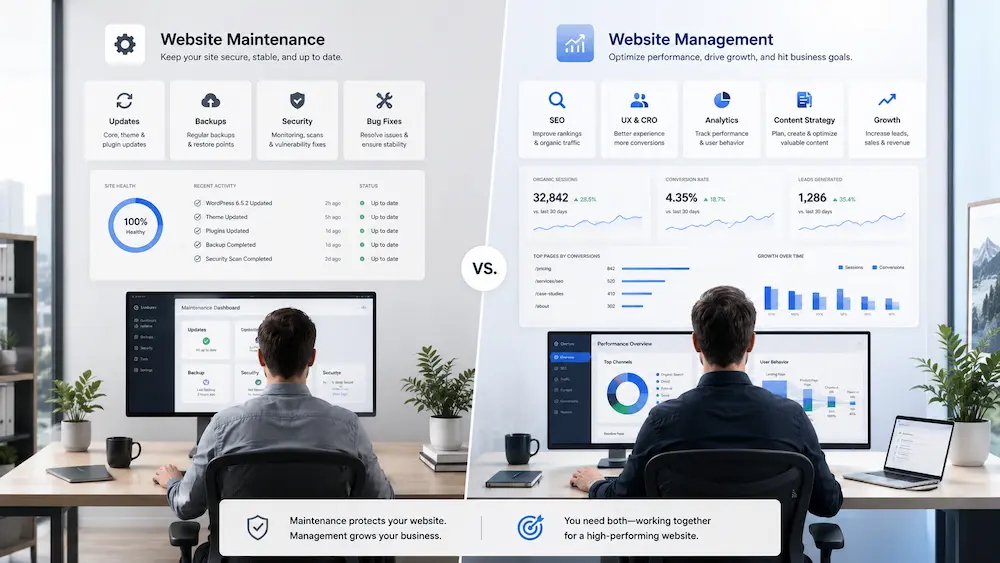
Website management is not “maintenance plus a few support hours.” It’s operational coverage for a live business site.
Where maintenance keeps the technical baseline healthy, management takes responsibility for what happens after the update runs, the alert fires, or the business changes.
A management retainer typically covers six operational areas: keeping updates from breaking live functionality, responding to incidents when they happen, resolving performance issues, handling feature and integration work, and evolving the site as the business grows.
For a founder, the difference is simple:
Maintenance keeps the site running. Management keeps the website working as part of the business.
Or, more practically:
With maintenance, you’re still the operational backstop.
With management, someone else owns the follow-through.
Here’s how that plays out in practice. Consider a founder running a WooCommerce store with a membership component — roughly 400 active subscribers, a monthly product drop, and a CRM integration:
| Situation | Under Maintenance | Under Management |
| Plugin update breaks membership checkout | Founder notices when a subscriber emails. Raises a ticket. Provider responds: out of scope. Founder finds a developer. | Caught in staging before deployment. Fix applied. Founder receives a one-line notification. |
| CRM integration stops syncing after platform update | Support ticket raised. Integration fix quoted as a new project. | Team identifies the API change, reconnects the integration within retainer hours. |
| Monthly product drop page needs a new layout | New quote. Two weeks of back-and-forth with a developer who needs to learn the site. | Briefed in one conversation. Built and live within the week from retainer hours. |
| Site goes down at 10pm on a Friday | Emergency ticket raised. Response time: best case 4-8 hours. | Named SLA: response within 1-2 hours. Team already knows the site. |
We go deeper on each of these dimensions below — with specific examples, tests, and the questions to ask your provider.
The 6 Operational Dimensions Every Live Business Site Needs
A live, revenue-generating site requires coverage across six distinct operational dimensions. A maintenance plan reliably covers one and a half to two of them. A management retainer covers all six.
| Dimension | Monthly Maintenance | Website Management | Founder’s gap when uncovered |
| 1. Plugin & theme updates | ✅ Scheduled, automated | ✅ Tested in staging first | Untested updates breaking live features |
| 2. Security monitoring | ✅ Scans and alerts | ✅ Monitoring + active response | Alerts with no one to act on them |
| 3. Performance monitoring | ⚠️ Reports, sometimes | ✅ Monitoring + remediation | Slow site with no fix in scope |
| 4. Feature & integration work | ❌ Not included | ✅ Covered under retainer hours | Ad-hoc requests at market rates |
| 5. Incident response & uptime | ❌ No guaranteed SLA | ✅ Defined SLA, active response | Founder chasing a developer at 2am |
| 6. Strategic site evolution | ❌ Not included | ✅ Quarterly reviews, CRO, UX | Site stagnates while business grows |
Dimension 1: Plugin and Theme Updates
Updates are the dimension maintenance plans are genuinely built for. A standard monthly plan will run plugin and theme updates on a defined schedule, usually weekly or fortnightly, and confirm backups before each cycle.
What maintenance covers
This is the dimension where maintenance earns its fee. Updates run. Backups are confirmed. A log exists. For most plans, this happens automatically without requiring any input from you.
The limit is testing. Most maintenance plans run updates directly on the live site. If a plugin update breaks a WooCommerce integration or a contact form, you find out when a customer tells you, or when you happen to log in and notice the breakage. A management retainer stages updates in a test environment first, then deploys to production only after confirming nothing breaks.
What management adds
Under a management retainer, updates are tested against your specific site configuration before they go live. Conflicts are caught before they affect customers. This matters more as your site gets more complex: more plugins, more custom integrations, more revenue at stake per hour of downtime.
We’ve caught plugin updates in staging that would have broken checkout flows entirely on live sites.
A WooCommerce Payments compatibility issue. A membership plugin update that conflicted with a custom form. In both cases, the conflict was visible within minutes of deploying to staging. On a live site, neither founder would have known until a customer complained.
The test for this dimension
Ask your provider: “If a plugin update breaks something on the live site on a Saturday, what happens?” A maintenance plan answer is typically: file a support ticket and wait. A management answer names a response time and a process.
Dimension 2: Security Monitoring and Response
Security is the dimension where the gap between maintenance and management becomes most expensive, and most invisible until it starts causing real unavoidable issues on your site .
The monitoring/response gap most founders miss
Almost every maintenance plan includes security monitoring. Scans run. Alerts trigger. What they almost never include is active response when something is found. When a scan flags malware or a vulnerability, most maintenance plans hand that alert back to you. Finding someone to remediate it quickly, at a reasonable rate, is now your problem.
This is the distinction a WordPress support plan comparison describes in practice: when something breaks on a maintenance plan, support coverage is typically included — but the scope is limited. Routine issues (a broken plugin, a failed login attempt) are usually handled within the plan.
Where the gap opens is when the problem goes deeper: a complex malware cleanup, a custom integration conflict, a vulnerability that requires real development work to patch. In those cases, most maintenance providers come back with a version of: “This falls outside our current plan and will need to be scoped as a separate project.” The monitoring is working. The scope of included resolution simply is not built for complex issues.
One client came to us after their maintenance provider flagged a compromised admin account. The alert arrived on a Friday evening. By Monday, when they’d found someone to help, three days of contact form submissions had been quietly redirected to an external address. The monitoring was working. The response wasn’t in scope.
You can run a free baseline scan using our WordPress Vulnerability Scanner to check your current exposure. What it shows you is the monitoring side. The response side is a question for your provider.
What full security management looks like
A management retainer includes active security response in scope. If malware is found, it gets cleaned. If a vulnerability is flagged, someone patches it within a defined timeframe. Firewall rules are reviewed. Access permissions are audited. The founder’s involvement is a notification, not a task.
Dimension 3: Performance Monitoring and Remediation
Performance is the dimension that degrades silently. No alert fires when your site slows over six months. Customers just start leaving faster.
Why monitoring without remediation is just a better dashboard
Most maintenance plans that include performance monitoring deliver a report. Core Web Vitals scores, PageSpeed numbers, maybe a Lighthouse summary. What they don’t include is fixing anything.
Knowing your site is slow is not the same as making your site faster. Remediation involves identifying the specific cause: an unoptimised image pipeline, a bloated query, a poorly-cached third-party script, and rebuilding or replacing it. That’s development work, not maintenance work.
We’ve seen this gap close directly for clients. A mobile PageSpeed improvement we delivered resulted in a 32.5% gain in scores. What actually caused the problem wasn’t obvious from the monitoring reports — it took a developer digging into render-blocking scripts and uncompressed assets to find it.
None of that diagnostic or remediation work would have been in scope under a standard maintenance plan. It required a development engagement focused specifically on identifying and resolving the performance constraints.
The test for Dimension 3: ask your provider, “If our PageSpeed score drops below 50 on mobile, what do you do about it?” A monitoring answer is: we tell you. A management answer is: we fix it.
Dimension 4: Feature and Integration Work
Feature work is entirely outside the scope of every standard maintenance plan. This is the dimension that generates the most unplanned spend.
The dimension maintenance never touches
Any time your site needs to do something new — a new payment gateway, a CRM integration, a form rebuild, a landing page for a campaign, a membership tier, a booking system — that is feature work. It is not covered by maintenance. It never has been.
Most founders know this intellectually but don’t realise how often it comes up until they’re billing it monthly. Every new integration, every updated workflow, every “can we add this” conversation with your team turns into an ad-hoc request. Each one needs a brief, a quote, and a new developer who has to learn your site before they can do anything useful.
What happens when feature work is ad hoc
Ad-hoc feature requests have three consistent problems. They take longer than expected because the developer needs to understand the existing setup first. They cost more than expected because urgency is billed at a premium. And they create undocumented changes that complicate future work.
A founder we work with switched CRM tools and needed to reconnect her contact forms, newsletter signup, and membership onboarding flow to the new platform. Under her previous maintenance plan, that would have been a new project quote, a fresh briefing with a developer who didn’t know her site, and two to three weeks of back-and-forth. Under the retainer, it was one email to our team. Done inside the week, drawn from existing retainer hours.
Under a website management retainer, feature work comes from the same team that knows your site. No onboarding cost. No context gap. The work is scoped in advance and drawn against retainer hours. Understanding the role of website management services means recognising that this dimension is where most of the real operational value sits.
Dimension 5: Incident Response and Uptime
This is the dimension that founders think about at 2am when the site is down and the support queue says 48–72 hours.
What “your site is down” looks like without an SLA
Most maintenance plans have no guaranteed response time for live incidents. They have support queues. The average wait for a non-emergency ticket from a maintenance provider is 24–72 hours. For an emergency classified as such, it might be 4–8 hours, if you reach someone who can help and if the fix is in scope.
When your site is down and revenue is stopped, the gap in your maintenance contract becomes very real, very fast. According to Dotcom Monitor’s downtime cost analysis, even small businesses face average downtime costs running into hundreds of dollars per hour when lost revenue, wasted staff time, and customer trust are factored in.
We’ve also seen downtime incidents take hours longer to resolve than they should have not because the fix was complex, but because nobody had documented the server credentials.
The developer who originally set up the hosting had moved on. The founder had a login somewhere but couldn’t find it under pressure. Under a management retainer, that documentation is maintained as part of the service. Under maintenance, it usually doesn’t exist.
If you’re dealing with an urgent WordPress issue right now, our WordPress Bug Fixing Chatbot can help you diagnose what’s happening while you work to get someone in scope.
What incident response under a management retainer covers
A management retainer defines incident response in the contract. A named SLA: response within 1–2 hours for live site issues. A defined escalation path. Someone who already knows your site configuration and doesn’t need to spend the first 30 minutes understanding what they’re looking at.
The test for Dimension 5: “If our site goes down at 11pm on a Sunday, what is your response time and who responds?” That answer, written into the contract, is the difference between maintenance and management.
Dimension 6: Strategic Site Evolution
Strategic evolution is the dimension that determines whether your site grows with your business or gradually falls behind it.
The dimension that determines whether your site grows with your business
Maintenance keeps the site alive. It does not make the site better. No conversion rate review. No UX audit. No quarterly look at which pages are underperforming and why. No assessment of whether the current site architecture can support the next stage of the business.
At $1M+ ARR, your website is an operational asset, not a brochure. It carries load. It qualifies leads. It generates revenue. And it reflects a version of your business that, for many founders, is 12 to 18 months out of date.A founder we work with had expanded her service offering significantly over the previous year, but the homepage still described the original three services from when the site launched. Her maintenance provider had no visibility into the business — their job was to keep the site running, not to notice that it had stopped describing the right thing.
We flagged it in a quarterly review, rebuilt the relevant sections within the retainer, and the homepage started matching what she was actually selling. The site had been sending the wrong message to every visitor for over a year.
Under a management retainer, strategic evolution is a scheduled conversation. Quarterly reviews. CRO recommendations. Proposals for what should change and why. The founder is not the only person thinking about whether the site is doing its job.
Our guide to 9 projects where a WordPress retainer works best covers the specific situations where this dimension becomes the most consequential. Useful reading if you’re trying to scope what management would actually involve for your business.
The True Cost of Funding the Gap Yourself
Most founders who are under-served by their maintenance plan don’t think of themselves as funding the gap. They think of it as normal business activity. It isn’t.
The gap between maintenance and management is funded through three channels simultaneously, and most founders are only counting one of them.
First: The founder time. Every hour you spend chasing a developer, coordinating an emergency fix, reviewing a security alert, or managing an ad-hoc request is an hour not spent running or growing the business. It’s a cost that doesn’t show up on any invoice. Analysis from Codeable notes that this pattern is one of the most consistently underestimated costs of under-specified maintenance plans.
Second- The internal team time. If you have a marketing manager, an operations person, or a Virtual Assistant (VA) touching site-related issues, those hours have a cost that never appears in the developer invoice.
Third- Emergency-rate ad-hoc requests. One integration fix, one broken checkout, one security cleanup can cost more than a month of management feesand nothing about it was planned or budgeted.
Here’s what that looks like in practice, across the same calendar month:
| Under maintenance (a typical month) | Under management (same month) |
| Plugin updates run automatically. One update conflicts with a WooCommerce plugin. You find out when a customer emails. You raise a ticket. Three days later it’s fixed — but it’s billable. | Plugin updates staged in test environment. Conflict caught before going live. Fixed before deployment. You receive a one-line notification. |
| Security scan flags a suspicious login. Alert lands in your inbox on Friday afternoon. You forward it to your provider. Reply on Monday: “We’ve noted this, please change your password.” | Security alert investigated by the team. Admin access audited. Password reset and permissions reviewed. You receive a summary of what was found and what was done. |
| Marketing team needs a new landing page for a campaign. Out of scope. New quote requested. Two weeks of back-and-forth. Campaign delayed. | Landing page briefed in a 20-minute conversation, drawn from retainer hours. Live within the week. |
| PageSpeed drops. You get a report. Nobody fixes anything. | PageSpeed drop flagged in monitoring, cause identified, fix deployed. You’re informed, not involved. |
| Your input this month: ~5 hours of chasing, coordinating, and managing. Plus an unplanned developer bill. | Your input this month: ~20 minutes of sign-offs and one brief. That’s it. |
Self-check: what is your plan actually covering?
Answer these six questions honestly. One for each dimension.
1. Plugin and theme updates
If a plugin update breaks a live feature on your site today, does your provider fix it, or do you have to raise a ticket and wait?
✅ In scope, handled | ❌ I’d have to chase someone
2. Security monitoring and response
If your site flagged malware right now, does your provider clean it up as part of your plan?
✅ Yes, response is included | ❌ Monitoring only — I’d have to find someone
3. Performance monitoring and remediation
If your Core Web Vitals dropped to a failing score this month, would your provider fix the underlying cause?
✅ Yes, remediation is in scope | ❌ I’d get a report but no fix
4. Feature and integration work
When you need to add a new integration or rebuild a workflow, does that come from your plan?
✅ Yes, covered under retainer hours | ❌ Every request is a new quote
5. Incident response and uptime
Does your current plan have a written SLA with a guaranteed response time for live site outages?
✅ Yes, named and written into the contract | ❌ No, or I don’t know
6. Strategic site evolution
Does someone review your site’s performance against your business goals on a scheduled basis?
✅ Yes, included in the retainer | ❌ No, I’m the only one thinking about this
Score 4–6: Your coverage is solid. Confirm the SLA and feature work scope in writing.
Score 2–3: You’re funding several dimensions yourself. The hidden cost is real and worth looking at honestly.
Score 0–1: Your maintenance plan is doing exactly what it was designed to do at a different business stage. The plan isn’t wrong. The fit is.
How to Evaluate Your Current Plan Against the 6 Dimensions
The self-check above tells you where the gaps are. This section gives you the language to do something about them.

The questions to ask your current provider
These six questions will tell you immediately whether you’re talking to a maintenance provider or a management partner.
- “What is your response time for live site outages, and is that written into the contract?”
- “If a plugin update breaks something on the live site, is fixing it in scope?”
- “Does our plan include any development hours for feature or integration work?”
- “If our PageSpeed score drops significantly, what do you do about it, and is that billable?”
- “Does the plan include any review of site performance against our business goals?”
- “Who is our named point of contact and how do we reach them outside business hours?”
Evasive answers to these questions are information. A provider who responds with “that would be a separate project” to three or more of them is confirming that you’re on a maintenance plan, not a management retainer.
The operational backstop test
The simplest test for any plan: if your site broke in a meaningful way at 11pm tonight, could you stop being the operational backstop?
Could you go to sleep confident that someone with both the authority and the capability to fix it is already on it? If the answer is no, if the honest answer is “I’d be the one chasing a developer and managing the situation”, that’s the gap. And that gap is what website management services are designed to close.
FAQ
What is the difference between website maintenance and website management?
Website maintenance covers plugin updates, backups, and basic security scans, roughly two of the six operational dimensions a live business site needs. Website management covers all six: updates, security monitoring and response, performance remediation, feature work, incident response with a defined SLA, and strategic site evolution. The key distinction is operational coverage, not just reactive vs. proactive intent.
What does monthly website maintenance typically include?
Most monthly maintenance plans include scheduled plugin and theme updates, automated backups, basic security scanning, and uptime monitoring. Some include a small block of support hours. What they almost never include is active security response, performance remediation, feature development, guaranteed incident response times, or strategic site reviews. Those dimensions require a management retainer.
How do I know if I need a website management retainer?
The clearest signal is that you’re regularly coordinating site work yourself — chasing developers, fielding emergency requests, managing integrations — outside of your maintenance plan’s scope. If your site generates meaningful revenue and you find yourself as the operational backstop when something breaks, you’ve likely outgrown a maintenance-only plan.
What does website management cost compared to maintenance?
Monthly maintenance plans typically range from $100–$500 per month. Website management retainers range from $800–$3,000+ per month, depending on scope and the size of your site. The comparison to make isn’t plan cost vs. plan cost. It’s plan cost vs. plan cost plus the ad-hoc requests, founder hours, and emergency fixes you’re currently funding separately.
Can I upgrade my maintenance plan to include management services?
Some maintenance providers offer upgrade tiers that include support hours or basic management features. The more important question is whether those additions cover all six operational dimensions, particularly incident response SLAs, feature work hours, and strategic site reviews. A plan that adds two hours of support per month is not a management retainer. Check against the 6-dimension framework before deciding.
If you’ve worked through the self-check and found gaps you can’t close with your current provider, the honest next step isn’t a sales call. It’s a conversation where we look at what you’re actually dealing with.
Most founders we talk to haven’t put all three cost channels on paper before. They know something feels off, but they haven’t mapped it against the six dimensions. That’s usually where the conversation starts.
Here’s how we work through it at WisdmLabs:
1. A quick call (30 minutes) — We go through the 6 dimensions against your current setup. You tell us what’s in scope with your provider and what you’re handling yourself. We tell you honestly where the gaps are and whether a management retainer is actually the right fit.
2. A clear scope — If there are gaps worth closing, we put a retainer scope together that maps to your six dimensions, not a generic package. We tell you what it costs and what it replaces.
3. We take over the operational side — Feature work, incident response, performance remediation, and strategic reviews. The chasing stops. You get notified, not involved.
4. You review, we operate — Nothing changes on your site without your sign-off on scope. But you stop being the operational backstop.
5. You own it — Full documentation. Full handover if you ever need it. No lock-in.
See what a management retainer actually covers, or start a conversation →