Choosing the right inventory solution for your WooCommerce store can feel like chasing squirrels – one minute you’re on top of stock, next minute you’re scrambling to restock. Keeping track of stock – that messy, ever-changing beast – is easier said than done.
In 2025, every serious WooCommerce store requires robust inventory management WooCommerce solutions that juggle multiple inventory locations, sync across different delivery channels, and promptly alert you before a stockout kills your business sales.
This guide dives deeper into the top ten inventory management WooCommerce tools and plugins, understanding their nuanced features, pros, and cons so you can pick the one that actually fits your quirks, budget, and chaos level.
Why You Need Inventory Management for WooCommerce
Let’s be honest – WooCommerce inventory management out of the box is… okay. It works, but it’s basic. If you’re scaling, selling across multiple channels, or just want to stop manually updating stock levels at 2 AM, you need more.
For e-commerce businesses selling physical products, effective inventory management isn’t only about tracking stock in WooCommerce — it also depends on how and where products are stored, making reliable warehouse storage essential for accurate stock levels and smooth fulfilment.
A good inventory management WooCommerce plugin can:
- Automate stock updates for your business.
- Handle multiple inventory warehouses at the same time (Say hello to WooCommerce multi-location inventory management!)
- Alert you before you run out of stock for your best-selling products.
- Sync with POS systems or marketplaces for real-time inventory tracking.
Top 10 WooCommerce Inventory Management Plugins
👉 ATUM Inventory Management for WooCommerce
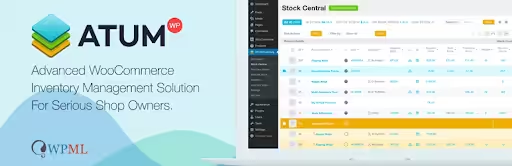
ATUM is one of those plugins that just… feels right. It’s free to start with and is a highly extensible stock-control suite that lives inside your WordPress webstore.
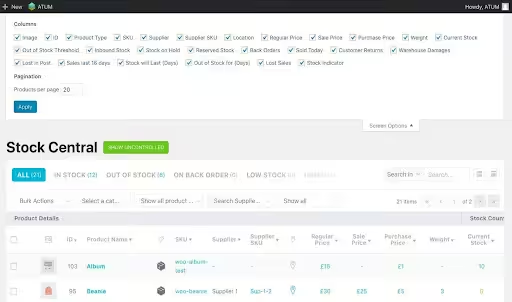
It’s a spreadsheet-style view that lets you see everything at a glance. It’s like having a super-powered Excel sheet right inside WordPress, but without all the problems of copy-pasting.
Source – WordPress.Org
💻 Detailed Features
- Stock Central: A dashboard with widgets for total stock value, SKU alerts, supplier overview, and location breakdown. Simply say, it offers a centralized, searchable, and editable dashboard.
- Advanced Filters: Query by SKU, supplier, barcode, weight, and location.
- Action Logs Add-On: Allows you to track every stock change – manual edits, orders, and refunds.
- Export/Import: XML, CSV, JSON, you can schedule exports or do it manually.
- REST API: CRUD endpoints for products, inventory levels, and locations.
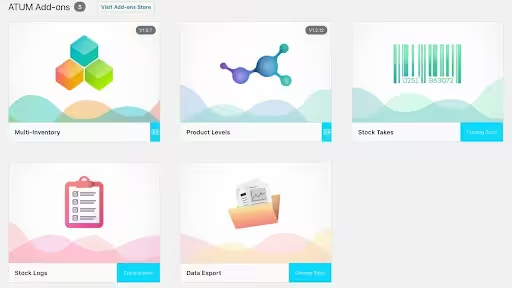
- Multi-Location Ready: With the usage of the right add-on, it becomes a solid WooCommerce multi-location inventory management tool.
Source – WordPress.Org
💻 Pros
- Zero cost for core plugin – perfect for small stores.
- Modular: Add only what you need (e.g., BOM, purchase orders, etc).
- Familiar UI: Seamless WordPress integration with drag-and-drop widgets.
💻 Cons
- Feature fragmentation: BOM, multi-location, POs require paid premium add-ons.
- Learning curve: Powerful, but menus and options can overwhelm non-techie users.
- Performance: Large catalogs and many add-ons may slow down dashboards.
Source – WordPress.Org
💻 Best For
Stores want a native and free WooCommerce solution that they can expand over time with several add-on features. This plugin will provide you with control without technical complexity.
💻 Pricing
- Core plugin: Free. Yes! The money saver 💰💰.
- Premium Add-Ons: Varies depending upon the add-on and payment option selected.
👉 Multi Inventory Management for WooCommerce
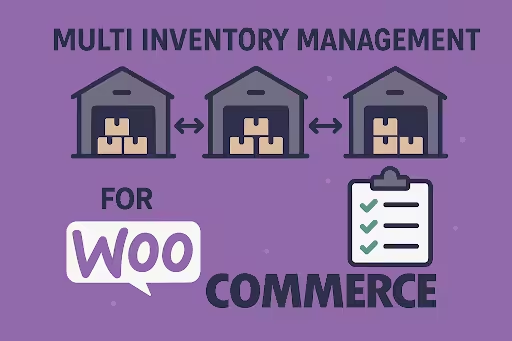
This plugin allows you to centralize your product stock across unlimited warehouses, tailored to solve the multi-location inventory chaos.
🗣️ Detailed Features
- Unlimited Locations: Add as many warehouses, drop-ships, or retail outlets as needed, making it particularly useful if you are running a business from a large number of stores.
- Per-Location Stock Levels: Allows you to set independent inventory counts; auto-deduct from the correct site to avoid errors.
- Order Routing: Allows you to set rules for shipping from the nearest or priority warehouse.
- Location Assignment UI: Bulk assign products to sites via checkboxes or CSV.
- Import / Export Stock for Inventories: You can use a CSV file to import stock quantities in bulk for various inventories rather than adding stock for each product.
- Smart Inventory Management Grid: From a single listing page, see and update the entire catalog’s stock with efficiency.
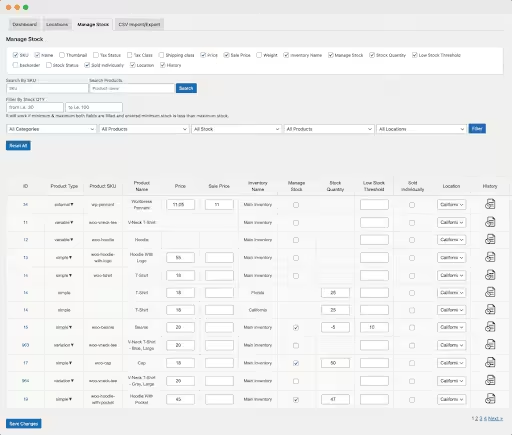
Source – WooCommerce.com
🗣️ Pros
- True multi-location: No hacks; stock is segregated and summed only where you choose to do so in your store. This allows multi-location inventory check at its best.
- Order precision: Minimizes shipping errors by auto-selecting the order fulfillment points.
- User-friendly: Clean, tabbed interface for each product warehouse to avoid confusion.
🗣️ Cons
- Reporting gaps: Detailed multi-location analytics behind a paywall.
- Theme/plugin conflicts: Occasional JavaScript clashes needing developer tweaks.
- UI simplicity: Too minimal for advanced forecasting needs.
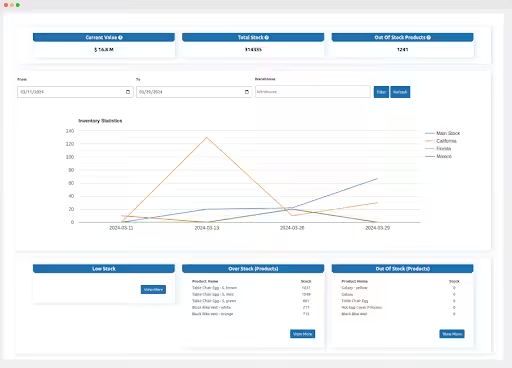
Source – WooCommerce.com
🗣️ Best For
Retailers or brands with multiple fulfillment points that require clarity on per-site stock availability without error.
🗣️ Pricing For a 1-year plan, you will have to shell out $129/year 💵💵. You can save when you are buying a 2-year plan. Considering long-term business goals, 2 years can be a good option.
👉 Smart Manager for WooCommerce
Think of Smart Manager as the ultimate time-saver. If you find yourself constantly clicking through individual product pages to make changes, this plugin is for you.
It turns your WooCommerce dashboard into a live, editable spreadsheet-style powerhouse for bulk editing everything – inventory, orders, customers, posts, etc.
It’s fantastic for making quick, large-scale changes, and hence suitable whether you are running a small webstore or a large one with thousands of SKUs.

Source – WordPress.Org
🔌 Detailed Features
- Live Spreadsheet: View and manage all your store data in one place.
- Grid UI: Allows infinite scroll, inline editing of stock, price, backorders, and attributes.
- Quick Filters: Combine SKU, stock status, price range, category, and custom fields.
- Scheduled Updates: Queue bulk changes to run off-peak.
- Customizable Columns: Show/hide any product-related field; save presets.
- Inline Editing: Change stock, prices, and more without leaving the page.
- Multi-location Support: With their extensions, it works well as a WooCommerce inventory management solution for businesses with multiple storage spots.
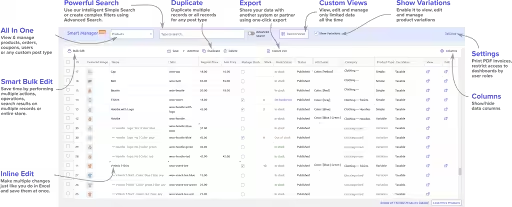
Source – WordPress.Org
🔌 Pros
- Speed: Bulk edit thousands of SKUs in seconds vs. manual product screens.
- Familiarity: You will feel like working in MS-Excel – lower training friction.
- Extensible: Works with subscriptions, bundles, and custom-field plugins.
- Manage Roles: Allows you to manage different WordPress user roles. You can change roles, assign different passwords, etc.
🔌 Cons
- Order & Customer Bulk: This feature is available only in the Pro tier.
- Pagination Lags: Very large catalogs (>10K SKUs) can sometimes stutter.
- UI clutter: Having too many columns can overwhelm if not properly pruned.
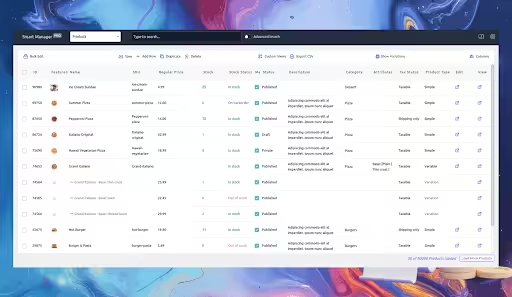
Source – Storeapps.Org
🔌 Best For
High-SKU stores require lightning-fast, in-dashboard inventory and attribute updates. Basically, if you are a store owner who loves data in spreadsheets, this is the right tool for you.
🔌 Pricing
- Core version: Free. Yes! You heard it right.
- Pro version: You will have to pay $199/year for 1 site and $249/year for 5 websites.
👉 Stock Sync for WooCommerce
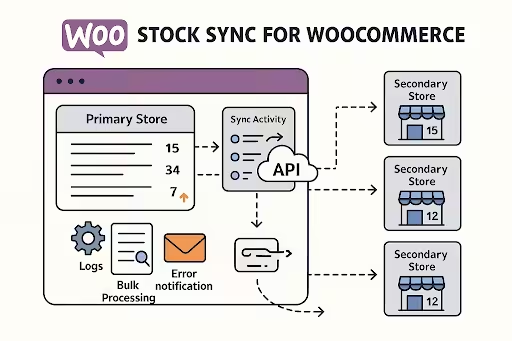
This plugin is pretty cool if you’re trying to keep stock levels updated across multiple WooCommerce stores or, more commonly, a WooCommerce store and a physical POS system.
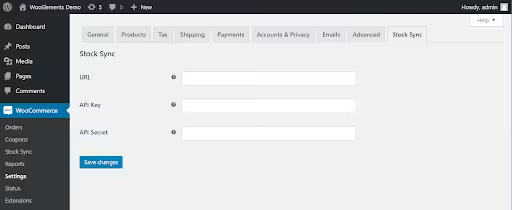
It’s a lifesaver for businesses that have their inventory data in a different system and need to regularly update their online store. It uses WooCommerce’s built-in API to communicate between stores.
📎 Detailed Features
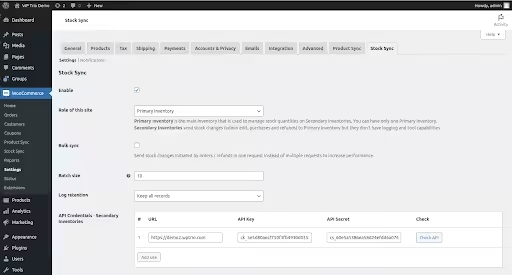
- Primary & Secondary Stores: Designate one hub; up to 10 spokes in Pro.
- Real-Time Sync: On purchase, refund, and manual edit in different stores.
- Batch Push: One-click “sync all” for full resets.
- Sync Reports: View logs by SKU, site, order ID; filter errors.
- Bidirectional Sync: Syncs stock between WooCommerce and external data sources (like Google Sheets or CSV, etc).
Source – WPTrio.com
📎 Pros
- Prevents oversells: Keeps every storefront honest in terms of inventory availability.
- Secure: Use of WooCommerce REST API with OAuth keys ensures data security.
- Background jobs: Run in the background with minimal impact on the front-end performance of your store.
📎 Cons
- Free cap: Only 100 products and 2 stores in the free version.
- Setup complexity: Multi-site networks require network activation and keys.
- Minimal UI: Basic reporting; does not provide a full dashboard like other plugins.
Source – WordPress.Org
📎 Best For
Multi-site networks or shops running parallel WooCommerce installs and needing one-to-many stock consistency. This is more suitable if you are into trading and want to link your store to suppliers’ ERPs.
📎 Pricing
- Free version: 2 stores and 100 products.
- Pro version: $89 per year for 1 site. The best part – 3030-day money-back guarantee.
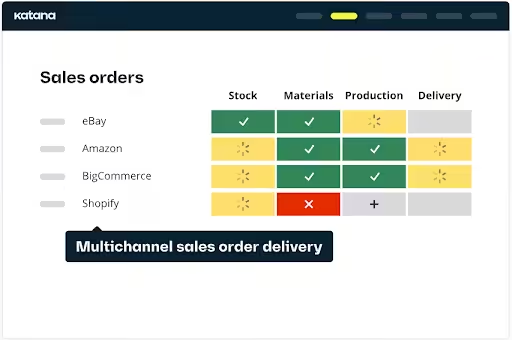
👉 Katana MRP
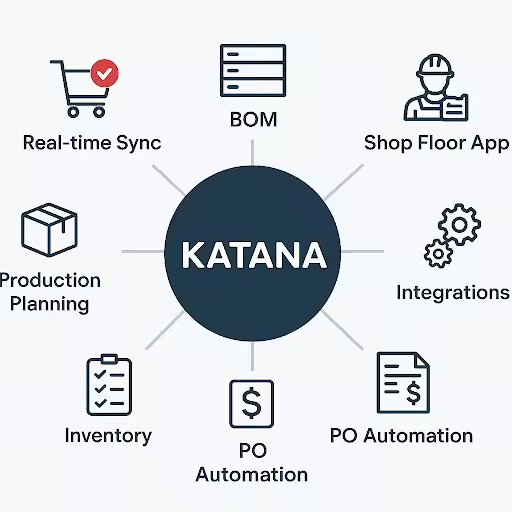
Katana is a bit different from other plugins. It’s an inventory management solution with a specific focus on manufacturers. If you are a business owner who manufactures its own products and needs to manage raw materials, production schedules, and finished goods, Katana is the perfect tool for you.
While its power to sync with WooCommerce makes it a useful tool, its real power lies in managing the entire production workflow.
🖇️ Detailed Features
- Real-time Inventory Sync: Bi-directional sync between WooCommerce and Katana with automatic stock updates.
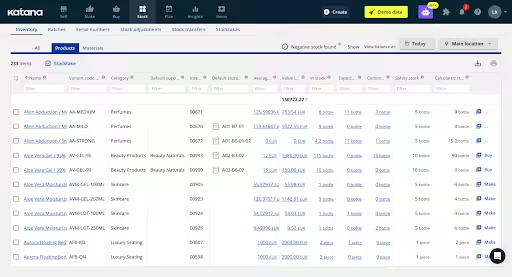
- Raw Material Management: Track raw materials, work-in-progress (WIP), and finished goods separately.
- Bill of Materials (BOM): Create and store detailed BOMs with automatic material allocation to production orders.
- Production Scheduling: Visual, drag-and-drop production planning with real-time shop floor tracking.
- Multi-location Support: Track inventory across multiple warehouses and production facilities.
- Shop Floor App: Mobile app for task management, barcode scanning, and real-time production updates.
- Serial/Batch Tracking: Full traceability from raw materials to finished products.
Source – Katnamrp.com
🖇️ Pros
- Manufacturing Focus: Specifically designed for businesses that manufacture their own products.
- Real-time Visibility: Live production tracking and inventory updates across all sales channels.
- Seamless Integration: Native WooCommerce connector imports orders automatically.
- Visual Interface: Intuitive, drag-and-drop interface for production planning.
- Comprehensive Tracking: Handles raw materials, WIP, and finished goods in one system.
- Excellent Support: Responsive customer service with quick response times.
🖇️ Cons
- High Cost: Standard plan starting at $359/month, plus potential onboarding fees.
- Manufacturing-Only: Overkill for simple retailers who don’t manufacture products.
- Learning Curve: Complex setup requiring understanding of manufacturing workflows.
- Feature Limitations: Some advanced features are limited to higher-tier plans.
- No Historical Data: Limited ability to merge customers or pull historical order data.
Source – Katnamrp.com
🖇️ Best For
Manufacturers who make their own products need to track raw materials, production schedules, and WooCommerce multi-location inventory management across multiple facilities.
🖇️ Pricing
- Starter: Free (up to 30 SKUs and 3 inventory locations)
- Standard: $359/month (when billed annually)
- Professional: $799/month (when billed annually)
- Professional Plus: Customized plan and pricing (upwards of $1000/month).
👉 Zoho Inventory Integration by WP Swings
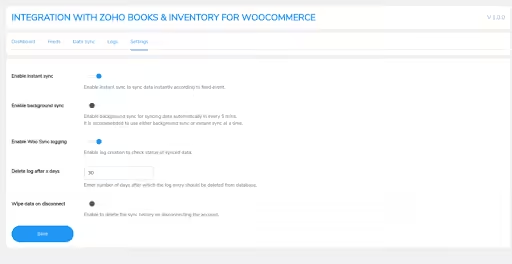
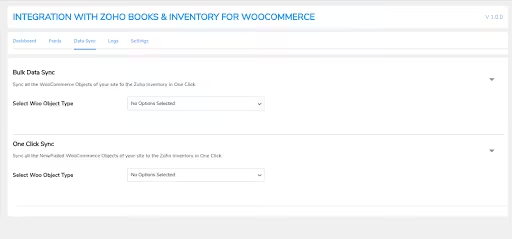
This plugin offers a bi-directional seamless connection of WooCommerce with Zoho, enabling real-time two-way sync for products, orders, customers, and more. It automates inventory updates, supports bulk/manual sync, logs activity, and ensures smooth performance for your WooCommerce business.

Source – Wpswings.com
📱 Detailed Features
- Feed Builder: Map WooCommerce objects (products, customers, orders) to Zoho modules.
- Sync Modes: You can do the syncing manually, schedule it for later, or do it in real-time.
- Selective Sync: Allows you to filter by category, tag, and SKU range.
- Error Logs: Detailed reports with retry options.
- Order Status Auto-Sync: Automatically syncs WooCommerce order status changes to Zoho
Source – WooCommerce.com
📱 Pros
- Comprehensive Sync Capabilities: Two-way syncing across multiple objects (products, orders, coupons) offers robust automation.
- Custom Feed Support: Tailor synchronization to custom Zoho objects via feeds for flexible workflows.
- Performance-Friendly: Background cron sync and log auto-cleanup help maintain efficient site performance.
- Fully Supported: Includes year-long support, a money-back guarantee, and is compatible with WooCommerce’s advanced HPOS framework.
📱 Cons
- Zoho Subscription is separately required at $299/month+.
- No Dual Integration: You can connect WooCommerce with either Zoho Books or Zoho Inventory – but not both simultaneously.
- Initial Setup: Mapping feeds can take hours to perfect.
- Steep Learning Curve: Zoho’s UI and terminology differ from WooCommerce.
Source – WooCommerce.com
📱 Best For
Small to medium-sized WooCommerce stores need seamless, real-time inventory, order, and contact sync with Zoho.
📱 Pricing
$99 per year for 1 site plan and $409 per year for 10 sites. The company generally offers a 10 – 15% discount on purchases. A Zoho subscription will cost you an additional $299+ per month.
👉 ATUM Multi-Inventory Add-On
This add-on enhances WooCommerce by enabling multiple stock records per product – perfect for managing various warehouses, suppliers, batch codes, and regional restrictions.
With batch tracking, FIFO/LIFO selling priorities, inventory iteration, expirable items, and region-based control, it brings powerful WooCommerce inventory management to ATUM’s free core.

Source – Stockmanagementlabs.com
🛒 Detailed Features
- Per-Inventory SKUs: Assign unique SKUs to each inventory and track them separately.
- Combined Reporting: Aggregates across inventories with drill-downs.
- Inventory Selling Priorities: Use a drag-and-drop interface to set selling priority – FIFO, LIFO, by expiry date, or custom ordering.
- Location Widgets: Add warehouses to the Stock Central dashboard.
- Sync with BOM: Works alongside the Product Levels add-on.
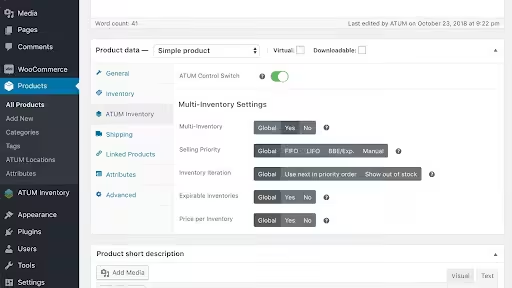
Source – Stockmanagementlabs.com
🛒 Pros
- Seamless UI: Native ATUM extension, no separate menus.
- Regional Restrictions: You can put region-wise restrictions on your inventory. This will ensure that customers only see the inventory and their prices as per their location.
- Unlimited profiles: Each product can have dozens of location records.
- Deep reporting: Breakdowns by site, month, supplier.
- Inventory Selling Priority: Selling priority and iteration automation will improve the order fulfillment efficiency.
- Expiry Details: Batch and expiration features help ensure product quality and better compliance.
🛒 Cons
- Requires ATUM core plus any other add-ons you need – cost adds up.
- Complexity: Non-technical users may struggle with the multiple SKU logic.
- Performance Issues: User reports have flagged performance problems, bugs, and unreliable bulk imports/exports.

Source – Stockmanagementlabs.com
🛒 Best For
WooCommerce ATUM users who need more than “one pool of stock” – true per-warehouse WooCommerce inventory management.
🛒 Pricing
$216 per year for 1 license and goes all the way to $812 per year for 5 licenses.
👉 WooCommerce Stock Manager
The Store Manager for WooCommerce is a standalone desktop solution by Store Apps tailored for powerful store administration. It streamlines bulk content management – products, orders, categories, inventory – and includes POS features, barcode scanning, and diagnostics.
Ideal for busy store managers, it simplifies complex workflows with a fast, desktop-driven interface.
Source – WordPress.org
🛍️ Detailed Features
- Bulk Product & Category Management: Allows you to create, edit, assign categories, and manage media efficiently.
- Front-end Pop-Up Editor: Edit key fields without page reloads.
- Color-Coded Buttons: Red for out-of-stock, yellow for low-stock, green for in-stock.
- Advanced Export/Import: Support for CSV/XML/XLS imports, HTTP/FTP source files, on-the-fly data mapping, and multi-source integration. You can bulk edit data offline.
- Variable Product Support: Edit each variation’s stock and backorder settings.
- Management Features: User roles, access control, advanced search filters, export/import for orders, coupons, and POS-enabled order creation.
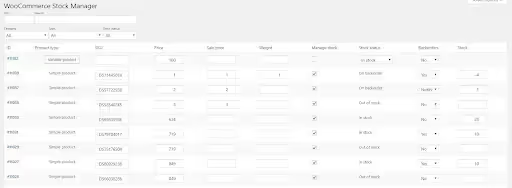
Source – WordPress.org
🛍️ Pros
- Completely free: Yes, there are no upsell nags.
- POS Capabilities: Seamless integration with barcode scanners and receipt printing bridges in-store/offline sales.
- Inline convenience: Pop-up editor avoids diving into product pages.
- Variable-friendly: Handles complex product types with ease.
- Highly Efficient Bulk Management: Speeds up large-scale product and order updates dramatically.
🛍️ Cons
- Minimal analytics: No low-stock alerts or multi-channel sync.
- Basic UI: The Table can feel cramped with many products.
- No automation: Manual edits only.
- Windows Only: Exclusive to the Windows platform – no macOS or browser version.

Source – Storeapps.org
🛍️ Best For
More useful for bootstrapped businesses or side-hustle shops needing a quick, zero-cost stock table upgrade.
🛍️ Pricing
Free for life! 😀
👉 QuickBooks Commerce Integration
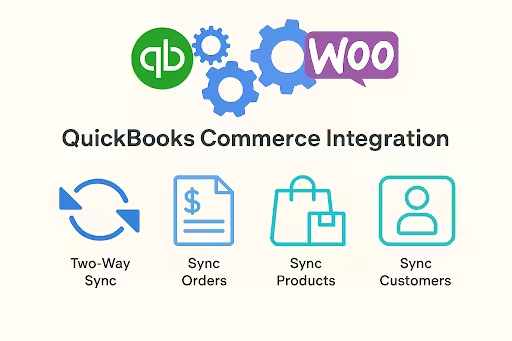
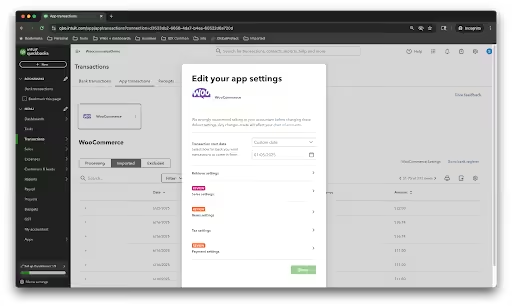
If your WooCommerce store and QuickBooks feel like ships passing in the night, this plugin acts like a traffic controller – smoothing orders, customers, inventory, and payment data back and forth. This tool is a breath of fresh air if you’re someone who is trying to keep online sales and accounting in sync without manual work.
Formerly known as TradeGecko, this plugin offers enterprise-grade sync for WooCommerce ↔ QuickBooks Commerce.
🚀 Detailed Features
- Two-Way Stock Sync: Updates from orders, manual adjustments, or POs in QB Commerce.
- Purchase Order Automation: Auto-generate POs when stock dips below the reorder point.
- Feature-rich Compatibility: works with WooCommerce Subscriptions, multilingual setups, POS plugins, custom order statuses, etc.
- Multi-Warehouse: Real-time stock across physical and 3PL locations.
- Demand Forecasting: AI-driven reorder recommendations by SKU.
- Multi-Currency and Global Reach: Supports stores in the US, UK, Australia, India, and beyond.

Source – WooCommerce.com
🚀 Pros
- Advanced forecasting: Predict stock needs weeks ahead.
- Reliable and Real-Time Automation: Keeps WooCommerce and QuickBooks continuously aligned.
- Accounting synergy: Tight QuickBooks Online link.
- PO workflows: Built-in vendor management, approvals.
- Self-Contained and Secure: Data stays within your site, helping with privacy concerns.
🚀 Cons
- High cost: QuickBooks plans start at $38 per month for 1 user and go all the way to $275 per month for the advanced version.
- Steep learning: QuickBooks Enterprise features require training the staff to use them.
- Less frequent updates: Believe it or not, some users mention the official WooCommerce-by-Intuit connector can feel buggy or limited.
Source – Quickbooks.intuit.com
🚀 Best For
Small to mid-sized stores that want straightforward, reliable inventory management, WooCommercesyncsc with QuickBooks Online.
🚀 Pricing
- WooCommerce Connector by Intuit is free but lacks advanced features and is less reliable.
- QuickBooks Integration for WooCommerce by WP Swings is available at $99 per year.
- QuickBooks Cost: QuickBooks plans start at $38 per month for 1 user and go all the way to $275 per month for the advanced version.
👉 Cin7 Inventory Connector
Think of the Cin7 Inventory Connector plugin as the brain syncing WooCommerce to your Cin7 system. It keeps your orders, inventory status, customer records, and product updates flowing smoothly—real-time, multi-channel aware, and frictionless.
It’s not for tiny side gigs, but if your store’s getting serious, it’s the kind of tool you don’t want to live without.
Source – Cin7.com
🪙 Detailed Features
- Seamless WooCommerce-Cin7 Sync: Orders, stock levels, products, customer data, and fulfillment updates flow bi-directionally in real time (or nearly real-time) – no manual copy-pasting required.
- OAuth & API: Flexible connection methods per store.
- Backorder and Coupon Syncing: Manage backorders effectively during stockouts and sync existing promotions and discounts for consistent pricing across channels.
- Warehouse Routing: The connector routes orders to the optimal warehouse or location based on rules like proximity or stock availability.
- Custom Metadata: Map any WooCommerce field to Cin7 shipments.

Source – Cin7.com
🪙 Pros
- Wholesale & EDI: Offers built-in portals, barcode scanners, and B2B workflows.
- Highly Automated Workflows: Stock adjustments, order routing, and fulfillment tasks run automatically – minimal manual grunt work.
- Real-Time Stock: Accurate availability across all sales channels.
- Unified Multichannel Visibility: WooCommerce becomes another dashboard within Cin7 – easy to monitor and manage alongside Amazon, Shopify, etc.
- Channel Agnostic: Works with POS, marketplaces, and Woo.
- Scalable for Growth: Built for complexity – it can handle multi-location inventories, warehouses, and multiple storefronts from a single system.
🪙 Cons
- Expensive: Plans start at $349/month + taxes – plus hidden implementation fees.
- Connector Fee: $299 per year in addition to the above fee.
- Complex Setup and Support Issues: Reported struggles during onboarding, buggy integrations, and less-than-stellar customer support.
- Customization Costs Add Up: Deep customization – like specific EDI or fulfillment workflows – can trigger extra charges.
🪙 Best For
Medium to large eCommerce businesses in WooCommerce running multiple sales channels (WooCommerce, marketplaces, wholesale, retail) with a need for synchronized inventory and complex fulfillment logic.
🪙 Pricing
- $299 per year for the connector
- Cin7 Core starts at $349 per month + taxes, with more advanced tiers going up to USD 999/month + taxes.
- Cin7 Omni is fully customizable, and hence, the price will depend on your requirements.
WooCommerce Inventory Management Plugins: Comparison
To help with your decision-making, we have created a summary of the various plugins/tools.
| Plugin / Tool | Multi-Locations | Alerts / Reports | Pricing |
| ATUM Inventory Management | Via add-on | Yes | Free Core Plugin + Premium Add-on |
| Multi Inventory Management for WooCommerce | Yes | Basic | $129 per year /Discount on 2-year plan |
| Smart Manager | Yes | Basic | Free for Core Version /Pro starts at $199 per year for 1 website |
| Stock Sync | No | Basic | Free version for 2 stores with 100 products / Pro version at $89 per year for 1 site |
| Katana MRP | Yes | Advanced support | Starter – Free. Goes up to $799 per month for the Professional plan. |
| Zoho Inventory Integration | No | Detailed | $99 per year for 1 website + Zoho $299+ per month for Zoho Subscription |
| ATUM Multi-Inventory Add-On | Yes | Via ATUM | $216 per year for 1 license and $812 per year for 5 licenses |
| WooCommerce Stock Manager | No | None | Free |
| QuickBooks Commerce Integration | Yes | Advanced | WooCommerce Connector by Intuit – Free / QuickBooks Integration for WooCommerce – $99 per year + QuickBooks starts at $38 per month for the basic version. |
| Cin7 Inventory Connector | Yes | Advanced | $299 per year for Connector Fee + Cin7 plans starting at $349+taxes per month. |
Conclusion
There’s no one-size-fits-all when it comes to WooCommerce inventory management. Some tools are sleek and simple. Others are beasts – powerful but complex. The right choice depends on your WooCommerce store’s requirements, the size, structure, and how much control you want.
Your ideal plugin should depend on various requirements:
- Small shops: ATUM core or WooCommerce Stock Manager keeps things simple.
- Multiple sites/warehouses: Multi-Inventory or ATUM Multi-Inventory delivers true per-location control.
- High-SKU needs: Smart Manager for lightning bulk edits.
- Multi-channel: Stock Sync or enterprise integrations like QuickBooks Commerce.
- Accounting tie-in: Zoho Inventory Integration or QuickBooks Commerce Integrations unify inventory with finances.
- Wholesale/distribution: Cin7 for EDI, portals, and multi-channel dispatch.
Compare the features, learning curve, and total cost before deep diving and buying any plugin for your WooCommerce multi-location inventory management needs. Remember! There’s no perfect plugin – only the one that makes your days smoother and nights less sleepless.
Frequently Asked Questions
❓ Are there free options for basic stock control?
Yes! Plugins and tools like ATUM core, Smart Manager (free), Stock Sync (basic), and Store Manager for WooCommerce are all available to you at zero cost.
❓ How do I prevent overselling on marketplaces?
Stock Sync in real time across WooCommerce stores or make use of enterprise tools like QuickBooks Commerce Integrations to ensure real-time matched of stock.
❓ Which plugin handles WooCommerce multi-location inventory management best?
Multi Inventory Management for WooCommerce, ATUM Multi-Inventory Add-On, and Katana MRP all excel for true per-warehouse control, with Katana offering the most comprehensive manufacturing-focused solution.
❓ Can I sync WooCommerce with accounting software?
Absolutely, Yes! You can make use of Zoho Inventory Integration or QuickBooks Commerce Integrations. These tools/plugins offer two-way sync between your WooCommerce store and accounting data in real time.
❓ Which tool offers the best forecasting?
QuickBooks Commerce Integrations, Cin7, and Katana MRP provide advanced demand forecasting and reorder suggestions, with Katana focusing specifically on manufacturing needs.