
Hey there, fellow coder! Have you ever been in the zone, typing away, feeling like a programming god, only to be brought crashing down to earth by a big, scary “fatal error” message in your JavaScript console? We’ve all been there. But don’t you worry! Those “fatal errors” aren’t as fatal as they sound.
A website with lesser number of script errors ensures a higher ranking of your website across the search engines.
In this guide, we will help you provide a comprehensive approach to identify the various reasons causing such errors, steps to troubleshoot, and fix the JavaScript fatal errors. Additionally, we will also help you with the tools and techniques for debugging the JavaScript code effectively.

Understanding JavaScript Fatal Errors
A fatal error in JavaScript is an error that causes the script or web application to stop executing. Unlike minor warnings or non-critical errors that might let your code continue running (albeit with some issues), fatal errors bring everything to a grinding halt.
When a JavaScript fatal error occurs, you’ll typically see random numbers and letters displayed on your screen, indicating that the JavaScript has crashed.
These errors can arise due to a variety of reasons, including but not limited to syntax mistakes, runtime errors, and logical flaws in the coding. Therefore, understanding the type of error and its causes will help you save a lot of time and get your web application up and running in no time.
Before we help you with the solutions to JavaScript Fatal Errors, let’s first have a deep dive into the different types of fatal JavaScript errors with examples.
Related Read: Your Guide to Decoding JavaScript Heap Memory Errors
Common Types of Fatal JavaScript Errors
- Syntax Errors
Syntax errors occur when the code violates the JavaScript language’s syntax rules. These errors are typically caught by the browser or development environment and are reported with specific error messages.
Common examples of syntax errors include the following –
- Missing or mismatched brackets or parentheses
- Missing semicolons or quotes
- Incorrect use of reserved keywords
Example of a Syntax Error:

- Type Error
This error occurs when you attempt to use a method that is not available in your script or is not accessible in the current context. It often arises due to typos or incorrect use of keywords.
Example of Type Error:

- Reference Error
This error happens when you try to access a variable that is not defined in the current scope of the JavaScript code.
Example of Reference Error:

- Internal Error
These errors happen when the JavaScript engine runs into an internal problem. This generally happens due to excessive recursion or memory issues.
Example of Internal Error:
// Too much recursion
function recurse() {
recurse();
}
recurse();
- Null and Undefined Property Access
For a business application, one of the most notorious causes of JavaScript fatal errors is attempting to access properties or methods on null or undefined values. This error accounts for a significant portion of production JavaScript failures and can turn out to be particularly frustrating to debug. The error typically manifests as “Cannot read properties of null” or “Cannot read properties of undefined”.

Suggested Read: Comprehensive Guide to Resolve WordPress Fatal Errors
Common Causes of JavaScript Fatal Errors
- Incorrect Feature Implementation – It is considered the top reason for fatal errors in JavaScript. This error happens when the code doesn’t do what it’s supposed to—even if the developer thinks it should. This is because maybe the logic is off, or a function is used incorrectly. These mistakes account for nearly half of all JavaScript bugs and can cause entire features or even the whole app to crash unexpectedly.
- Undefined Variables and Methods – One of the most frequent culprits for fatal errors in JavaScript is trying to access variables or call methods that don’t exist. It’s like trying to open a door that isn’t there – your code crashes into a wall.

- General Programming Mistakes – Simple errors during coding, such as typos, wrong variable names, or logic mistakes, are a common source of JavaScript Fatal Error. While less common than the issue above, they still happen often enough to cause trouble, especially in a language as flexible as JavaScript.
- Logical Errors – Logical errors are flaws in the code’s logic that do not prevent the code from running but lead to unexpected behavior. In simpler words, the program you developed is running successfully but does not give the intended results. These errors can be very challenging to identify and may require careful debugging.
- DOM Manipulation Errors – These errors account for 68% of the top 10 JavaScript errors globally. Such errors occur when you try to manipulate the HTML elements that don’t exist or haven’t loaded yet.

- Outdated Libraries – Using outdated versions of libraries or frameworks in your code.
- Infinite Loops and Stack Overflow – If a function keeps calling itself without a way to stop, or if you accidentally create a loop that never ends, JavaScript will eventually throw a stack overflow or internal error. This is common with recursive functions that lack a proper exit condition.
- Cross-Browser Compatibility Issues – Sometimes, the code used for your web application might not be compatible with all the browsers commonly used by the targeted audience. This is why cross-browser testing is important, especially for public-facing web applications.
- Corrupted or Unexpected Data – If your code expects data in a certain format but gets something else, say a huge file, malformed JSON, or corrupted input. In that case, it can cause fatal errors in JavaScript, especially during memory allocation or parsing.
Troubleshooting Steps to Fix Fatal JavaScript Errors
- Identify and Analyze the Error
Use the web browser’s developer tools and inspect the console for any error messages. You can access the developer tools in your Chrome web browser through View > Developer > Developer Tools.
The console can help you with valuable information about various JavaScript errors and their locations in the code. You can make use of console.log() to print variables and track the flow of your code.
Once you get the error message, check for the error type and its location. If the error is new, directly review recent code changes to pinpoint the cause.
- Use Try-Catch-Finally Approach
Through this approach, instead of allowing the errors to crash the entire application, you catch them and handle them appropriately.

- Check for Syntax Errors
Syntax errors are the most common type of JavaScript error. Use a code editor with syntax highlighting to identify and fix these errors.

You can make use of online tools like ESLint to help you catch syntax errors in coding early.
- Check for Missing Dependencies
Ensure that all required libraries and modules are included in your coding project. Missing dependencies in JavaScript can cause fatal errors.

You can make use of package managers like npm or Yarn to manage and identify the missing dependencies.
- Update Libraries and Frameworks
Outdated libraries can cause compatibility issues and errors. Regularly update your libraries and frameworks to the latest versions. Check the documentation for any breaking changes in order to update your code.
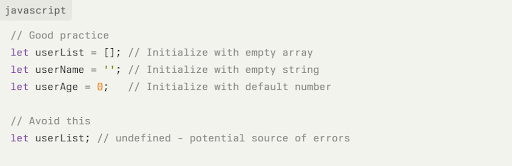
- Proper Variable Initialization
Always initialize your variables with default values. This is like making sure you have gas in your car before starting a road trip.
- Clear Cache and Cookies
Sometimes, cached files can cause issues. Clear your browser’s cache and cookies to ensure that you are loading the latest version of your code.
- Open your web browser’s settings.
- Navigate to the privacy or history section in the settings.
- Clear the cache and cookies (different time zone options available).
- Check Browser Compatibility
Ensure that your code is compatible with all the targeted web browsers, working on desktop as well as handheld devices. You can make use of feature detection and polyfills to check the browser compatibility.

You can also use tools like BrowserStack to test your code across different browsers.
- Review Network Requests
Network issues can cause JavaScript errors, especially when working with APIs. Use the Network tab in the developer tools to inspect network requests and responses.
- Open the developer tools (F12 or right-click > Inspect).
- Click on the Network tab.
- Make the API request and inspect the request and response details.
- Use a Linter
Linters like ESLint can help identify potential issues in your code. They enforce coding standards and catch errors early in the web development process.
Advanced Steps to Troubleshoot the Fatal Errors in JavaScript
- Memory Leaks
Memory leaks can cause performance issues and crashes. Use tools like Chrome DevTools to monitor memory usage and identify leaks. Look for detached DOM nodes and unclosed event listeners.
- Concurrency Issues
JavaScript is single-threaded, but asynchronous operations can lead to concurrency issues. Use promises and async/await to manage asynchronous code effectively. Also, make use of modern JavaScript features to avoid callback hell.
- Third-Party Scripts
Third-party scripts can introduce errors and conflicts. Ensure that these scripts are loaded correctly and do not interfere with your code. You can make use of tools like Sentry to monitor and track errors from third-party scripts.
Tools for Debugging JavaScript
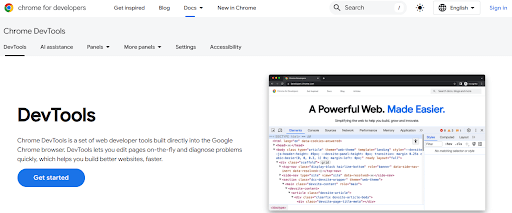
- Browser Developer Tools – Chrome DevTools and Firefox Developer Edition etc.
- IDE – Visual Studio Code and IntelliJ IDEA, etc.

- Debugging Extensions – LT Debug by LambdaTest and JavaScript Debugger by Microsoft

- Testing Frameworks – Jest and Mocha, etc.

Best Practices to Avoid Future JavaScript Fatal Errors
There is a common saying – Prevention is better than a cure! We have listed some best strategies for your business to mitigate the recurrence risk of such JavaScript Fatal Error:
- Make use of Strict Code – You should enable strict mode to catch common coding mistakes early.

- Make use of clean and descriptive code – Always make use of meaningful variable names and keep your functions focused on single tasks.

Don’t forget to regularly review code to catch syntax and logical errors before they make the web application non-functional.
- Automated Testing – Use unit tests to validate code functionality on a regular basis. You can make use of tools like Jest and Cypress to help you automate this process.

- Error Logging – Implement logging to track different errors to help with debugging.

- Code Organization – Keep code modular and well-organized to reduce complexity and make identification of errors easier.
People Also Read: How To Prevent TLS Client Credential Fatal Error in Your System
Conclusion
Fixing JavaScript fatal errors might sound like a challenging and intimidating task. However, you can manage these errors with the right approach or can hire WordPress experts.
Just remember the following key action points, and you can resolve this error quickly:
- Understanding is the first step – Understand different types of errors and their common causes. This knowledge will help you identify problems quickly and find the correct solutions.
- Prevention beats cure – Use defensive programming techniques, proper error handling, and regular testing.
- Always have a plan – Implement comprehensive error handling strategies including try-catch blocks, custom error types, and global error handlers.
- Monitor your business actively – Use error monitoring tools and logging to catch issues in production before they impact users significantly.
- Be a learner – JavaScript and web development evolve constantly. Stay updated with best practices and new debugging tools.
Don’t forget – The goal is not to eliminate all errors because that’s impossible. The objective is to simply handle them gracefully, learn from them, and create better user experiences. Every error is an opportunity to make your application more robust and user-friendly.
Frequently Asked Questions
A. Are there tools to help monitor JavaScript errors in production?
Yes, there are several tools that can monitor JavaScript errors in production environments, including Sentry, TrackJS, Rollbar, and Bugsnag. These tools will provide you with real-time error notifications, detailed stack traces, user impact analysis, and help you prioritize which errors to fix first.
B. What tools can help identify JavaScript errors?
Tools like ESLint can help identify syntax errors, while Chrome DevTools can be used for debugging and monitoring memory usage. Package managers like npm or Yarn can help manage dependencies.
C. What’s the difference between fatal and non-fatal JavaScript errors?
Fatal JavaScript errors will completely halt the script execution and prevent your application from functioning. On the other hand, non-fatal errors might generate warnings or cause minor issues, but they will allow the rest of your code to continue running.
Consequently, fatal errors in JavaScript will require immediate attention on your part, whereas non-fatal errors can often be addressed as part of the regular maintenance exercise.
D. What are memory leaks in JavaScript?
Memory leaks occur when memory that is no longer needed is not released. This can cause performance issues and crashes. Use tools like Chrome DevTools to monitor memory usage and identify leaks.
E. What is the role of try-catch blocks in JavaScript’s fatal error handling?
Try-catch blocks allow you to execute code and catch errors before they become fatal and help in handling such exceptions gracefully, thereby preventing application crashes.
This way, instead of crashing your entire business application, you can provide fallback behavior, show user-friendly messages, and log error details for debugging while keeping your application up and running for the users.
F. Can JavaScript fatal errors be prevented completely?
You might not be able to eliminate the fatal errors in JavaScript completely. However, you can significantly reduce such errors through defensive programming, proper error handling with try-catch blocks, regular testing, and code reviews.