You know, it’s a bit frustrating when you think about it – every single day, customers fill up their carts with products from your WooCommerce website, get excited about their purchase, and then… they just vanish. Gone. Like they never existed. According to recent studies, around 70% of online shopping carts are abandoned, which means you’re potentially losing 7 out of every 10 sales that seemed almost certain to happen.
But here’s the thing – and this might sound counterintuitive at first – cart abandonment isn’t necessarily a sign that something’s wrong with your store. It can be a combination of one or more reasons. People tend to get distracted easily, their phones ring, or they simply decide to think about buying it later and then forget about it. What’s important is – Are you doing anything to bring them back?
That’s where WooCommerce cart abandonment recovery plugins become absolutely crucial for your business. These tools can help you recover anywhere from 15% to 30% of those lost sales, which for most stores translates to significant additional revenue without spending a penny on new customer acquisition.
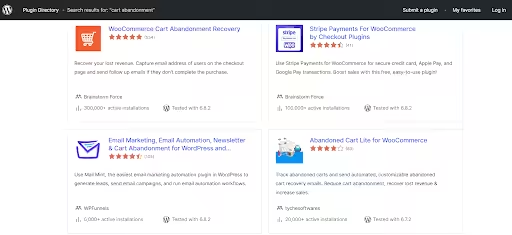
Source – WordPress.Org
Why Cart Abandonment Happens (And Why It’s Not Always Your Fault)
Before we dive into the plugins, let’s understand why customers abandon their carts. Research shows the most common reasons include unexpected shipping costs (48%), being forced to create an account (24%), slow delivery times (22%), and security concerns (18%). But honestly? Sometimes customers just get distracted or decide to do a comparison before payment, and that’s completely normal.
The key insight here is that many of these customers are still interested in purchasing your product or service. They’re not lost causes; they just need a gentle nudge at the right time with the right message.
Related Blog: 10 Proven Ways for Effective WooCommerce Abandoned Cart Recovery
Top WooCommerce cart abandonment recovery Plugins for 2025
👉 FunnelKit Automations – The All-in-One Winner
Our experts declare FunnelKit Automations the winner. And honestly, once you look at all the options, it will be an easy decision for you.
FunnelKit Automations isn’t just a WooCommerce abandoned cart recovery plugin – it’s a complete marketing automation platform that happens to excel at abandoned cart recovery. What will set it apart is the level of control it gives you over when and how to track the cart abandonment.
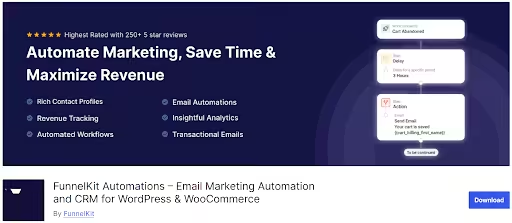
Source – WordPress.org
Key features of the plugin:
- Smart Cart Tracking: Captures carts for logged-in users immediately when products are added, not just at checkout.
- Dynamic Discount Coupons: Creates time-sensitive, unique discount codes automatically to create urgency and drive meaningful order conversions.
- Multi-step Email Sequences: Set up complex automation with 20+ rules and conditions.
- Canvas Mode: Visual workflow builder that lets you see your automation as you build it.
- Pre-built Templates: 20+ ready-to-use workflows including optimized cart recovery sequences.
- GDPR and Multilingual Support: Consent management, opt-ins, and seamless localization in 15+ languages.
- Advanced segmentation: Allows you to target users by cart value, items, user role, location, and more, for highly personalized outreach.
- A/B Testing: Experiment with subject lines, messages, and sending times to optimize for max recovery.
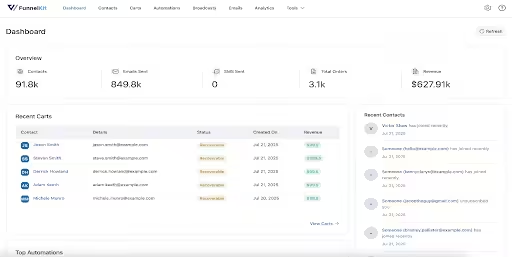
- Analytics and Customer Profiles: Performance dashboards show open/click rates, recovered revenue, and detailed user history in one place.
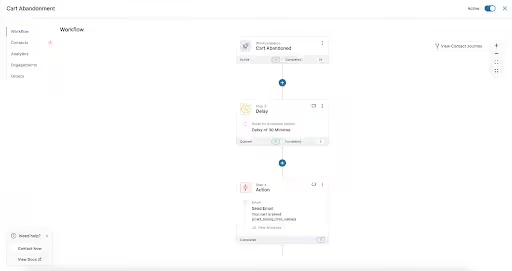
Source – WordPress.org
What’s particularly clever about FunnelKit is how it handles different scenarios. You can set up conditional automation based on cart value, customer type, or specific products. For instance, high-value carts might get a different email sequence than lower-value ones.
Pricing: Starts at $99.5/year for the Basic version, going all the way to $399.5/year for the Elite version.
Best For: WooCommerce store owners who want comprehensive marketing automation beyond just cart recovery.
👉 WooCommerce cart abandonment recovery (by CartFlows) – Best Free Option
Sometimes the best things in life really are free. The WooCommerce cart abandonment
recovery plugin by CartFlows is a completely free and surprisingly powerful tool.
This plugin does exactly what it says on the cover – it captures abandoned carts and sends automated follow-up emails to the customers. The beauty of this plugin lies in its simplicity and the fact that it costs absolutely nothing to your pockets.

Source – Cartflows.com
Key features of the plugin:
- Email Capture: Automatically records customer emails during the checkout process.
- Unique Checkout Links: Creates personalized links that return customers to pre-filled checkout pages.
- Customizable Templates: Ready-made email templates that you can adapt to your brand.
- GDPR Compliant: Includes privacy notices for checkout pages.
- Performance Tracking: Monitor recovery rates and revenue generated from returning customers, and abandonment rate reductio,n etc.
- Webhook and CRM Hooks: Allows you to send cart data to ActiveCampaign, HubSpot, and custom endpoints.
- Funnel Builder: Craft upsells, downsells, and post-purchase flows adjacent to the recovery.

Source – Cartflows.com
The plugin captures emails as soon as customers enter them on the checkout page, even if they don’t complete the purchase. It then waits for a specified time (default 15 minutes) before marking the cart as abandoned and triggering the email sequence.
Pricing: Free !! Yes. You heard it right.
Best For: Small businesses or stores just starting with cart recovery who want to test the waters without investment
👉 AutomateWoo – The Premium Powerhouse
AutomateWoo is like the Swiss Army knife of WooCommerce marketing automation. It’s been around for years and has a solid reputation among serious eCommerce businesses.
What makes AutomateWoo special is its session tracking technology that can detect returning registered users even when they’re not logged in. It also captures guest emails using pre-submit techniques, which means you can reach customers who haven’t even completed the checkout form.
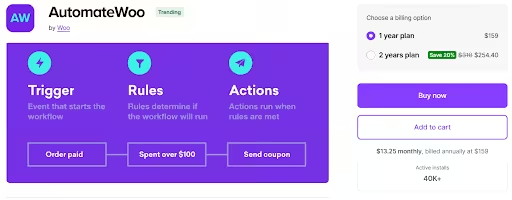
Source – WooCommerce.com
Key features of this plugin:
- Intelligent Session Tracking: Detects registered users even when they are not logged in.
- Pre-submit Email Capture: Captures guest emails before checkout completion.
- Unlimited Email Sending: No volume restrictions, unlike many SaaS solutions.
- SMS Integration: You can send SMS notifications via Twilio for multi-channel recovery campaigns.
- Personalized Coupons: Generate user-dynamic, time-limited discount codes automatically embedded in recovery emails.
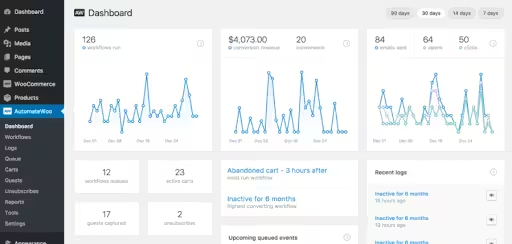
- Comprehensive Reporting: Track open rates, clicks, conversions, and revenue attribution with detailed reporting.
- WPML Support: Send multilingual abandoned cart emails for international stores.
- VIP Customer Automation: Reward high-value customers with special status based on their spending thresholds.
- Pre-Built Preset Workflows: Provides two ready-made abandoned cart sequences (4-hour and 12-hour delays) for instant deployment.
- Wishlist Marketing: You can send wishlist reminder emails and notify them when the wishlist product goes on sale. You can integrate this feature using WooCommerce Wishlists or YITH WooCommerce Wishlists.
- Refer A Friend: Allows you to boost referral sales by integrating with the AutomateWoo Refer A Friend Add-on.
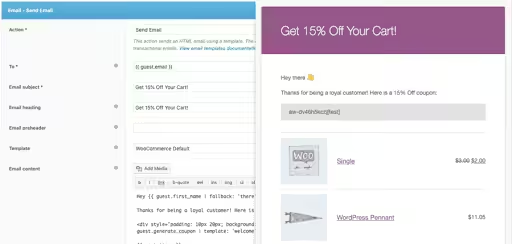
Source – WooCommerce.com
One particularly eye-catchy feature is that AutomateWoo workflows will only run once per cart, regardless of whether the customer returns and abandons again. This prevents email spam and also ensures customers still get reminded about their purchases.
Pricing: $159/year for 1-year plan and discounted $254.40 for 2-year plan.
Best For: Established stores that want professional-grade automation with detailed tracking
👉 Omnisend – Multi-Channel Champion
If you want to reach out to your customers across multiple channels, Omnisend might be your answer. This plugin is specifically designed for eCommerce and offers email, SMS, and push notifications all in one platform for WooCommerce abandoned cart recovery.
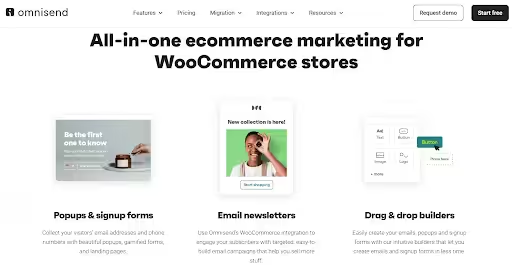
Source – Omnisend.com
Key features of the plugin:
- Multi-Channel Recovery: Sequence messages via email, SMS, push, and in-app notifications.
- Cookie-Based Tracking: Tracks website visitors before they enter email addresses.
- Pre-built Workflows: Ready-made abandoned cart sequences.
- Advanced Segmentation: Based on cart value, customer tags, or past purchase behavior, target different customer types with tailored messages.
- Dynamic Product Recommendations: Suggest related items to the visitors to increase AOV.
- A/B Testing and Analytics: Split-test subject lines, timing, and incentives. It also allows you to visualize the recovery rates by segment.
- GDPR and Privacy: The plugin offers built-in consent management, data retention controls, and double-opt-in flows to ensure GDPR compliance.
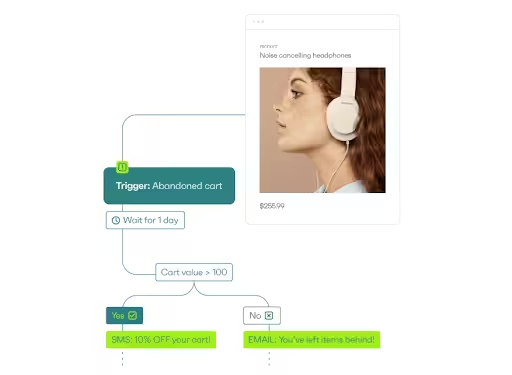
Source – Omnisend.com
Omnisend’s strength lies in its ability to reach customers through their preferred communication channel. The platform reports that automated messages have 52% better open rates and 332% higher click rates compared to regular campaigns.
Pricing: Free plan available. If you want advanced features, paid plans start at $11.20/month for the Standard version and go up to $41.30/month for the Pro version.
Best For: Stores that want to engage customers across multiple channels and have a budget for ongoing subscription fees.
👉 YITH WooCommerce Recover Abandoned Cart
YITH has excelled itself at creating quality WooCommerce plugins for years, and their WooCommerce abandoned cart recovery plugin is no exception. It focuses on recovering both abandoned carts and pending orders while being compliant with customer privacy.
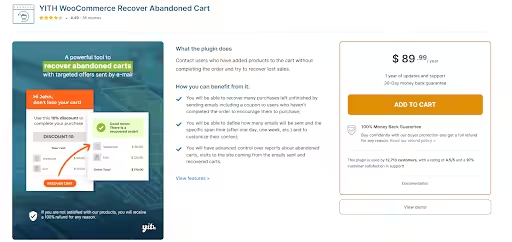
Source – Yithemes.com
Key features of the plugin:
- Dual Recovery System: Handles both abandoned carts and pending orders for your store.
- Guest Cart Recovery: Saves and recovers carts from non-registered users.
- Flexible Timing: You can configure when carts should be considered abandoned and when emails are sent to the customers. You can define up to five emails at custom intervals.
- User Role Restrictions: Allows you to choose which user roles receive recovery emails, i.e., all users or a specific user role, such as customer.
- GDPR Consent Options: Show checkboxes for promotional email consent, ensuring GDPR compliance by the website.
- Detailed Dashboards: View abandonment and recovery statistics by user role and coupon usage.
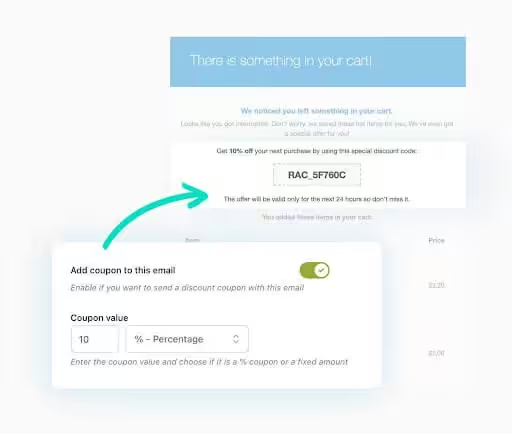
Source – Yithemes.com
According to YITH, this plugin can recover up to 60% of abandoned orders. What’s particularly useful is its ability to handle pending orders – those cases where customers start the checkout process but don’t complete the payment.
Pricing: Premium version starts at $89.99/year with 30-day 100% money-back guarantee.
Best For: It is most suitable for stores that want a reliable, straightforward solution from an established plugin developer.
👉 Retainful – Simple Yet Effective
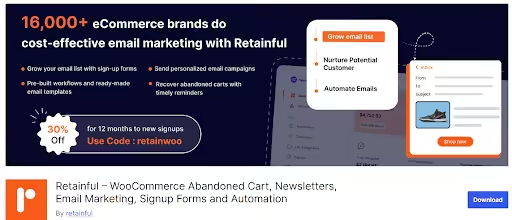
Retainful is an all-in-one tool for your WooCommerce store marketing that keeps things simple while adding some clever features that many competitors miss. Their focus on next-order coupons is particularly smart for building customer loyalty.
Source – WordPress.org
Key features of the plugin:
- Single-Click Cart Recovery: Offers a simplified checkout process for returning customers.
- Prebuilt Sequences: Three-email flow plus one “we miss you” reminder.
- Next-Order Coupons: Automatically generates coupons for future purchases, enticing customers to return and make a second purchase.
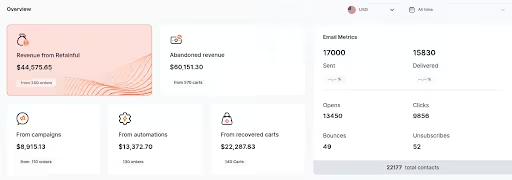
- Real-Time Analytics: Monitor the recovery campaign performance with detailed reports.
- Unlimited Email Templates: Allows you to create as many template variations as you need.
- CRM Integrations: The plugin offers native connectors for MailChimp, ActiveCampaign, ConvertKit (now Kit).
- Insights: You can track subscriber growth, revenue per reminder, and email deliverability.
- Developer-Friendly: Offers extensive API and webhook support.
Source – WordPress.org
The next-order coupon feature is what sets Retainful apart from other plugins. Every transactional email includes a discount code for the customer’s next purchase, encouraging customers to return and place another order. This makes it useful business tool far more useful than just cart recovery.
Pricing: Free plan available. If you want premium features, you have the Starter plan at $14/month and the Growth plan at $69/month.
Best For: Emerging stores focused on building long-term customer relationships, encouraging repeat purchases, and CRM-driven sellers.
👉 Tyche Abandoned Cart Pro for WooCommerce – Feature-Rich Plugin
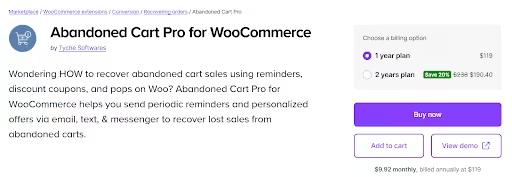
Tyche Software’s premium version offers one of the most comprehensive feature sets in the market to business owners. It’s particularly strong for store owners who want detailed customization options.
Source – WooCommerce.com
Key features of the plugin:
- Email and SMS Notifications: Multi-channel approach to recover the abandoned cart.
- Geolocation-Based Personalization: Customize messages by the customer’s location.
- Dynamic Discount Codes: Generate unique, time-limited offers to woo customers.
- Exit-Intent Popups: Capture abandoning visitors before they leave by showing cart recovery offers.
- Rule Builder: Allows you to build rules and trigger sequences when cart value > X or user spent > Y in past month.
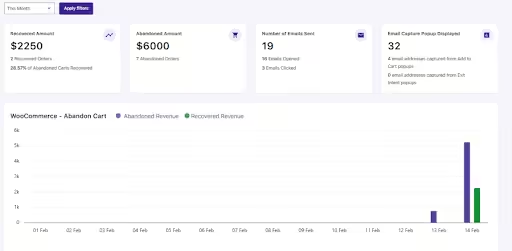
- Exportable Reports: CSV reports on recovered carts, revenue, and open/click logs.
Source – WooCommerce.com
The A/B testing capability of this plugin is particularly valuable for business optimization. You can test different email approaches and subject lines to see what resonates best with your specific audience.
Pricing: For 1-year license, the Starter version costs $119/yearly, the Business version costs $249/yearly, and the Enterprise version at $349/yearly.
Best For: This plugin is more useful for web stores that are data-driven and want to optimize every aspect of their cart recovery campaigns with detailed reporting.
Also Read: Ultimate Guide to WooCommerce Inventory Management
Quick Comparison of the WooCommerce Cart Abandonment Recovery Plugins
| Plugin | Channels | Starting Price | Best For |
| FunnelKit Automations | Email, SMS, Push, CRM/Segments | $99.5 per year + | Real-time tracking, advanced automations and WordPress native |
| WooCommerce cart abandonment recovery (by CartFlows) | Email only (core) | Free | Frictionless link recovery and funnel integrations |
| AutomateWoo | Email, SMS (Twilio) | $159 per year | Official WooCommerce integration, workflow automation and presets for email |
| Omnisend | Email, SMS, Push | $0 / $11.20 / $41.30 per month | Rich omnichannel automations and analytics |
| YITH Recover Abandoned Cart | $89.99 per year | GDPR-compliance and role-based, guest recovery | |
| Retainful | Free / $14 per month + | Beginner-friendly wizard and CRM integrations | |
| Abandoned Cart Pro (Tyche) | Email, SMS, Messenger | $119 per year | Enterprise rules, multi-channel, advanced reporting |
Step-by-Step Setup Guide for Cart Recovery Success
Once you have narrowed down the plugin you want, setting it up for WooCommerce abandoned cart recovery doesn’t have to be complicated. Here’s a practical, step-by-step guide for setting-up the plugins we have discussed:
- Install the Plugin:
✏️ Download FunnelKit Automations from WordPress Repository.
✏️ In WP Admin, go to Plugins > Add New > Upload, and install the .zip files. Click Activate.
- Activate and License:
✏️ Go to FunnelKit settings.
✏️ Paste in the activation keys for Core / Pro / Connectors.
- Create an Automation:
✏️ Go to Automations > Create Automation.
✏️ Pick “Start from scratch” (or import a prebuilt template with Pro).
✏️ Name your workflow. For example – ‘WooCommerce Cart Abandonment Recovery’.
- Assign Cart Abandonment Trigger:
✏️ Select Event > WooCommerce > Cart Abandoned.
✏️ Configure to trigger multiple times, if required for your business.
- Design the Workflow:
✏️ Click + to add actions: choose “Send Email”, set delays (30min, 24hr, 48hr, etc.).
✏️ Personalize emails with merge tags like {{customer_first_name}}, {{cart_link}}, dynamic product blocks, and dynamic coupon codes.
✏️ Add conditional branches for VIP carts or repeat customers.
- Test and Activate:
✏️ Send test emails and check merge tag rendering.
✏️ When satisfied, toggle automation to “Active”.
- Analyze Performance:
✏️ Monitor via the analytics dashboard: see open / click / recovery rates, pipeline, and detailed customer journeys.
✏️ Regularly conduct A/B test and iterate on messages, discounts, and timing.
Advanced Tips and Best Practices
- Send multi-channel: Use a sequence “email + SMS + push notification” to maximize the WooCommerce abandoned cart recovery odds.
- Dynamic segmentation: Run split tests on incentives for high-value vs low-value carts.
- Exit-intent: Pair with FunnelKit’s Cart or Popups to prompt for email capture right before exit.
- Data cleanup: FunnelKit automations auto-clear recovered carts for accuracy, reducing false signals if your WooCommerce cart abandonment recovery not working.
👉 WooCommerce cart abandonment recovery (by CartFlows)
- Install and Activate
✏️ Plugins > Add New > search “CartFlows” > Install > Activate. Alternatively, you can download it from here.
- Enable Cart Abandonment
✏️ CartFlows > Settings > Cart Abandonment > toggle ON > set “Abandoned after” to 15 min.
- Create Abandoned Cart Flow
✏️ CartFlows > Flows > Add New > choose “Abandoned Cart Recovery” template > Import.
- Customize Email Sequence
✏️ Edit each email step: insert {{order.cart_url}} and {{coupon_code}}.
✏️ Set delays for email: Email 1 at 1 hr, Email 2 at 24 hr, Email 3 at 72 hr.
- Connect Webhooks
✏️ In CartFlows > Settings > Integrations > add webhook URL for CRM (e.g., ActiveCampaign).
- Review Analytics
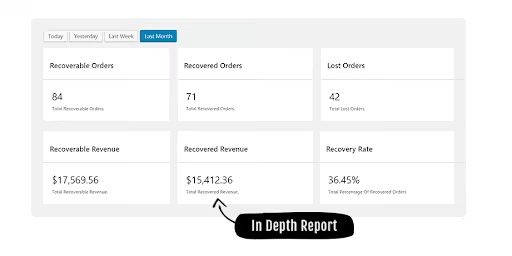
✏️ CartFlows > Analytics > track recovered orders and abandonment rate drop. Review results at CartFlows > Analytics.
Source – Cartflows.com
Advanced Tips and Best Practices
- Exclude carts below a certain threshold like $10 or $20, using Flow Rules to avoid spamming low-value leads.
- Offer tiered discounts like 5% for carts <$100 and 10% for ≥$100, via coupon tokens and conditional splits.
- Integrate Facebook Conversions API via webhook for retargeting audiences.
- Use CartFlows Pro’s dynamic offers to upsell right within recovery emails.
- Initial Installation of the Plugin:
✏️ Purchase and Download: Buy AutomateWoo from WooCommerce.com.
✏️ Install Plugin: Upload the .zip file via WordPress Admin > Plugins > Add New > Upload Plugin.
✏️ License Activation: Navigate to AutomateWoo > Settings > General and enter your WooCommerce.com API key.
✏️ Configure Email Settings: Set sender name and email under AutomateWoo > Settings > Email Sender Options.
- Quick Start with Presets:
✏️ Browse Presets: Go to AutomateWoo > Workflows > Browse Presets.
✏️ Select Template: Choose either “Abandoned Cart 4 Hours” or “Abandoned Cart 12 Hours”.
✏️ Create Workflow: Click “Create Workflow” to import the preset.
✏️ Customize Content: Edit email subject lines, content, and add personalized coupons.
✏️ Activate: Toggle the workflow status to “Active”.
- Custom Workflow Creation:
✏️ Add New Workflow: Navigate to AutomateWoo > Workflows > Add Workflow.
✏️ Set Trigger: Choose “Cart Abandoned” from the triggers dropdown.
✏️ Configure Rules: Add conditions like minimum cart value or customer role if needed.
✏️ Add Actions:
- Select “Send Email” action
- Customize email template with variables like {{ cart.items }} and {{ cart.link }}
- Include dynamic coupon codes using {{ coupon.code }}
✏️ Set Timing: Configure when emails send (immediately, delayed, or scheduled).
✏️ Test and Activate: Preview emails and activate the workflow.
- Advanced Configuration:
✏️ Enable Guest Tracking: Under AutomateWoo > Settings > Carts, enable pre-submit data capture.
✏️ Configure SMS: Set up Twilio integration for multi-channel campaigns.
✏️ Analytics Setup: Configure conversion tracking and Google Analytics integration.
✏️ GDPR Compliance: Enable consent checkboxes and data retention settings.
Source – WooCommerce.com
Advanced Tips and Best Practices
- Create separate workflows for high-value carts (>$100) with bigger discounts.
- Use AutomateWoo’s timezone features to send emails at optimal local times.
- Create multiple versions of the same workflow to test subject lines and content.
- Connect with MailChimp or ActiveCampaign for broader email marketing campaigns.
- Regularly review the AutomateWoo > Reports section to optimize timing and content.
- Set up rules to exclude customers who’ve already made recent purchases to avoid over-messaging.
👉 Omnisend
- Install and Activate
✏️ In WordPress Admin, go to Plugins > Add New > search “Omnisend for WooCommerce” > Install > Activate.
- Connect Store
✏️ In WooCommerce > Settings > Integration > Omnisend > click “Connect My Store” > authorize via Omnisend account.
- Create Automation Workflow
✏️ In Omnisend dashboard > Automations > New Workflow > select “Abandoned Cart”.
✏️ Name it “Abandoned Cart Recovery” and choose start trigger “Cart Abandoned.”
- Configure Triggers and Delays
✏️ Set initial email 30 min after abandonment, second at 12 hr, third at 48 hr.
✏️ Under Workflow Settings > add conditional split: cart total ≥ $100 vs. <$100 for tailored messaging.
- Design Emails and Channels
✏️ Drag in Email block, customize with {{ first_name }}, dynamic cart widget, recovery link.
✏️ Add SMS block (Pro plan) after split for high-value carts.
- Activate and Monitor
✏️ Toggle workflow ON.
✏️ View performance under Reports > Automation.

Source – WordPress.org
Advanced Tips and Best Practices
- Use exclusion filters to skip customers who just browsed without the intent to buy something. For example, where the cart total < $10.
- Test single-click recovery v/s multi-step sequences and analyze open/click-to-order rates.
- Leverage web push for non-email subscribers – combined flows yield 15% incremental recovery.
- Use conditional splits: If no click in the first email, switch to SMS in the second.
- Implement double opt-in for GDPR compliance and higher deliverability.
👉 YITH WooCommerce Recover Abandoned Cart
- Purchase and Install
✏️ Purchase the plugin from here and download .zip file.
✏️ Upload the zip file in WP Admin > Plugins.
- General Configuration
✏️ YITH > Recover Cart > General > enable “Recover guest carts” and set abandonment time (30 min).
- Popup Email Capture
✏️ Recover Cart > Popup Settings > enable modal on cart page > customize fields (email consent).
- Email Sequence Setup
✏️ Recover Cart > Email Templates > edit templates 1–3 > set delays (1 hr, 6 hr, 24 hr).
✏️ Add merge tags {{cart_items}}, {{discount_code}}.
- Coupon and GDPR
✏️ Recover Cart > Coupons > enable auto-generate coupons; set amount and expiry.
✏️ GDPR Tools > toggle consent checkbox on checkout.
- Monitor Recovery
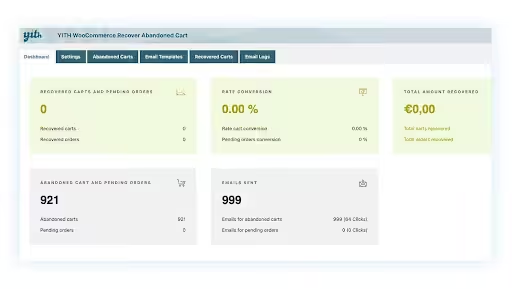
✏️ Recover Cart > Dashboard > view abandoned vs recovered carts, coupon usage.
Source – Yithemes.com
Advanced Tips and Best Practices
- A/B test popup timing and designs to maximize guest email captures.
- Use role-based workflows like wholesalers get larger discounts.
- Filter out carts from repeat abandoners by limiting email frequency per user.
- Audit “abandoned after” threshold monthly to reduce false positives.
- Account and Plugin
✏️ Register at Retainful.com > Install Retainful plugin > Activate.
- API Integration
✏️ WooCommerce > Retainful > Preferences > paste API key > Save.
- Wizard Setup
✏️ Launch Setup Wizard > Step 1: enable “Abandoned Cart Emails.”
✏️ Step 2: choose template and set timings (15 min, 8 hr, 24 hr).
✏️ Step 3: Configure coupon rules and recovery link.
- Email Customization
✏️ Retainful > Email Templates > edit subject, body; include {{customer_name}}, {{cart_link}}.
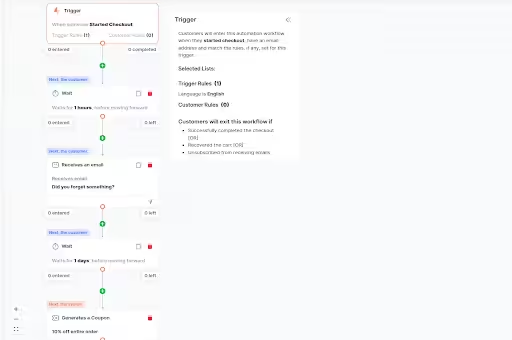
- Launch and Track
✏️ Activate sequence > view performance under Retainful dashboard like recovered revenue and clicks.
Source – WordPress.org
Advanced Tips and Best Practices
- Upgrade for custom domains to improve brand trust in recovery links.
- Use Zapier integration to sync recovered carts to CRM or Google Sheets.
- Segment by cart value: send additional SMS for carts > $150.
- Regularly export contacts to clean stale leads and maintain deliverability.
👉 Abandoned Cart Pro for WooCommerce by Tyche Softwares
- Purchase and Install
✏️ Download plugin from Tyche > Plugins > Add New > Upload > Activate.
- Enable Modules
✏️ WooCommerce > Abandoned Cart Pro > Settings > enable Email, SMS, Messenger modules.
- Exit-Intent and Popup
✏️ Settings > Exit Intent > configure popup design and trigger on cart/checkout.
- Create Sequences
✏️ Abandoned Cart Pro > Email Templates > create 3 templates (1 hr, 24 hr, 48 hr delays).
✏️ SMS/Messenger Templates > set second-channel messages.
- Rule Engine
✏️ Rules > add rule: cart_total ≥ $200 > route to VIP workflow with 15% coupon.
- Reporting
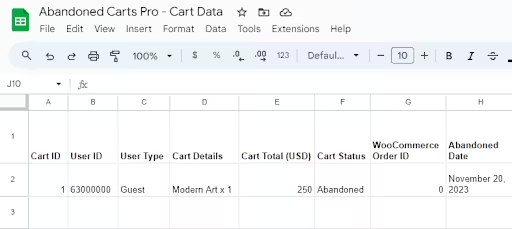
✏️ Reports > Recovered Carts > export CSV and analyze open / click / conversion metrics.
Source – WooCommerce.com
Advanced Tips and Best Practices
- Use exit-intent to capture emails before abandonment for guest visitors.
- Configure fallback: if email is unopened after 12 hr, send SMS via Twilio to increase reach.
- Leverage Messenger integration to engage customers with chat-based recovery.
- Schedule monthly audits of recovered totals vs. email volume to refine thresholds.
Related Blog: Speed Up WooCommerce Checkout in 2025
When WooCommerce Cart Abandonment Recovery Not Working: Troubleshooting Guide
Sometimes things don’t work the way you are expecting them to work. We have created a list of the common issues resulting in WooCommerce cart abandonment recovery not working and how you can quickly resolve these issues in your WooCommerce Website store :
Issue 1: Carts Not Getting Captured
Symptoms: This issue occurs when no abandoned carts are showing in your dashboard despite having visitors on your website.
Solutions:
- Check if cart tracking is enabled in settings.
- Verify whether CRON jobs are working properly.
- Ensure customers reach the checkout page and enter email addresses.
- For logged-in users, carts should be captured immediately when items are added.
Issue 2: Emails Not Being Sent
Symptoms: Carts are getting captured but no emails are going out to the prospective buyers.
Solutions:
- Configure SMTP settings properly.
- Check if WordPress CRON is disabled in wp-config.php.
- Verify email templates are active and properly configured.
- Test with a different email address to rule out spam filters.
Issue 3: WooCommerce Cart Abandonment Recovery Not Working with Multilingual Sites
Symptoms: Plugin conflicts with WPML or other translation plugins can often cause this issue.
Solutions:
- Check plugin compatibility with your translation setup.
- Contact plugin developers about multilingual support.
- Consider using plugins specifically tested with WPML.
Issue 4: Abandoned Cart Recovery Links Not Working
Symptoms: Customers click on the email links, but carts are not getting restored.
Solutions:
- Check for plugin conflicts with caching or security plugins.
- Verify recovery link generation is working correctly.
- Test with different browsers and devices.
- Ensure session data isn’t being cleared too aggressively.
Best Practices for Maximum WooCommerce Abandoned Cart Recovery Rates
Getting your WooCommerce abandoned cart recovery plugin installed is just the beginning of the recovery process. Here’s how you can maximize your WooCommerce abandoned cart recovery rates:

Source – Retainful.com
👉 Email Timing Strategy
- First Email: Send 1-3 hours after WooCommerce cart abandonment. This catches customers while their interest is still high but allows time for distractions to get clear.
- Second Email: 24-48 hours later with more urgency or social proof of your products.
- Third Email: 3-4 days later with a discount offer to come and buy your products.
👉 Email Content Best Practices
- Subject Lines: Keep them personal and curiosity-driven (“You forgot something!” works better than “Complete your order”)
- Personalization: Use customer names and show actual cart items they were planning to buy with images.
- Clear CTAs: Make it obvious what action you want them to take in your email.
- Mobile Optimization: Over 60% of emails are opened on mobile devices. So, make them readable for mobile devices.
- Social Proof: Include customer reviews or testimonials when relevant.
👉 Advanced Strategies
- Segmentation: Try to send different emails based on parameters such as cart value, customer history, or product categories.
- Dynamic Pricing: Try to customize discount levels based on cart abandonment patterns.
- Multi-Channel Approach: Combine email with SMS or retargeting ads for better coverage.
- Personalized Recommendations: Include related products that customers might be interested to buy together.
Conclusion
Look, implementing WooCommerce cart abandonment recovery isn’t going to solve every problem with your store. But it’s one of those straightforward wins that can genuinely impact your bottom line without requiring massive changes to how you operate.

Source – Pixabay.com
The truth is that cart abandonment is going to happen regardless of how perfect your store is. The question isn’t how to eliminate it completely – it’s how to turn that abandoned interest back into completed sales. With the right plugin and setup, you can potentially recover 15-30% of those lost sales, which for most businesses represents significant additional revenue.
Whether you choose the comprehensive FunnelKit Automations, the solid free option from CartFlows, or any of the other excellent plugins we’ve covered, the most important thing is to start somewhere.
Pick a plugin that fits your budget and needs, set it up following our guide, and begin testing. If you have diversified business needs and want a customized plugin built to suit your needs, reach out to Wisdmlabs expert team today.
Remember, even if your WooCommerce abandoned cart recovery efforts only bring back 1 in 10 abandoned customers, you’re still ahead of where you were before. And once you start seeing results, you can always optimize and expand your efforts.F
The customers are already interested in your products – they’ve proven that by adding items to their cart. Your job is simply to remind them why they wanted those products in the first place and make it as easy as possible for them to complete their purchase.
Frequently Asked Questions
A. How effective are abandoned cart recovery plugins?
Studies show that abandoned cart recovery can help you recover 15-30% of lost sales. The average abandoned cart email achieves about 40-45% open rate and can generate significant additional revenue for most stores.
B. When should I send my first abandoned cart email?
The optimal timing for your first email is 1-3 hours after cart abandonment. This gives customers time to handle whatever distracts them while their interest in your products is still fresh.
C. Why is my WooCommerce cart abandonment recovery not working?
Common issues include disabled cart tracking, CRON job problems, inactive email templates, SMTP configuration errors, or plugin conflicts. Check your plugin settings, verify emails are being sent, and test the recovery links.
D. Do I need a premium plugin, or is the free version sufficient?
The free WooCommerce cart abandonment recovery by CartFlows plugin is surprisingly powerful and perfect for getting started. Premium plugins offer additional features like SMS, advanced segmentation, and A/B testing, but the free version can effectively recover abandoned carts for most WooCommerce stores.
E. How many abandoned cart emails should I send?
Most successful sequences include 2-4 emails: a simple reminder after 1-3 hours, a second email with urgency after 24 hours, and a third email with a discount after 3-4 days. Test what works best for your specific audience.
F. Can I track guest user abandoned carts?
Yes, most plugins can track guest user carts once they enter their email address on the checkout page. Some advanced plugins like AutomateWoo can even capture emails earlier in the browsing process.
G. Will abandoned cart emails annoy my customers?
If done properly, abandoned cart emails are actually helpful reminders rather than annoying spam. Keep emails personal, valuable, and don’t send too many. Most customers appreciate being reminded about items they were genuinely interested in purchasing.
H. How do I know if my cart recovery is working?
Check your plugin’s analytics dashboard for key metrics like – number of abandoned carts captured, emails sent, recovery rate (percentage of abandoned carts that convert), and total recovered revenue. Most plugins provide detailed reporting on these metrics.
I. Can I customize the abandoned cart emails?
Absolutely! All quality plugins allow you to customize email templates, subject lines, sending schedules, and content. Personalization with customer names, product images, and brand-specific messaging typically improves recovery rates.