

| Picking LearnDash add-ons is not hard because there are no options. It is hard because there are too many. This list helps you shortlist faster. We have picked 19 LearnDash add-ons that cover real needs like instructors, design, reporting, automation, community, payments, and selling. So, you can choose what fits your LMS and skips the rest. |
Who this blog is for
This blog is for you if:
- you are building a LearnDash website and want the right add ons from day one
- you already have LearnDash but it feels limited or messy
- you want features like multi instructor, group learning, better reporting, or automation
- you do not want to install 15 plugins and then regret it later
What you will learn
By the end of this blog, you will know:
- how to pick LearnDash add ons based on what your LMS actually needs
- which add-ons help with instructors, design, reporting, engagement, and selling
- what to watch out for so your site stays fast and manageable
- how to avoid plugin overlap and conflicts

Are you trying to pick LearnDash add ons for your LMS and feeling totally stuck?
Don’t worry, you are not the only one.
LearnDash has hundreds of add ons, and that is both a blessing and a headache.
Because for a platform built on WordPress, that is also a superpower. You can customize LearnDash to extend or limit the functionality, however you like.
But the real question is how do you pick the right ones for your website.
Most people end up doing the same boring loop.
They open a few “top add ons” lists, jump between feature pages, compare pricing, try demos, and still feel unsure because everything sounds useful.
So we made this simpler.
With this article, we will help you shortlist LearnDash add ons without the guesswork.
We have curated a list of 19 LearnDash add ons that are genuinely useful for real LearnDash sites, whether you are starting fresh or upgrading what you already have.
You will see add ons for instructor management, course design, reporting, automation, community, payments, and selling.
This way, you can pick what fits your site and skip what you do not need.
[optin-monster slug=”bbmyslb83qmpbddtqzqs”]
Things to do before you install any add-ons
Before you install anything, do these quick checks. They save you hours later.
- Write your LMS model in one line
Example: single instructor course site, multi instructor school, course marketplace, or corporate training. - Pick your top goal
Example: engagement, reporting, selling, automation, or group management. - Set a plugin limit
Keep it tight. More plugins means more updates, more conflicts, and more things to maintain. - Avoid overlap
If two add ons do the same thing, pick one.
Quick Add on Picker (If you don’t have time to go through the list)
This gives readers a fast starting point before they scroll the full list.
| If you are trying to build this | Start with these add ons from this list |
|---|---|
| Multi instructor site or marketplace | Instructor role, ratings, and reviews |
| Corporate training with team enrollment | group registration, reporting |
| Community driven learning | BuddyPress integration and discussions |
| Better learner engagement | notifications and gamification |
| SCORM and xAPI reporting | Tin Canny reporting |
| Membership based access | Paid Memberships Pro integration |
| Selling courses like products | Easy Digital Downloads integration |
| Better design without custom dev | eLumine, design upgrade, quiz customizer |
Here’s a Detailed Comparison:
| 2026 note: Some LearnDash features and payment setups have changed over time, so always double-check the current setup and compatibility before installing any payment-related add-on. |
1. Instructor Role (LearnDash Add on)
If your LearnDash site has more than one instructor, this add on makes life a lot easier.
Instead of everything running through the admin, the Instructor Role lets you give instructors the access they need to manage courses, without giving them full WordPress backend control. It is built for multi-instructor setups like academies, training teams, and course marketplaces.
Instructor Role also comes with a dedicated instructor dashboard and front-end course creation, so instructors can create and manage course content in a simpler interface. It supports Elementor, too, which helps instructors build pages without needing to touch technical settings.
Key features
- Dedicated instructor role with controlled permissions
- Front end course creation for courses, lessons, topics, and quizzes
- Course sharing so multiple instructors can collaborate on a course
- Instructor dashboard that can be customized using Gutenberg blocks
- Admin approval options if you want to review before publishing
- Commission settings with logs to track earnings
- PayPal payouts based on commission settings
- WooCommerce product creation support when selling courses via WooCommerce
- BuddyPress private messaging support for student instructor communication (optional)

Pricing
- 1 Site: $99 per year
- 10 Sites: $199 per year
- Unlimited: $399 per year
2. eLumine

Among the plethora of best LearnDash themes available today, the one that manages to stand out because of its focus on user experience, speed, and distraction-free layouts is eLumine – a premium LearnDash theme built to ensure your courses have an elegant look and feel.
eLumine boasts Neo layouts that are designed for students to have maximum readability and engagement and are fully compatible with LearnDash 3.0. Packed with 6 Pre-built business demos (Corporate training, School, Music Academy, Masterclass, Single Instructor, and Classic LMS), advanced customizer options, engaging course designs, night mode, and focus mode are just a few of the 35+ awesome features eLumine possesses with several (major) updates planned later this year.
Pricing
- $100 – Single site Annual License.
3. UnCanny Toolkit Pro

Uncanny Toolkit is one of those plugins people install because they want LearnDash to feel a little more complete.
Not in a flashy way. More like practical upgrades that save time and reduce friction.
The free version gives you a set of useful modules that cover common gaps. The Pro version adds many more, so you can expand LearnDash without installing five separate mini plugins.
As of now, the free Toolkit includes 16 modules, and Toolkit Pro adds 30 more modules.
A few examples from your list that still work well:
- Autocomplete lessons and topics
- Enhanced course grid
- Course dashboard
- Group login redirect
- Lazy loading course navigation
- Import users
Pricing
- $149 – Single site Annual License.
4. Design Upgrade Pro & Quiz Customiser
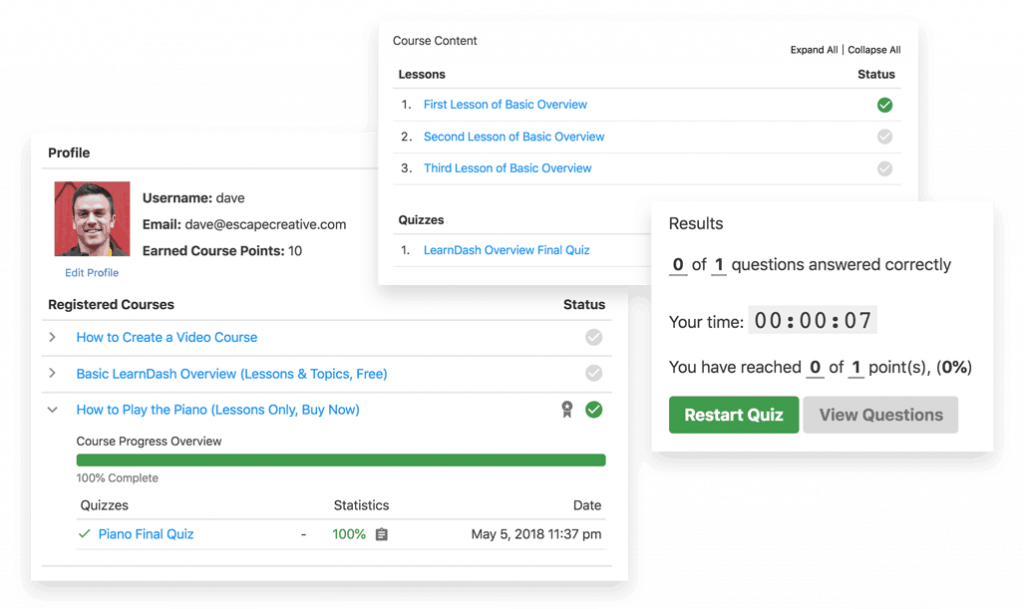
These two plugins by Escape Creative help you transform your website’s design.
Design Upgrade Pro gives you 90+ Customiser Options to completely revamp the look of your LMS. Other than that, you can change different elements of your LMS such as Course Grid Design, and Course Navigation, or create Custom Progress Bars, the LearnDash Profile page, and a whole lot more!
The same goes for the LearnDash Quiz Customiser. You can quite easily upgrade the look and feel of LearnDash quizzes in a matter of minutes. This add-on offers several Quiz customizing options such as Customize Quiz Text, Custom Quiz Colors, Quiz Question Styles, Quiz Timer Bar and so much more.
Both these plugins can help you style LearnDash LMS and elevate your brand in the coming year.
Pricing
- The Quiz Customizer Starts at $9 – Single site Annual License.
- The Design Upgrade Pro starts at $29 – Single Site Annual License.
5. LearnDash Notifications

This official LearnDash add on lets you send automatic emails based on learner actions. Like enrollment, course completion, quiz pass or fail, or even when someone has not logged in for a few days.
It is a small feature, but it is one of the easiest ways to keep learners moving without you manually chasing them.
Features of this plugin include:
- 13 different triggers: Triggers for course enrollment, course completion, course scheduling, quiz completion, passing the quiz, failing the quiz, not logging in for specific days, and many others.
- Shortcode enabled: Use dynamic shortcodes to include additional content like other courses, information from the web, and other details in your notification messages.
- Immediate or delayed notifications: You can choose whether to deliver your notifications immediately or after some delay.
Pricing
- This is a free add-on.
6. BuddyPress Integration
If you want to build a community around your courses then this plugin is the best choice.
BuddyPress for LearnDash helps in including social learning features in your course. Thus making them less boring and more impactful.
This plugin is designed carefully to promote group-based learning. It allows participants to have course-specific or subject-specific discussions. Therefore it adds more value to your online courses.
All you need to do is associate a LearnDash course with a BuddyPress group and the users automatically get added as members.
Features of this addon include:
- Automatic addition of participants to the group
- Group becomes private to course participants and invited members
- All course lessons are visible to the group
- Course activity is streamed into the group feed
Pricing
- This is a free plugin
7. Tin Canny LearnDash Reporting

If you’ve used LearnDash for a while now, you’ll know that reporting in LearnDash is basic. Activities such as assignments and quizzes are tracked and others which could include H5P, Articulate Storyline, Adobe Captivate, or iSpring modules are not. You’ll have to use an external Learning Record Store (LRS) which can lead to fragmented reports.
With Tin Canny, you can have all reports in one place. The plugin supports SCORM modules and integrates LearnDash, Tin Can/xAPI, and SCORM records inside WordPress.
Some features include:
- Track data for modules authored in Storyline 2, Storyline 3, and Storyline 360, Articulate Rise, Adobe Captivate 9, Adobe Captivate 2017, iSpring 8, and H5P right inside WordPress.
- Mark activities complete inside modules
- Get an overview of completed courses and Tin Can/SCORM statement trends
- Monitor course and learner activity at a glance
- Provide Group Leaders access to reports from the front-end
- Review LearnDash, Tin Can, and SCORM activity by individual user and course
Pricing
- $179 USD – Single site Annual License.
8. WISDM Ratings, Reviews, and Feedback
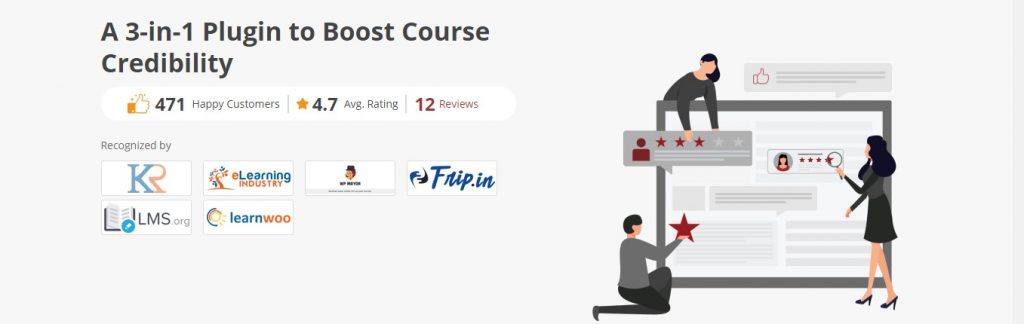
Use this add-on to enable a rating and review system on your LearnDash site. With this extension, you will not just improve your course content but also boost the confidence of new learners.
The key features of this plugin are as follows:
- Full control over the display of ratings: You control how your ratings and reviews are shown on the course pages. You can display them in a location of your choice, and also in an order of your choice.
- Easy accessibility of reviews for learners: Your learners can also find the relevant reviews related to the course(s) of their choice by using the sort and filter options built into this plugin.
- Only genuine reviews: Fake reviews are a big menace on most sites. This plugin weeds them out even before they’re planted because only those learners who have completed a course can post a review about that course.
Pricing
- $80 – Single site Annual License*
*Included in LEAP (LearnDash Essential Add-ons Pack)
9. MailChimp Integration

MailChimp is unarguably the most popular email marketing and automation platform in the world, and there’s a very high chance that you too may be using or planning to use it for your e-Learning site. This add-on makes it easier for you to integrate MailChimp with your LearnDash site so you can add learners automatically to custom email lists based on their actions in courses.
Here are some of its key features:
- Automatic generation of segmented course lists: MailChimp for LearnDash automatically generates list segments for each of your courses based on user behavior. Whenever you update any course, all subscribers in the segmented list of that course are notified automatically.
- Easy setup: Just add your MailChimp API and you’re done. It takes care of the rest on its own.
Pricing
- $29 – Single site Annual License.
10. GamiPress Integration

Want to add the functionality of awards, rewards, and points to your LearnDash site? The GamiPress Integration add-on can help you do that. You can reward users based on their progress in various courses with custom badges, and you can also run a reward points program completely automated in nature.
Here are some other key features of this add-on:
- Create a leaderboard: Encourage healthy learning competition among your users by creating a leaderboard that shows the points of the highest scorers.
- Create reward points for any task: Your learners can also be rewarded for non-course-related tasks like forum comments, purchases, posts, etc.
- Automated emails for every reward: Just configure your emails for every type of reward only once and forget it. From that point onwards, congratulatory emails are sent automatically by GamiPress.
Pricing
- This add-on is available for Free.
11. WISDM Group Registration

Easily bulk enrolls students in groups with the help of this LearnDash add-on from WisdmLabs. That way it helps you substantially increase your enrollments, and also helps your instructors manage their students easily.
Here are its key features:
- Assign group leaders: The plugin allows people to purchase seats for any of your courses in bulk. The bulk buyer is automatically assigned as a group leader, and a group is created automatically by the plugin. A group leader can add or remove students from the course.
- Create subgroups – Group Leaders can create sub-groups within the groups and assign sub-group leaders to ensure smooth and better management.
For e.g: If a principal buys a Group of courses for 1000 students in his school, he can then divide them into groups of 200, and then assign a Teacher as a Sub-Group Leader for all these sub-groups or classes. - View progress reports of students: Group leaders can also check the progress of each student in the group. Based on that they can pay special attention to those students who are getting left behind.
- Manage groups from the front end: No need to create a WordPress account for Group leaders, as they can do whatever they want to do from the front end of your site.
Pricing
- $80 – Single site Annual License*
*Included in LEAP (LearnDash Essential Add-ons Pack)
12. Paid Memberships Pro Integration

If you want to offer access to your courses on a multi-level membership basis, this plugin can come in handy for the purpose. With its help, you can create multiple levels of membership within your site, and associate each membership level with different courses.
For instance -If you’re having 3 different courses related to programming, one teaching the basics, another one teaching any popular programming language, and a third one teaching web development, you can couple all of them in an Expert-level membership. Whoever purchases this membership will be automatically enrolled in all 3 courses.
Similarly, you can also create a Beginner level membership associated only with the Programming basics course, and a Pro-level membership associated with the Basics course and Programming language course.
Some of its major features include:
- Associate one or multiple courses with a membership
- Auto-expire memberships after a certain time
- Trial memberships are also available
Pricing
- Paid Memberships Pro starts Free, and its LearnDash integration add-on is Free as well.
13. Course Scheduler
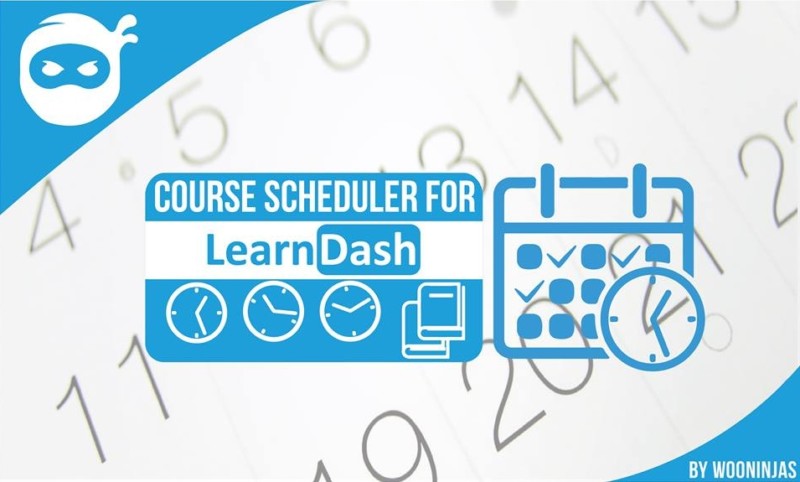
As the name suggests, this plugin allows you to easily schedule the courses you’ve created. That way you can automate the delivery of your courses.
The key features of this plugin are as follows:
- Simple drag-and-drop-based scheduling: You can drag and drop courses on a calendar built into it, and the courses get delivered to your learners automatically as per the schedule decided by you.
- Preview courses dropped by you on the calendar: See how your courses will appear on the date set by you once you’ve scheduled them
- Show or hide courses on dates selected: You can also choose between whether to show courses on dates set by you or whether to show them on all dates except for the ones selected by you.
- Modify the error messages: You can change the error message your learners receive when they try to access the course on a date when it’s not available.
Pricing
- This is available for Free.
14. WISDM Content Cloner

This plugin allows you to easily clone your LearnDash courses. While running an e-Learning site you may face situations when you want to copy the structure of one of your courses for the content of another course.
Or you may want to relaunch any of your courses with a few modifications to the original content. In all such situations, this plugin can come really handy.
Key highlights of this plugin are:
- Create course copies easily: Clone your entire courses with intact course structure ( (i.e. hierarchy, lessons, quizzes, etc.) and content. Or copy only a few lessons, depending on your choice.
- Bulk renaming of titles: Create multiple copies of your courses with different titles. You don’t need to rename each of the titles individually as you can rename all of them in one go.
- Edit the cloned course easily with the click of a button from the cloning dialogue box itself.
Pricing
- This plugin is available for Free*
*Included in LEAP (LearnDash Essential Add-ons Pack)
15. Course Grid
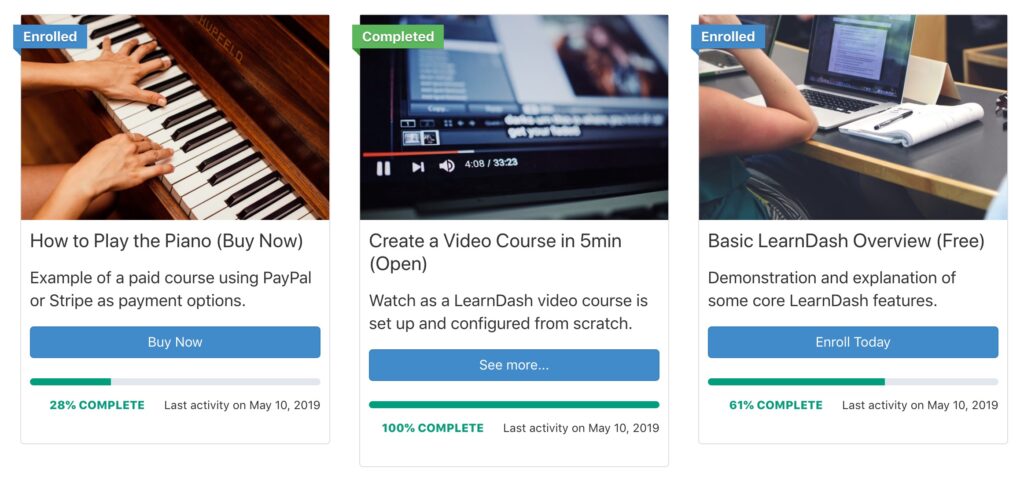
Created by the same team of developers who have developed LearnDash, this add-on allows you to create a responsive grid library of your courses that can be inserted on any page or post.
Now, if you are using eLumine, you need not get this add-on separately because the theme already integrates this feature. However, if you are using a different eLearning theme, you will need to install Course Grid independently.
Its major features include:
- Category filters: Allows your learners to search for courses by category
- Featured video support: Show featured videos instead of images in the grid columns of your courses
- Progress bar: The course grid shows your enrolled users the progress that they’ve made in any particular course with the help of a progress bar.
You can use it to show your courses in a grid layout on any theme of your choice.
Pricing
- This is a Free plugin.
16. Stripe Connect

If you have been using LearnDash for a while, you might remember the old Stripe add on.
That one has been discontinued, and it will not receive feature updates going forward.
The recommended way now is Stripe Connect, which is included in LearnDash core settings. So, you can connect Stripe without installing an extra Stripe add-on.
Here is what Stripe Connect helps you do:
- Connect your Stripe account from LearnDash settings
- Accept payments without relying on the discontinued Stripe add on
- Migrate from the older Stripe setup to the newer Stripe Connect flow
- Keep payment setup simpler and easier to maintain
Pricing
- Stripe Connect is part of the LearnDash core. You still pay Stripe processing fees as usual.
17. Easy Digital Downloads (EDD) Integration

Besides a payment gateway, you’ll also need an eCommerce plugin to sell your courses. And when you’re searching for a shopping cart solution, aimed at digital products, that work well with WordPress, there can be no better option than Easy Digital Downloads.
It has been downloaded more than 400,000 times, which should be enough of a fact to give you a sense of how good it can be for your LearnDash site. And to make things better, it also has a LearnDash extension that will make its integration with your site much easier.
Its key features include:
- Easy course mapping: Just create a product in EDD, and you can easily map it to one of your courses by checking a checkbox and selecting your course from the dropdown menu.
- Associate multiple courses: You can also create products that are “packages” of courses related to each other by associating multiple courses with a single product.
- Auto-enrollment of users: No need to enroll the users after a successful purchase. EDD enrolls them automatically in associated courses.
Pricing
- Easy Digital Downloads is available Free of cost.
18. WISDM Reports for LearnDash PRO

If you want accurate course and student data for your LearnDash courses, then you can’t go wrong with – WISDM Reports for LearnDash.
This LearnDash Reporting Plugin provides visual insights about how your learners spend time in your courses, student progress, and quiz performance, among other things with the help of simple and intuitive graphical reports.
It has the most comprehensive reporting dashboard with all important course and learner activity reports in one place. Hence it saves time that you’d otherwise spend on collecting data and helps you take important eLearning decisions faster.
It also offers a customized view through filters and lets you dig deep into the performance of each learner.
Using this reporting and analytics tool, you can follow and keep a record of groups of learners as well.
You can also export and share the reports with your stakeholders.
Its key features include:
- Personalized dashboards for each user role like – admins, instructors, and group leaders
- Insightful and interesting graphical reports that are easy to understand
- Customizable and advanced filters to deep dive into reports by course, course category, quiz, lesson, topic, date, etc.
- Detailed course reports that are easy to export
- Learning behavior and trends to monitor course engagement
- Accurate time spent reports to track the actual time user spends in your LearnDash courses
- Activity log to check the learner’s latest activity
Pricing
- FREE Download available.
- WISDM Reports PRO for LearnDash – $120 (Single Site License)
Further Reading: How to use WISDM Reports for LearnDash to improve the learner experience
19. WP Fusion LearnDash Integration

WP Fusion takes your LearnDash experience to the next level by integrating powerful CRM workflows, tag-based automation, and personalized learning—all in one.
It integrates your LearnDash site bidirectionally with 60+ CRMs and email marketing platforms. And it’s not just limited to LearnDash— WP Fusion supports over 100 of the most popular WordPress plugins.
Key Features:
- Free Plugin for Basic CRM Sync — Get started with lightweight CRM integrations and tag-based automation at no cost.
- Tag-Based Access Control & Automation — Use CRM tags to control course, lesson, or quiz access, and automate enrollment or progress tracking.
- Adaptive Learning Workflows — Customize student pathways via marketing automation: each course can be personalized using tags in your connected CRM.
- Seamless CRM Connectivity — Instantly sync student activity (enrollment, completions, quiz status) with CRMs like ActiveCampaign, Mailchimp, HubSpot, Salesforce, and more.
- Paid Plans Unlock Full Power:
- Plus (Single site annual license): Includes six addon plugins including Enhanced Ecommerce, Abandoned Cart Tracking, Media Engagement Tracking, and more
- Professional (Multi-site/Agency license): Unlimited sites for agencies and WordPress professionals
Pricing:
- Free version available for basic syncing and tagging
- Paid plans start with a Personal license ($297 – single-site annual)
| Red Flag Bingo (a small game): If you say yes to 3 or more, your plugin stack is headed for trouble: 1) I install plugins “just in case” 2) I have two plugins doing the same job 3) My LMS feels slower than before 4) Mobile course navigation feels annoying 5) Updates break layouts often 6) My team is scared to touch settings 7) Learners complain about login, navigation, or speed |
FAQ: LearnDash add-ons (real questions people keep asking)
1) “There are hundreds of add-ons. Which ones do I actually need to start?”
Start with the add-ons that match your business model, not a “top 19” list. If you are selling courses, pick your selling setup first. If you are doing corporate training, pick groups and reporting first. Then add engagement and design upgrades after the foundation is stable.
2) “Is LearnDash worth it, or should I switch to another WordPress LMS because add-ons get expensive?”
LearnDash is worth it when you want control, and you are okay with building a proper stack. But yes, costs can climb when you treat add-ons like shopping. The best move is to list your must-have outcomes first (sell courses, memberships, reporting, community). Then buy only what solves those.
3) “Is Uncanny Owl Toolkit Pro worth paying for?”
It can be worth it if you want a bunch of small LearnDash improvements without installing 8 separate plugins. But do not buy it just because it has “lots of modules.” Buy it because 4 to 6 specific modules solve real problems on your site (bulk user upload, better navigation, dashboards, tracking).
4) “LearnDash Notifications feels basic. How do I send nice-looking emails?”
That complaint is common. Notifications are great for triggers and automation, but it is not an email design tool. The clean fix is: keep Notifications for “when to send,” and use a proper email template system for “how it looks” (a WordPress email template plugin, or a transactional email service if your setup needs it). Also, test deliverability, because pretty emails are useless if they land in spam.
5) “I need to email all learners in a course whenever I want. Notifications do not fit. Any better way?”
Correct. Notifications is trigger based. For one-off broadcasts, your best options are: export users for that course and email them, or sync learners into a list in your email tool using an integration plugin. That gives you proper segmentation and makes future campaigns easier.
6) “Can I do monthly subscriptions with LearnDash and Stripe, or do I need something like Paid Memberships Pro or WooCommerce?”
This is one of the most active questions. The short answer: it depends on how complex your selling needs are. If you want simple course payments, LearnDash payments can work. If you want proper subscription rules, tiered access, coupons, bundles, upgrades, proration, local gateways, or a real “membership” experience, a membership plugin or WooCommerce setup is usually the safer path.
7) “My buy now or get started button is not showing. Could it be Stripe Connect?”
Yes, Stripe Connect and webhooks come up a lot in troubleshooting. When checkout buttons disappear, or enrollments do not trigger, it is often a setup issue (webhook mismatch, old configuration, caching, or a conflict). First step is to confirm you are using the current Stripe setup and that webhooks are firing correctly.
8) “Do I really need SCORM and xAPI reporting? LearnDash reports feel limited.”
If you are using Storyline, Rise, Captivate, iSpring, or H5P and you care about detailed tracking, LearnDash default reporting often feels too shallow. That is why reporting tools that support SCORM and xAPI stay popular. You get one place to view activity instead of juggling separate tools.
9) “Is community learning worth adding, or is it just extra complexity?”
Worth it when your course needs discussion, accountability, and peer learning. Not worth it when your course is meant to be quick and solo. Community adds moderation work, so only add it if you have a plan for keeping it active.
Wrapping Up
LearnDash is one of the most popular WordPress LMS plugins with a wide range of features to help you set up a Learning Management System easily to run a successful eLearning business.
But using the plugin will help you improve scale up your eLearning business, improve your productivity levels, and take critical business decisions easily.
Now using these plugins you can extend every aspect of your LearnDash LMS including management, design, layout, and reporting, among other things.
Just one word of caution, there can be some downsides to using free plugins. So I recommend reading this post before.
So, what are you waiting for?
Grab these plugins and level up your LearnDash today.
Are there any add-ons I didn’t include? Feel free to mention them below and I’ll add it to the list.
Until next time.
Happy Teaching! 🙂
Read More
How to proctor exams and courses on LearnDash to prevent cheating?
Top LearnDash extensions for course websites











2 Responses
Hey Ryan, Thankyou for putting up this list together.
Hey Adeel,
The pleasure is all mine 🙂